
This is the universal build of Evernote - Note Organizer 10.155.2. It contains native libraries for every CPU architecture (arm64-v8a, armeabi-v7a, x86, x86_64), so it installs on any Android device. The trade-off is size — it's larger than per-architecture variants. Pick this one if you're unsure which CPU your phone has, or if you plan to share the APK with multiple devices.
File size: 124.2 MB • Min Android: 28 • Target Android: 35 • Version code: 1243034 • Framework: React Native • Permissions: 32
Screenshots
File Information
| Package Name | com.evernote |
|---|---|
| Version Name | 10.155.2 |
| Version Code | 1243034 |
| Architecture | Universal |
| Min Android Version | Android 28 (API 35) |
| Main Activity | com.evernote.SplashActivity |
| Framework | React Native |
| File Size | 124.17 MB |
| Signature (SHA1) | 0B47D8D21D8A24A2A40C4159E8A5D4D6B027AF25 |
| File Hash (SHA256) | 26cef0337bf488070862332401aa05f21472b0ad66ed42f0fac371e8cf6cc8c6 |
What's New
Fixes:
- Performance improvements and miscellaneous bug fixes
- Performance improvements and miscellaneous bug fixes
App Description
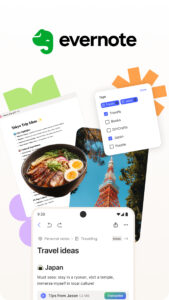
Capture ideas when inspiration strikes. Bring your notes, to-dos, and schedule together to tame life’s distractions and accomplish more—at work, at home, and everywhere in between.
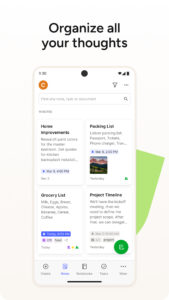
Evernote syncs to all your devices, so you can stay productive on the go. Tackle your to-do list with Tasks, connect your Google Calendar to stay on top of your schedule, and see your most relevant information quickly with a customizable Home dashboard.
"Use Evernote as the place you put everything … Don’t ask yourself which device it’s on—it’s in Evernote" – The New York Times
“When it comes to taking all manner of notes and getting work done, Evernote is an indispensable tool.” – PC Mag
---
CAPTURE IDEAS
• Write, collect, and capture ideas as searchable notes, notebooks, and to-do lists.
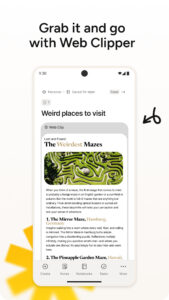
• Clip interesting articles and web pages to read or use later.
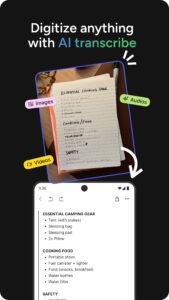
• Add different types of content to your notes: text, docs, PDFs, sketches, photos, audio, web clippings, and more.
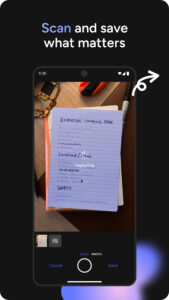
• Use your camera to scan and organize paper documents, business cards, whiteboards, and handwritten notes.
GET ORGANIZED
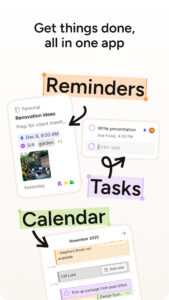
• Manage your to-do list with Tasks—set due dates and reminders, so you never miss a deadline.
• Connect Evernote and Google Calendar to bring your schedule and your notes together.
• See your most relevant information instantly on the Home dashboard.
• Create separate notebooks to organize receipts, bills, and invoices.
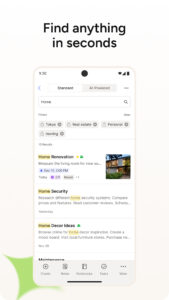
• Find anything fast—Evernote's powerful search can even find text in images and handwritten notes.
ACCESS ANYWHERE
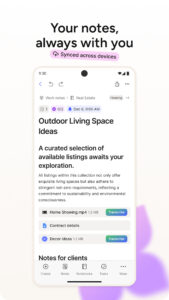
• Sync your notes and notebooks automatically across any Chromebook, phone, or tablet.
• Start work on one device and continue on another without missing a beat.
EVERNOTE IN EVERYDAY LIFE
• Keep a journal to keep your thoughts organized.
• Go paperless by scanning receipts and important documents.
EVERNOTE IN BUSINESS
• Keep everyone up to date by capturing meeting notes and sharing notebooks with your team.
• Bring people, projects, and ideas together with shared Spaces.
EVERNOTE IN EDUCATION
• Keep track of lecture notes, exams, and assignments so you don’t miss important details.
• Create notebooks for each class and keep everything organized.
---
Also available from Evernote:
EVERNOTE PERSONAL
• 10 GB of new uploads each month
• Unlimited number of devices
• Create and manage tasks
• Connect one Google Calendar account
• Access your notes and notebooks offline
EVERNOTE PROFESSIONAL
• 20 GB of new uploads each month
• Unlimited number of devices
• Create, manage, and assign tasks
• Connect multiple Google Calendar accounts
• Access your notes and notebooks offline
• Home dashboard - Full customization
Price may vary by location. Subscriptions will be charged to your credit card through your Google Play account. Where applicable, your subscription will automatically renew unless canceled at least 24 hours before the end of the current period. Subscriptions may not be cancelled for refund except as provided in Evernote's Commercial Terms. Manage your subscriptions in Account Settings after purchase.
---
Privacy Policy:
evernote.com/legal/privacy.php
Terms of Service:
evernote.com/legal/tos.php
Commercial terms:
evernote.com/legal/commercial-terms
Evernote syncs to all your devices, so you can stay productive on the go. Tackle your to-do list with Tasks, connect your Google Calendar to stay on top of your schedule, and see your most relevant information quickly with a customizable Home dashboard.
"Use Evernote as the place you put everything … Don’t ask yourself which device it’s on—it’s in Evernote" – The New York Times
“When it comes to taking all manner of notes and getting work done, Evernote is an indispensable tool.” – PC Mag
---
CAPTURE IDEAS
• Write, collect, and capture ideas as searchable notes, notebooks, and to-do lists.
• Clip interesting articles and web pages to read or use later.
• Add different types of content to your notes: text, docs, PDFs, sketches, photos, audio, web clippings, and more.
• Use your camera to scan and organize paper documents, business cards, whiteboards, and handwritten notes.
GET ORGANIZED
• Manage your to-do list with Tasks—set due dates and reminders, so you never miss a deadline.
• Connect Evernote and Google Calendar to bring your schedule and your notes together.
• See your most relevant information instantly on the Home dashboard.
• Create separate notebooks to organize receipts, bills, and invoices.
• Find anything fast—Evernote's powerful search can even find text in images and handwritten notes.
ACCESS ANYWHERE
• Sync your notes and notebooks automatically across any Chromebook, phone, or tablet.
• Start work on one device and continue on another without missing a beat.
EVERNOTE IN EVERYDAY LIFE
• Keep a journal to keep your thoughts organized.
• Go paperless by scanning receipts and important documents.
EVERNOTE IN BUSINESS
• Keep everyone up to date by capturing meeting notes and sharing notebooks with your team.
• Bring people, projects, and ideas together with shared Spaces.
EVERNOTE IN EDUCATION
• Keep track of lecture notes, exams, and assignments so you don’t miss important details.
• Create notebooks for each class and keep everything organized.
---
Also available from Evernote:
EVERNOTE PERSONAL
• 10 GB of new uploads each month
• Unlimited number of devices
• Create and manage tasks
• Connect one Google Calendar account
• Access your notes and notebooks offline
EVERNOTE PROFESSIONAL
• 20 GB of new uploads each month
• Unlimited number of devices
• Create, manage, and assign tasks
• Connect multiple Google Calendar accounts
• Access your notes and notebooks offline
• Home dashboard - Full customization
Price may vary by location. Subscriptions will be charged to your credit card through your Google Play account. Where applicable, your subscription will automatically renew unless canceled at least 24 hours before the end of the current period. Subscriptions may not be cancelled for refund except as provided in Evernote's Commercial Terms. Manage your subscriptions in Account Settings after purchase.
---
Privacy Policy:
evernote.com/legal/privacy.php
Terms of Service:
evernote.com/legal/tos.php
Commercial terms:
evernote.com/legal/commercial-terms
Download Evernote - Note Organizer APK
Fast, free and safe download.
APK Permissions 32
- android.permission.ACCESS_FINE_LOCATION
- android.permission.ACCESS_NETWORK_STATE
- android.permission.ACCESS_WIFI_STATE
- android.permission.CAMERA
- android.permission.DOWNLOAD_WITHOUT_NOTIFICATION
- android.permission.FOREGROUND_SERVICE
- android.permission.FOREGROUND_SERVICE_MICROPHONE
- android.permission.GET_TASKS
- android.permission.INTERNET
- android.permission.POST_NOTIFICATIONS
- android.permission.READ_EXTERNAL_STORAGE
- android.permission.READ_MEDIA_AUDIO
- android.permission.READ_MEDIA_IMAGES
- android.permission.READ_MEDIA_VIDEO
- android.permission.READ_PROFILE
- android.permission.RECEIVE_BOOT_COMPLETED
- android.permission.RECORD_AUDIO
- android.permission.SCHEDULE_EXACT_ALARM
- android.permission.SYSTEM_ALERT_WINDOW
- android.permission.USE_BIOMETRIC
- android.permission.USE_FINGERPRINT
- android.permission.VIBRATE
- android.permission.WAKE_LOCK
- android.permission.WRITE_EXTERNAL_STORAGE
- com.android.launcher.permission.INSTALL_SHORTCUT
- com.android.vending.BILLING
- com.applovin.array.apphub.permission.BIND_APPHUB_SERVICE
- com.evernote.android.permission.APP_EVENT
- com.evernote.DYNAMIC_RECEIVER_NOT_EXPORTED_PERMISSION
- com.google.android.c2dm.permission.RECEIVE
- com.google.android.finsky.permission.BIND_GET_INSTALL_REFERRER_SERVICE
- com.google.android.gms.permission.AD_ID
APK Verified
The cryptographic signature guarantees that the file is safe to install and was not tampered with in any way.
Similar in Productivity


More by Evernote Corporation

Frequently Asked Questions about Evernote - Note Organizer APK
This is the universal variant — a single APK that contains native libraries for every CPU architecture. It installs on any Android device but is larger than per-architecture variants.
Yes — the APK's signature has been cryptographically verified against the publisher's signing key. The SHA-256 hash is shown in the File Information panel so you can independently confirm the file matches the original release.
Android 28 (API level 35) or newer. Older devices will refuse the install.
Install a free app like 'CPU-Z' or 'Droid Hardware Info' from the Play Store and look at the ABI / Instruction Set row. Most phones made after 2017 are arm64-v8a; if in doubt, download the universal variant.
All variants are functionally identical — same features, same version. They differ only in which CPU architectures the native code is compiled for, and (sometimes) which screen densities the included graphics target. Pick the one that matches your device for the smallest install size, or pick 'Universal' if you're unsure.