
This is the universal build of My Eclipse 2.9.0. It contains native libraries for every CPU architecture (arm64-v8a, armeabi-v7a, x86, x86_64), so it installs on any Android device. The trade-off is size — it's larger than per-architecture variants. Pick this one if you're unsure which CPU your phone has, or if you plan to share the APK with multiple devices.
File size: 110.1 MB • Min Android: 21 • Target Android: 35 • Version code: 157 • Framework: Native (Java/Kotlin) • Permissions: 6
Screenshots
File Information
| Package Name | com.eclipsesim.app |
|---|---|
| Version Name | 2.9.0 |
| Version Code | 157 |
| Architecture | Universal |
| Min Android Version | Android 21 (API 35) |
| Main Activity | com.eclipsesim.app.MainActivity |
| Framework | Native (Java/Kotlin) |
| File Size | 110.06 MB |
| Signature (SHA1) | 7095EAAFC6F93B2BD657771F676A87E54EEAE0A7 |
| File Hash (SHA256) | e4aa1adac1f4deb3063337671d79bd1f1f7030dad24ed3c876fb9058c840a3c7 |
What's New
- Added Sunrise + Sunset
- Fixed minor bugs for partial eclipses
- Fixed minor bugs for partial eclipses
App Description
Explore the cosmos like never before with our three-step interactive guide to the world of eclipses.
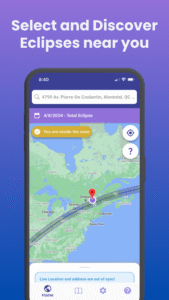
Discover Your Eclipse
Achieve pinpoint accuracy for the trajectory of upcoming solar eclipses, personalized visibility data, and optimal viewing times specific to your geographic location. Eclipse Guide is more than an app; it's your personal guide to navigating and experiencing these celestial spectacles.
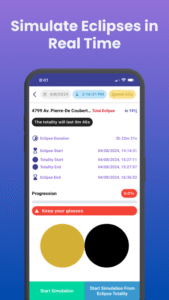
Prepare with Simulation
Use our sophisticated simulation feature to visualize and understand the trajectory, phases, and magnitude of an upcoming solar eclipse before it happens. Immerse yourself in this virtual celestial landscape from your device, thus preparing you for the actual event.
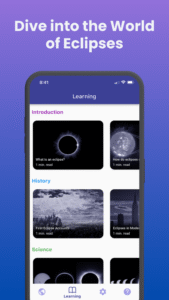
Dive into the World of Eclipses
Navigate through our organized content to explore various types of eclipses, their occurrence, historical significance, and the unique phenomena associated with them. Designed to appeal to astronomy enthusiasts as well as casual observers, Eclipse Guide enhances your eclipse-watching experience, transforming it into a journey of discovery and learning.
Whether you are planning for an upcoming eclipse, looking to explore past or future events, or simply want to immerse yourself in the science behind these majestic astronomical events, Eclipse Guide: Discovery & Simulation has got you covered.
Experience the dance of celestial bodies in an enlightening, engaging, and exciting way. Download Eclipse Guide now on Android and iOS, and let the universe come alive in the palm of your hand!
Discover Your Eclipse
Achieve pinpoint accuracy for the trajectory of upcoming solar eclipses, personalized visibility data, and optimal viewing times specific to your geographic location. Eclipse Guide is more than an app; it's your personal guide to navigating and experiencing these celestial spectacles.
Prepare with Simulation
Use our sophisticated simulation feature to visualize and understand the trajectory, phases, and magnitude of an upcoming solar eclipse before it happens. Immerse yourself in this virtual celestial landscape from your device, thus preparing you for the actual event.
Dive into the World of Eclipses
Navigate through our organized content to explore various types of eclipses, their occurrence, historical significance, and the unique phenomena associated with them. Designed to appeal to astronomy enthusiasts as well as casual observers, Eclipse Guide enhances your eclipse-watching experience, transforming it into a journey of discovery and learning.
Whether you are planning for an upcoming eclipse, looking to explore past or future events, or simply want to immerse yourself in the science behind these majestic astronomical events, Eclipse Guide: Discovery & Simulation has got you covered.
Experience the dance of celestial bodies in an enlightening, engaging, and exciting way. Download Eclipse Guide now on Android and iOS, and let the universe come alive in the palm of your hand!
Download My Eclipse APK
Fast, free and safe download.
APK Permissions 6
- android.permission.ACCESS_COARSE_LOCATION
- android.permission.ACCESS_FINE_LOCATION
- android.permission.ACCESS_NETWORK_STATE
- android.permission.FOREGROUND_SERVICE
- android.permission.INTERNET
- com.eclipsesim.app.DYNAMIC_RECEIVER_NOT_EXPORTED_PERMISSION
APK Verified
The cryptographic signature guarantees that the file is safe to install and was not tampered with in any way.


Frequently Asked Questions about My Eclipse APK
This is the universal variant — a single APK that contains native libraries for every CPU architecture. It installs on any Android device but is larger than per-architecture variants.
Yes — the APK's signature has been cryptographically verified against the publisher's signing key. The SHA-256 hash is shown in the File Information panel so you can independently confirm the file matches the original release.
Android 21 (API level 35) or newer. Older devices will refuse the install.
Install a free app like 'CPU-Z' or 'Droid Hardware Info' from the Play Store and look at the ABI / Instruction Set row. Most phones made after 2017 are arm64-v8a; if in doubt, download the universal variant.
All variants are functionally identical — same features, same version. They differ only in which CPU architectures the native code is compiled for, and (sometimes) which screen densities the included graphics target. Pick the one that matches your device for the smallest install size, or pick 'Universal' if you're unsure.