
Download DevCheck Device & System Info APK 5.46 armeabi-v7a · Android 16+
Download APK
Verified Safe
This is the armeabi-v7a build of DevCheck Device & System Info 5.46, compiled for 32-bit ARM processors found in older Android phones (roughly 2013-2017). Use this build if your device's primary ABI is armeabi-v7a — modern 64-bit phones should pick the arm64-v8a or universal variant for better performance.
File size: 11.0 MB • Min Android: 16 • Target Android: 34 • Version code: 546 • Framework: Native (Java/Kotlin) • Permissions: 32
Screenshots
File Information
| Package Name | flar2.devcheck |
|---|---|
| Version Name | 5.46 |
| Version Code | 546 |
| Architecture | armeabi-v7a |
| Min Android Version | Android 16 (API 34) |
| Main Activity | flar2.devcheck.MainActivity |
| Framework | Native (Java/Kotlin) |
| File Size | 11.02 MB |
| Signature (SHA1) | EEA505590523A0BE70CC6A1F1002CB571DB82C2B |
| File Hash (SHA256) | e784250152c271b8bd0a839feaf7df5e8d40b07f70436d9d42a2a927c2bb60ce |
What's New
5.46:
-support new hardware and devices
-bug fixes and improvements
5.40:
-support new hardware and devices
-improve battery info
-improve eSIM info
-improve camera info
-bug fixes and improvements
5.37:
-support new hardware and devices
-bug fixes and improvements
-update translations
5.36:
-support new hardware and devices
-improve permissions explorer
-bug fixes and improvements
-update translations
-support new hardware and devices
-bug fixes and improvements
5.40:
-support new hardware and devices
-improve battery info
-improve eSIM info
-improve camera info
-bug fixes and improvements
5.37:
-support new hardware and devices
-bug fixes and improvements
-update translations
5.36:
-support new hardware and devices
-improve permissions explorer
-bug fixes and improvements
-update translations
App Description
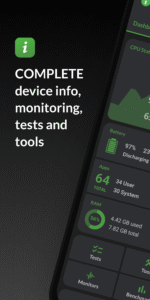
Monitor your hardware in real time and get complete information about your device model, CPU, GPU, memory, battery, camera, storage, network, sensors and operating system. DevCheck shows all the information you need about your hardware and operating system in a clear, accurate and organized way.
DevCheck provides the most detailed CPU and System-on-a-chip (SOC) info available. See specifications for Bluetooth, GPU, RAM, storage and other hardware in your phone or tablet. See details about your Wi-Fi and mobile networks, including dual SIM info. Get real time sensor data. Learn about your phone's operating system and architecture. Root is fully supported, so rooted users can discover even more info.
Dashboard:
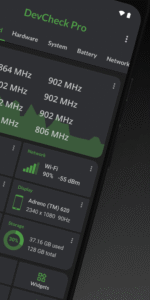
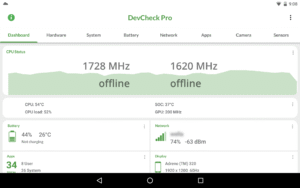
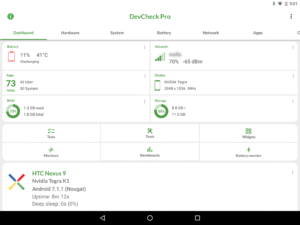
a comprehensive overview of critical device and hardware info, including real-time monitoring of CPU frequencies, memory usage, battery stats, deep sleep and uptime. With summaries and shortcuts to system settings.
Hardware:
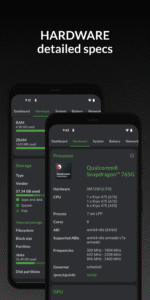
displays all detail about your SOC, CPU, GPU, memory, storage, Bluetooth and other hardware, including chip names and manufacturers, architecture, processor cores and configuration, manufacturing process, frequencies, governor, storage capacity, input devices and display specifications.
System:
get all info about your device, including codename, brand, manufacturer, bootloader, radio, Android version, security patch level and kernel. DevCheck can also check root, busybox, KNOX status and other info related to software and operating system.
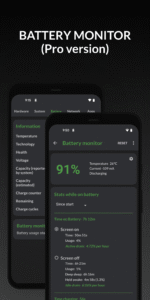
Battery:
real-time info about your battery status, temperature, level, technology, health, voltage, current, power and capacity. With Pro version, get details about battery usage with the screen on and off using the Battery Monitor service.
Network:
shows info about your Wi-Fi and mobile/cellular connections, including IP addresses (ipv4 and ipv6), connection info, operator, phone and network type, public IP and more. Most complete dual SIM information available
Apps:
detailed info and management of all your apps. Running apps provides list of apps and services running on your device, with current memory usage. On Android Nougat or later, memory usage is only available on rooted devices.
DevCheck displays the most advanced camera specifications, including aperture, focal length, ISO range, RAW capability, 35mm equivalents, resolution (megapixels), crop factor, field of view, focus modes, flash modes, JPEG quality and image format, available face detection modes and more
Sensors:
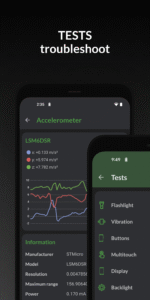
a list of all sensors on the device, including type, manufacturer, power and resolution. Real time graphical info for accelerometer, step detector, gyroscope, proximity, light and other sensors.
Tests:
flashlight, vibrator, buttons, multitouch, display, backlight, charging, speakers, headset, earpiece, microphone and biometric scanners (the last six tests require PRO version)
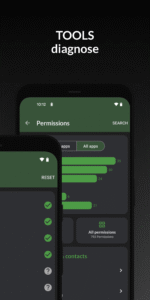
Tools:
root check, bluetooth, SafetyNet, Permissions, Wi-Fi scan, GPS location and USB accessories (Permissions, SafetyNet, Wi-Fi, GPS & USB tools require PRO)
PRO VERSION
is available through in-app purchase
The pro version includes access to all tests and tools, benchmarking, battery monitor, widgets and floating monitors.
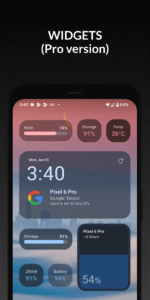
DevCheck Pro has several modern
widgets
to choose from. Show battery, RAM, storage usage and other stats right on your home screen!
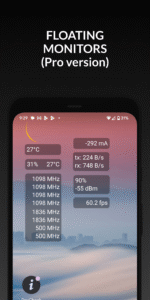
Floating monitors
are customizable, movable, always-on-top transparent windows that allow you to monitor CPU frequencies, temperatures, battery, network activity and more in real time while using other apps.
The pro version also allows you to choose different color schemes.
PERMISSIONS
DevCheck requires many permissions in order to display detailed information about your device. None of your personal information is ever collected or shared. Your privacy is always respected. DevCheck is ad-free.
DevCheck provides the most detailed CPU and System-on-a-chip (SOC) info available. See specifications for Bluetooth, GPU, RAM, storage and other hardware in your phone or tablet. See details about your Wi-Fi and mobile networks, including dual SIM info. Get real time sensor data. Learn about your phone's operating system and architecture. Root is fully supported, so rooted users can discover even more info.
Dashboard:
a comprehensive overview of critical device and hardware info, including real-time monitoring of CPU frequencies, memory usage, battery stats, deep sleep and uptime. With summaries and shortcuts to system settings.
Hardware:
displays all detail about your SOC, CPU, GPU, memory, storage, Bluetooth and other hardware, including chip names and manufacturers, architecture, processor cores and configuration, manufacturing process, frequencies, governor, storage capacity, input devices and display specifications.
System:
get all info about your device, including codename, brand, manufacturer, bootloader, radio, Android version, security patch level and kernel. DevCheck can also check root, busybox, KNOX status and other info related to software and operating system.
Battery:
real-time info about your battery status, temperature, level, technology, health, voltage, current, power and capacity. With Pro version, get details about battery usage with the screen on and off using the Battery Monitor service.
Network:
shows info about your Wi-Fi and mobile/cellular connections, including IP addresses (ipv4 and ipv6), connection info, operator, phone and network type, public IP and more. Most complete dual SIM information available
Apps:
detailed info and management of all your apps. Running apps provides list of apps and services running on your device, with current memory usage. On Android Nougat or later, memory usage is only available on rooted devices.
DevCheck displays the most advanced camera specifications, including aperture, focal length, ISO range, RAW capability, 35mm equivalents, resolution (megapixels), crop factor, field of view, focus modes, flash modes, JPEG quality and image format, available face detection modes and more
Sensors:
a list of all sensors on the device, including type, manufacturer, power and resolution. Real time graphical info for accelerometer, step detector, gyroscope, proximity, light and other sensors.
Tests:
flashlight, vibrator, buttons, multitouch, display, backlight, charging, speakers, headset, earpiece, microphone and biometric scanners (the last six tests require PRO version)
Tools:
root check, bluetooth, SafetyNet, Permissions, Wi-Fi scan, GPS location and USB accessories (Permissions, SafetyNet, Wi-Fi, GPS & USB tools require PRO)
PRO VERSION
is available through in-app purchase
The pro version includes access to all tests and tools, benchmarking, battery monitor, widgets and floating monitors.
DevCheck Pro has several modern
widgets
to choose from. Show battery, RAM, storage usage and other stats right on your home screen!
Floating monitors
are customizable, movable, always-on-top transparent windows that allow you to monitor CPU frequencies, temperatures, battery, network activity and more in real time while using other apps.
The pro version also allows you to choose different color schemes.
PERMISSIONS
DevCheck requires many permissions in order to display detailed information about your device. None of your personal information is ever collected or shared. Your privacy is always respected. DevCheck is ad-free.
Download DevCheck Device & System Info APK
Fast, free and safe download.
APK Permissions 32
- android.permission.ACCESS_COARSE_LOCATION
- android.permission.ACCESS_FINE_LOCATION
- android.permission.ACCESS_NETWORK_STATE
- android.permission.ACCESS_WIFI_STATE
- android.permission.BATTERY_STATS
- android.permission.BLUETOOTH
- android.permission.BLUETOOTH_ADMIN
- android.permission.BLUETOOTH_CONNECT
- android.permission.BLUETOOTH_SCAN
- android.permission.CAMERA
- android.permission.CHANGE_WIFI_STATE
- android.permission.DUMP
- android.permission.FOREGROUND_SERVICE
- android.permission.FOREGROUND_SERVICE_SPECIAL_USE
- android.permission.INTERNET
- android.permission.PACKAGE_USAGE_STATS
- android.permission.POST_NOTIFICATIONS
- android.permission.QUERY_ALL_PACKAGES
- android.permission.READ_PHONE_STATE
- android.permission.RECEIVE_BOOT_COMPLETED
- android.permission.RECORD_AUDIO
- android.permission.REQUEST_DELETE_PACKAGES
- android.permission.REQUEST_IGNORE_BATTERY_OPTIMIZATIONS
- android.permission.SYSTEM_ALERT_WINDOW
- android.permission.TRANSMIT_IR
- android.permission.USE_BIOMETRIC
- android.permission.USE_FINGERPRINT
- android.permission.VIBRATE
- android.permission.WAKE_LOCK
- com.android.vending.BILLING
- com.google.android.providers.gsf.permission.READ_GSERVICES
- flar2.devcheck.DYNAMIC_RECEIVER_NOT_EXPORTED_PERMISSION


Frequently Asked Questions about DevCheck Device & System Info APK
This variant is built for 32-bit ARM (older Android phones, ~2013–2017). If your device's CPU matches, this is the smallest, fastest version to install.
Yes — the APK's signature has been cryptographically verified against the publisher's signing key. The SHA-256 hash is shown in the File Information panel so you can independently confirm the file matches the original release.
Android 16 (API level 34) or newer. Older devices will refuse the install.
Install a free app like 'CPU-Z' or 'Droid Hardware Info' from the Play Store and look at the ABI / Instruction Set row. Most phones made after 2017 are arm64-v8a; if in doubt, download the universal variant.
All variants are functionally identical — same features, same version. They differ only in which CPU architectures the native code is compiled for, and (sometimes) which screen densities the included graphics target. Pick the one that matches your device for the smallest install size, or pick 'Universal' if you're unsure.