
This is the universal build of Fossify Notes Beta 1.5.0. It contains native libraries for every CPU architecture (arm64-v8a, armeabi-v7a, x86, x86_64), so it installs on any Android device. The trade-off is size — it's larger than per-architecture variants. Pick this one if you're unsure which CPU your phone has, or if you plan to share the APK with multiple devices.
File size: 5.2 MB • Min Android: 26 • Target Android: 34 • Version code: 11 • Framework: Native (Java/Kotlin) • Permissions: 6
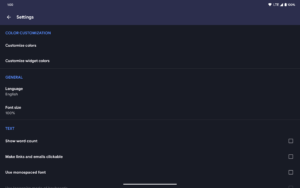
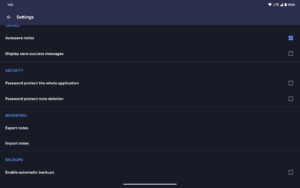
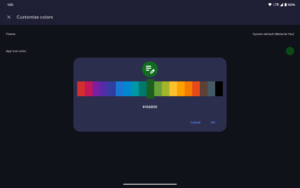
Screenshots

File Information
| Package Name | org.fossify.notes |
|---|---|
| Version Name | 1.5.0 |
| Version Code | 11 |
| Architecture | Universal |
| Min Android Version | Android 26 (API 34) |
| Main Activity | org.fossify.notes.activities.SplashActivity.Green |
| Framework | Native (Java/Kotlin) |
| File Size | 5.20 MB |
| Signature (SHA1) | 279E994F35E1551DB80DD99D46295A680901A2A6 |
| File Hash (SHA256) | 7a26757385d7079f400900f243b6a9d0d1991c179d87acc4058fdfa91dc35313 |
What's New
New in version 1.5.0
Changed:
• Updated translations
Fixed:
• Fixed a glitch in pattern lock after incorrect attempts
Changed:
• Updated translations
Fixed:
• Fixed a glitch in pattern lock after incorrect attempts
App Description
Introducing Fossify Notes – your ultimate tool for effortless note-taking, organization, and planning. Simplify your life with this intuitive organizer designed to streamline your tasks and ideas effortlessly.
🗒️ SIMPLE NOTE-TAKING:
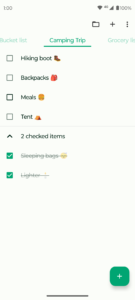
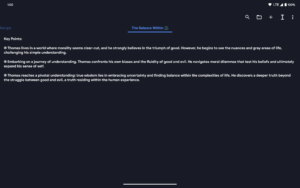
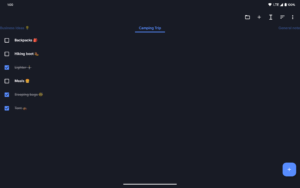
Fossify Notes lets you quickly jot down shopping lists, address reminders, or brilliant startup ideas with just a tap. Say goodbye to clutter and hello to efficient note creation. No more fussing over complex setups.
📋 REMARKABLE ORGANIZATION:
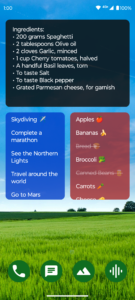
Stay on top of your duties with ease using Fossify Notes' simple-to-use organizer and colorful note-taking widget. Never forget crucial information or shopping lists again – it's all at your fingertips.
💾 AUTOMATIC SAVING:
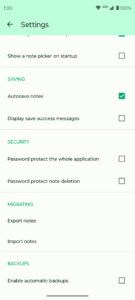
Forget about losing your work. Fossify Notes automatically saves your edits, ensuring that your changes are always preserved. Create multiple independent notes and lists effortlessly.
🖼️ CUSTOMIZABLE WIDGET:
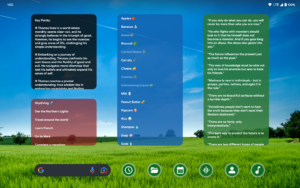
Access your lists and manage your to-do tasks in a flash with Fossify Notes' customizable widget. Enjoy seamless organization on the go with just a tap.
🚫 AD-FREE AND PRIVACY-FOCUSED:
Enjoy a clutter-free experience with Fossify Notes – no ads or unnecessary permissions. Fossify Notes operates offline without internet permission ensuring a stable and secure environment for your notes.
🔓 OPEN-SOURCE FREEDOM:
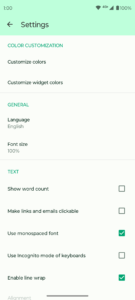
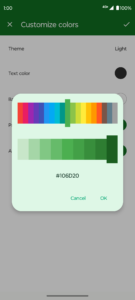
Fossify Notes is fully open-source, offering customizable colors and providing transparency and flexibility for users. Experience the freedom of customization and peace of mind with a community-driven note-taking solution.
Experience the simplicity and efficiency of note-taking with Fossify Notes. Download now and unlock the power of organized thinking.
Explore more Fossify apps:
www.fossify.org
Open-Source Code:
www.github.com/FossifyOrg
Join the community on Reddit:
www.reddit.com/r/Fossify
Connect on Telegram:
t.me/Fossify
Author:
Fossify
License:
GNU General Public License v3.0 only
Website
Issue Tracker
Translation
Source Code
Changelog
Build Metadata
Reproducibility Status
🗒️ SIMPLE NOTE-TAKING:
Fossify Notes lets you quickly jot down shopping lists, address reminders, or brilliant startup ideas with just a tap. Say goodbye to clutter and hello to efficient note creation. No more fussing over complex setups.
📋 REMARKABLE ORGANIZATION:
Stay on top of your duties with ease using Fossify Notes' simple-to-use organizer and colorful note-taking widget. Never forget crucial information or shopping lists again – it's all at your fingertips.
💾 AUTOMATIC SAVING:
Forget about losing your work. Fossify Notes automatically saves your edits, ensuring that your changes are always preserved. Create multiple independent notes and lists effortlessly.
🖼️ CUSTOMIZABLE WIDGET:
Access your lists and manage your to-do tasks in a flash with Fossify Notes' customizable widget. Enjoy seamless organization on the go with just a tap.
🚫 AD-FREE AND PRIVACY-FOCUSED:
Enjoy a clutter-free experience with Fossify Notes – no ads or unnecessary permissions. Fossify Notes operates offline without internet permission ensuring a stable and secure environment for your notes.
🔓 OPEN-SOURCE FREEDOM:
Fossify Notes is fully open-source, offering customizable colors and providing transparency and flexibility for users. Experience the freedom of customization and peace of mind with a community-driven note-taking solution.
Experience the simplicity and efficiency of note-taking with Fossify Notes. Download now and unlock the power of organized thinking.
Explore more Fossify apps:
www.fossify.org
Open-Source Code:
www.github.com/FossifyOrg
Join the community on Reddit:
www.reddit.com/r/Fossify
Connect on Telegram:
t.me/Fossify
Author:
Fossify
License:
GNU General Public License v3.0 only
Website
Issue Tracker
Translation
Source Code
Changelog
Build Metadata
Reproducibility Status
Download Fossify Notes Beta APK
Fast, free and safe download.
APK Permissions 6
- android.permission.RECEIVE_BOOT_COMPLETED
- android.permission.SCHEDULE_EXACT_ALARM
- android.permission.USE_FINGERPRINT
- android.permission.WAKE_LOCK
- android.permission.WRITE_EXTERNAL_STORAGE
- org.fossify.android.permission.WRITE_GLOBAL_SETTINGS
APK Verified
The cryptographic signature guarantees that the file is safe to install and was not tampered with in any way.
Similar in Productivity


Frequently Asked Questions about Fossify Notes Beta APK
This is the universal variant — a single APK that contains native libraries for every CPU architecture. It installs on any Android device but is larger than per-architecture variants.
Yes — the APK's signature has been cryptographically verified against the publisher's signing key. The SHA-256 hash is shown in the File Information panel so you can independently confirm the file matches the original release.
Android 26 (API level 34) or newer. Older devices will refuse the install.
Install a free app like 'CPU-Z' or 'Droid Hardware Info' from the Play Store and look at the ABI / Instruction Set row. Most phones made after 2017 are arm64-v8a; if in doubt, download the universal variant.
All variants are functionally identical — same features, same version. They differ only in which CPU architectures the native code is compiled for, and (sometimes) which screen densities the included graphics target. Pick the one that matches your device for the smallest install size, or pick 'Universal' if you're unsure.