
This is the universal build of GIF Maker, GIF Editor 1.6.12.440Q. It contains native libraries for every CPU architecture (arm64-v8a, armeabi-v7a, x86, x86_64), so it installs on any Android device. The trade-off is size — it's larger than per-architecture variants. Pick this one if you're unsure which CPU your phone has, or if you plan to share the APK with multiple devices.
File size: 17.5 MB • Min Android: 29 • Target Android: 34 • Version code: 2912440 • Framework: Native (Java/Kotlin) • Permissions: 18
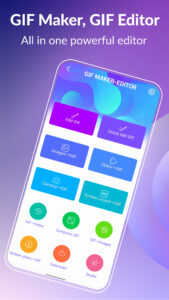
Screenshots
File Information
| Package Name | com.media.zatashima.studio |
|---|---|
| Version Name | 1.6.12.440Q |
| Version Code | 2912440 |
| Architecture | Universal |
| Min Android Version | Android 29 (API 34) |
| Main Activity | com.media.zatashima.studio.LoadingScreen |
| Framework | Native (Java/Kotlin) |
| File Size | 17.54 MB |
| Signature (SHA1) | 3CA9FDAD404755E5CA7BE6C43D9F90DF060BFAA6 |
| File Hash (SHA256) | 15055ceb49dd62a1915aebcec47c33abc5f148be9d9b5827ff57df9103f1c177 |
What's New
Improve home screen UI.
App Description
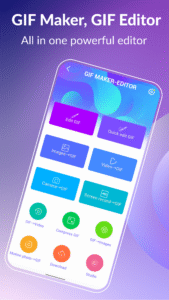
Unleash your creativity with GIF Maker & GIF Editor, the all-in-one gif app that lets you create and edit high-quality animated gifs without any watermarks. With its intuitive and user-friendly interface, you can easily transform images, videos, screen recordings and even existing gifs into stunning animations.
GIF Maker & GIF Editor supports a wide range of popular video and image formats including PNG, JPEG, MP4, MPEG, FLV, 3GP, GIF and more. You can easily customize and edit your gifs to perfectly capture your unique style.
Whether you prefer a dark or light theme, GIF Maker & GIF Editor offers the perfect environment for unleashing your creativity. Start making stunning gifs that stand out and get noticed today with GIF Maker & GIF Editor.
Support up to 22 languages: English, Français, Español, Italian, 한국인, 中文, 日本語, Deutsche, हिंदी, Pусский, Tiếng Việt, Português, Ελληνικά, Bahasa, Türk, ไทย, Polski, Dansk, Suomen kiel, Nederlands, Norsk, Svenska.
GIF Creator & GIF Editor:
·Transform your memories into stunning animated GIFs with our versatile app. Whether you want to convert a video clip, combine multiple images, or even record your screen, you can easily create high-quality GIFs with just a few taps.
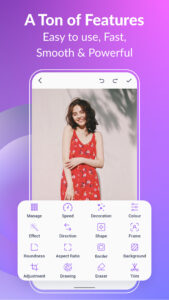
There are tons of features like crop, resize, speed, emoji, filters, trim, stickers, aspect ratio, roundness, and more. With up to 400 frames and 50 frames per second supported. Your creations will be saved as high-quality GIFs or videos with no watermarks.
Compress GIF:
·Easily share smaller, more manageable GIFs and animated images with our GIF compressor tool. Choose from multiple quality options to find the perfect balance between file size and image quality.
Convert GIF to Video, GIF converter:
·Effortlessly convert GIF to video with just three clicks. Maintain the same quality and resolution for seamless transitions.
GIF Background:
·Make your GIFs come alive with background options like transparent, black, white, solid color, gradient colors, blur, and more.
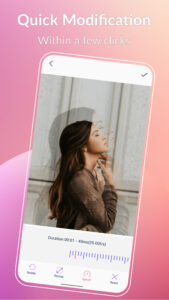
Quick edit GIF:
·Transform your GIFs with ease using our quick modification tools. Resize, adjust play speed, and more in just a few seconds.
GIF Effects and Picture frames:
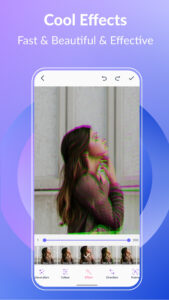
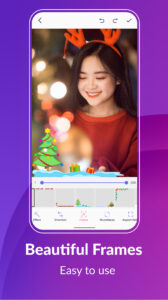
·Add some style to your GIFs with our cool effects and beautiful picture frames. Choose from popular options like 1977, Amaro, Brannan, Early Bird, Hefe, Glitches, VHS, and more.
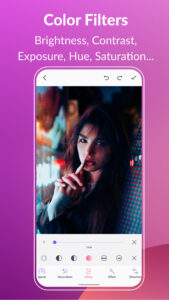
Color filters:
·Bring your GIFs to life with our color filters. Adjust brightness, contrast, exposure, hue, saturation, and white balance.
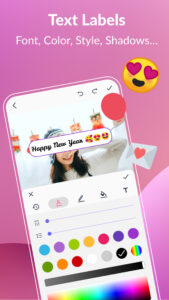
Text labels and Memes:
·Add captivating text labels to your GIFs with ease. Choose from a variety of styles, colors, shadows, border, background color, spacings, font, and adjust the timing to ensure your message is seen in your GIF.
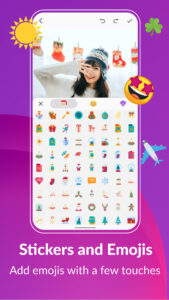
Stickers and Emojis:
·Bring some fun and personality to your GIFs with our collection of funny stickers and emojis. Easily adjust the timing to show your stickers and emojis, and even combine them with other images for even more impact.
Manage GIF collection:
·Easily manage and edit your GIF collection with our all-in-one app. View and edit all the GIFs on your device with ease.
Export frames from a GIF:
·Effortlessly extract GIF frames with just three clicks. Quickly and easily split your GIF animations into individual frames.
Share your GIFs:
·Easily share your animations with the world. Post your GIFs or videos on popular platforms like WhatsApp, Facebook, Messenger, Twitter, Skype, Giphy, Tenor, Tiktok, and more. Show off your creativity and get your GIF animations seen by a wider audience.
Get creative and have fun with GIF Maker & GIF Editor. Create or edit your GIF animations in your preferred style and bring your unique vision to life. Unleash your imagination and make your GIFs truly stand out.
GIF Maker & GIF Editor supports a wide range of popular video and image formats including PNG, JPEG, MP4, MPEG, FLV, 3GP, GIF and more. You can easily customize and edit your gifs to perfectly capture your unique style.
Whether you prefer a dark or light theme, GIF Maker & GIF Editor offers the perfect environment for unleashing your creativity. Start making stunning gifs that stand out and get noticed today with GIF Maker & GIF Editor.
Support up to 22 languages: English, Français, Español, Italian, 한국인, 中文, 日本語, Deutsche, हिंदी, Pусский, Tiếng Việt, Português, Ελληνικά, Bahasa, Türk, ไทย, Polski, Dansk, Suomen kiel, Nederlands, Norsk, Svenska.
GIF Creator & GIF Editor:
·Transform your memories into stunning animated GIFs with our versatile app. Whether you want to convert a video clip, combine multiple images, or even record your screen, you can easily create high-quality GIFs with just a few taps.
There are tons of features like crop, resize, speed, emoji, filters, trim, stickers, aspect ratio, roundness, and more. With up to 400 frames and 50 frames per second supported. Your creations will be saved as high-quality GIFs or videos with no watermarks.
Compress GIF:
·Easily share smaller, more manageable GIFs and animated images with our GIF compressor tool. Choose from multiple quality options to find the perfect balance between file size and image quality.
Convert GIF to Video, GIF converter:
·Effortlessly convert GIF to video with just three clicks. Maintain the same quality and resolution for seamless transitions.
GIF Background:
·Make your GIFs come alive with background options like transparent, black, white, solid color, gradient colors, blur, and more.
Quick edit GIF:
·Transform your GIFs with ease using our quick modification tools. Resize, adjust play speed, and more in just a few seconds.
GIF Effects and Picture frames:
·Add some style to your GIFs with our cool effects and beautiful picture frames. Choose from popular options like 1977, Amaro, Brannan, Early Bird, Hefe, Glitches, VHS, and more.
Color filters:
·Bring your GIFs to life with our color filters. Adjust brightness, contrast, exposure, hue, saturation, and white balance.
Text labels and Memes:
·Add captivating text labels to your GIFs with ease. Choose from a variety of styles, colors, shadows, border, background color, spacings, font, and adjust the timing to ensure your message is seen in your GIF.
Stickers and Emojis:
·Bring some fun and personality to your GIFs with our collection of funny stickers and emojis. Easily adjust the timing to show your stickers and emojis, and even combine them with other images for even more impact.
Manage GIF collection:
·Easily manage and edit your GIF collection with our all-in-one app. View and edit all the GIFs on your device with ease.
Export frames from a GIF:
·Effortlessly extract GIF frames with just three clicks. Quickly and easily split your GIF animations into individual frames.
Share your GIFs:
·Easily share your animations with the world. Post your GIFs or videos on popular platforms like WhatsApp, Facebook, Messenger, Twitter, Skype, Giphy, Tenor, Tiktok, and more. Show off your creativity and get your GIF animations seen by a wider audience.
Get creative and have fun with GIF Maker & GIF Editor. Create or edit your GIF animations in your preferred style and bring your unique vision to life. Unleash your imagination and make your GIFs truly stand out.
Download GIF Maker, GIF Editor APK
Fast, free and safe download.
APK Permissions 18
- android.permission.ACCESS_ADSERVICES_AD_ID
- android.permission.ACCESS_ADSERVICES_ATTRIBUTION
- android.permission.ACCESS_ADSERVICES_TOPICS
- android.permission.ACCESS_NETWORK_STATE
- android.permission.FOREGROUND_SERVICE
- android.permission.FOREGROUND_SERVICE_MEDIA_PROJECTION
- android.permission.INTERNET
- android.permission.POST_NOTIFICATIONS
- android.permission.READ_EXTERNAL_STORAGE
- android.permission.READ_MEDIA_IMAGES
- android.permission.READ_MEDIA_VIDEO
- android.permission.READ_MEDIA_VISUAL_USER_SELECTED
- android.permission.WAKE_LOCK
- android.permission.WRITE_EXTERNAL_STORAGE
- com.android.vending.BILLING
- com.google.android.finsky.permission.BIND_GET_INSTALL_REFERRER_SERVICE
- com.google.android.gms.permission.AD_ID
- com.media.zatashima.studio.DYNAMIC_RECEIVER_NOT_EXPORTED_PERMISSION
APK Verified
The cryptographic signature guarantees that the file is safe to install and was not tampered with in any way.


Frequently Asked Questions about GIF Maker, GIF Editor APK
This is the universal variant — a single APK that contains native libraries for every CPU architecture. It installs on any Android device but is larger than per-architecture variants.
Yes — the APK's signature has been cryptographically verified against the publisher's signing key. The SHA-256 hash is shown in the File Information panel so you can independently confirm the file matches the original release.
Android 29 (API level 34) or newer. Older devices will refuse the install.
Install a free app like 'CPU-Z' or 'Droid Hardware Info' from the Play Store and look at the ABI / Instruction Set row. Most phones made after 2017 are arm64-v8a; if in doubt, download the universal variant.
All variants are functionally identical — same features, same version. They differ only in which CPU architectures the native code is compiled for, and (sometimes) which screen densities the included graphics target. Pick the one that matches your device for the smallest install size, or pick 'Universal' if you're unsure.