
Download Bitvelo - internet speed meter APK 1.8.4 Universal · Android 24+
Download APK
Verified Safe
This is the universal build of Bitvelo - internet speed meter 1.8.4. It contains native libraries for every CPU architecture (arm64-v8a, armeabi-v7a, x86, x86_64), so it installs on any Android device. The trade-off is size — it's larger than per-architecture variants. Pick this one if you're unsure which CPU your phone has, or if you plan to share the APK with multiple devices.
File size: 7.9 MB • Min Android: 24 • Target Android: 34 • Version code: 109 • Framework: Native (Java/Kotlin) • Permissions: 23
Screenshots
File Information
| Package Name | com.AFG.internetspeedmeter |
|---|---|
| Version Name | 1.8.4 |
| Version Code | 109 |
| Architecture | Universal |
| Min Android Version | Android 24 (API 34) |
| Main Activity | com.AFG.internetspeedmeter.MainActivity |
| Framework | Native (Java/Kotlin) |
| File Size | 7.87 MB |
| Signature (SHA1) | A80910AAB5E799D9A0CD790296C99EF80E7CF7BF |
| File Hash (SHA256) | d298cfb5ea08427aa7967df32624a53c3d3b4b4a6335a96d7c2d8eb71f781b2b |
What's New
Bug fixed: Incorrect no connection detection when Wi-Fi disconnects while mobile data is active.
App Description
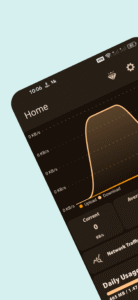
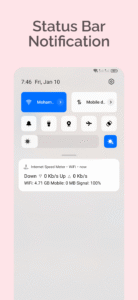
Experience a seamless and connected internet browsing experience with Internet Speed Meter. Our intuitive and feature-rich app provides real-time internet speed display right on your notification bar, ensuring you're always aware of your network performance. With its sleek and stunning UI, the app offers a delightful user experience, allowing you to customize the color scheme to your preference. Choose from a vast array of colors for both light and dark themes, making it uniquely yours. 🌈🎨
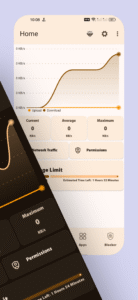
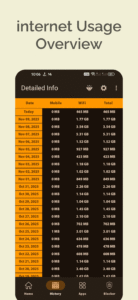
In addition to real-time speed monitoring, Internet Speed Meter goes beyond by offering a range of powerful features. Visualize your internet usage with the integrated chart bar, giving you a clear overview of your data consumption patterns over time. Whether you're curious about your daily, weekly, or monthly usage, this visual representation helps you stay informed. 📊📈
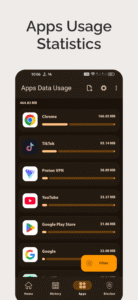
App usage tracking is another valuable aspect of Internet Speed Meter. Keep tabs on your app usage patterns and understand which applications consume the most data📱💡
One of the core strengths of Internet Speed Meter is its secure data storage feature. You can trust that your internet speed and usage data are stored safely within the app for up to 30 days. This data storage capability enables you to analyze historical trends and patterns, giving you valuable insights into your internet behavior. 🔒📊
Internet Speed Meter is designed to be a comprehensive tool that puts you in control of your internet experience. Stay connected, monitor your speed, track your app usage, and easily analyze your data. Download the Internet Speed Meter now and take charge of your internet connectivity like never before. 💪🌐
In addition to real-time speed monitoring, Internet Speed Meter goes beyond by offering a range of powerful features. Visualize your internet usage with the integrated chart bar, giving you a clear overview of your data consumption patterns over time. Whether you're curious about your daily, weekly, or monthly usage, this visual representation helps you stay informed. 📊📈
App usage tracking is another valuable aspect of Internet Speed Meter. Keep tabs on your app usage patterns and understand which applications consume the most data📱💡
One of the core strengths of Internet Speed Meter is its secure data storage feature. You can trust that your internet speed and usage data are stored safely within the app for up to 30 days. This data storage capability enables you to analyze historical trends and patterns, giving you valuable insights into your internet behavior. 🔒📊
Internet Speed Meter is designed to be a comprehensive tool that puts you in control of your internet experience. Stay connected, monitor your speed, track your app usage, and easily analyze your data. Download the Internet Speed Meter now and take charge of your internet connectivity like never before. 💪🌐
Download Bitvelo - internet speed meter APK
Fast, free and safe download.
APK Permissions 23
- android.permission.ACCESS_NETWORK_STATE
- android.permission.ACCESS_WIFI_STATE
- android.permission.AIRPLANE_MODE
- android.permission.FOREGROUND_SERVICE
- android.permission.FOREGROUND_SERVICE_SPECIAL_USE
- android.permission.GET_TASKS
- android.permission.INTERNET
- android.permission.KILL_BACKGROUND_PROCESSES
- android.permission.PACKAGE_USAGE_STATS
- android.permission.READ_LOGS
- android.permission.READ_NETWORK_USAGE_HISTORY
- android.permission.READ_PHONE_STATE
- android.permission.RECEIVE_BOOT_COMPLETED
- android.permission.REQUEST_IGNORE_BATTERY_OPTIMIZATIONS
- android.permission.SYSTEM_ALERT_WINDOW
- android.permission.WAKE_LOCK
- com.AFG.internetspeedmeter.DYNAMIC_RECEIVER_NOT_EXPORTED_PERMISSION
- com.AFG.internetspeedmeter.READ_NETWORK_USAGE_HISTORY
- com.android.vending.BILLING
- com.android.vending.CHECK_LICENSE
- com.applovin.array.apphub.permission.BIND_APPHUB_SERVICE
- com.google.android.gms.permission.AD_ID
- com.samsung.android.providers.context.permission.WRITE_USE_APP_FEATURE_SURVEY
APK Verified
The cryptographic signature guarantees that the file is safe to install and was not tampered with in any way.


Frequently Asked Questions about Bitvelo - internet speed meter APK
This is the universal variant — a single APK that contains native libraries for every CPU architecture. It installs on any Android device but is larger than per-architecture variants.
Yes — the APK's signature has been cryptographically verified against the publisher's signing key. The SHA-256 hash is shown in the File Information panel so you can independently confirm the file matches the original release.
Android 24 (API level 34) or newer. Older devices will refuse the install.
Install a free app like 'CPU-Z' or 'Droid Hardware Info' from the Play Store and look at the ABI / Instruction Set row. Most phones made after 2017 are arm64-v8a; if in doubt, download the universal variant.
All variants are functionally identical — same features, same version. They differ only in which CPU architectures the native code is compiled for, and (sometimes) which screen densities the included graphics target. Pick the one that matches your device for the smallest install size, or pick 'Universal' if you're unsure.