
This is the universal build of GMX - Mail & Cloud 8.13.1. It contains native libraries for every CPU architecture (arm64-v8a, armeabi-v7a, x86, x86_64), so it installs on any Android device. The trade-off is size — it's larger than per-architecture variants. Pick this one if you're unsure which CPU your phone has, or if you plan to share the APK with multiple devices.
File size: 46.7 MB • Min Android: 28 • Target Android: 35 • Version code: 405147 • Framework: Native (Java/Kotlin) • Permissions: 55
Screenshots
File Information
| Package Name | de.gmx.mobile.android.mail |
|---|---|
| Version Name | 8.13.1 |
| Version Code | 405147 |
| Architecture | Universal |
| Min Android Version | Android 28 (API 35) |
| Main Activity | com.unitedinternet.portal.ui.HostActivity |
| Framework | Native (Java/Kotlin) |
| File Size | 46.73 MB |
| Signature (SHA1) | 50D00431A2C2979E99477C758C467C664E281F03 |
| File Hash (SHA256) | 8eed65f0ed7d538c83df1681ace6d082fcc22e40d7594ca5f19a02947b8778c8 |
What's New
✔ Support for Android 15
✔ Performance and stability improvements
✔ Performance and stability improvements
App Description
GMX Mail App – Your All-in-One Email App
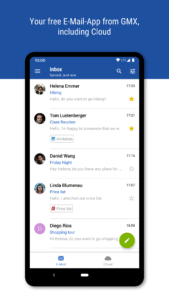
Everything you've come to expect from a GMX webmail account can now be utilized on your Android mobile device with our official email app. Enjoy convenient and easy access to your free email account wherever you are. Quickly find contacts in your address book, view, receive and reply to messages, all at the touch of your fingertips. Experience unparalleled mobility and freedom with our email app.
✰ Some of the features of the GMX Mail app at a glance:
✓ Available on every Android device
✓ Optimized, simple and intuitive usage
✓ Synchronization with your GMX or WEB.DE address book (optional)
✓ Battery saving push notifications for incoming emails
✓ Secure access with PIN protection mode
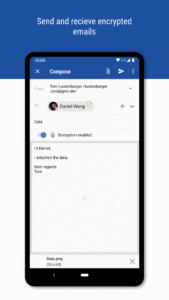
✓ Read and save attachments easily
GMX’s free email app is not only designed to be easy to use, but simple to install, too. Once downloaded, you'll have access to all the same features as on your desktop. No longer will you be anchored in one place to receive an email, but you will be afforded the flexibility to view and receive emails while on the go.
Ease of Use
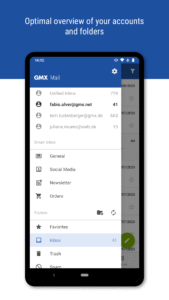
Sending and receiving emails should be as easy as possible, and it's that ease of use that has gone into the design of the GMX Mail app. Regardless of your provider, collect all of your email accounts in one single place. Navigating and managing emails is a simple task with the use of swipe gestures, and your address book, inbox and other folders are never more than a click away. Saving attachments is effortless and will allow you to keep them on hand for later use.
✰ Customizable and Intuitive
Just as everyone lives a different lifestyle, we understand everyone has different expectations and requirements from an email client. With this in mind, we have made our app customizable to suit all tastes and needs. Whether you'd like to set custom alerts for emails, enjoy a more low-key mail experience with a vibration notification, or change the way emails are presented to you, GMX Mail enables you to do this and more.
✰ Always take your Email with you
Never miss another urgent email with GMX's mail app. Our push notifications will alert you to incoming emails, meaning you won't even have to have the app open to be informed of new messages. With GMX's PIN protection mode, you can rest assured that your mail will always remain safe and secure, and will be privy only to you. Never miss another email with our free mobile app, courtesy of GMX.
Have fun using the GMX Mail app!
Everything you've come to expect from a GMX webmail account can now be utilized on your Android mobile device with our official email app. Enjoy convenient and easy access to your free email account wherever you are. Quickly find contacts in your address book, view, receive and reply to messages, all at the touch of your fingertips. Experience unparalleled mobility and freedom with our email app.
✰ Some of the features of the GMX Mail app at a glance:
✓ Available on every Android device
✓ Optimized, simple and intuitive usage
✓ Synchronization with your GMX or WEB.DE address book (optional)
✓ Battery saving push notifications for incoming emails
✓ Secure access with PIN protection mode
✓ Read and save attachments easily
GMX’s free email app is not only designed to be easy to use, but simple to install, too. Once downloaded, you'll have access to all the same features as on your desktop. No longer will you be anchored in one place to receive an email, but you will be afforded the flexibility to view and receive emails while on the go.
Ease of Use
Sending and receiving emails should be as easy as possible, and it's that ease of use that has gone into the design of the GMX Mail app. Regardless of your provider, collect all of your email accounts in one single place. Navigating and managing emails is a simple task with the use of swipe gestures, and your address book, inbox and other folders are never more than a click away. Saving attachments is effortless and will allow you to keep them on hand for later use.
✰ Customizable and Intuitive
Just as everyone lives a different lifestyle, we understand everyone has different expectations and requirements from an email client. With this in mind, we have made our app customizable to suit all tastes and needs. Whether you'd like to set custom alerts for emails, enjoy a more low-key mail experience with a vibration notification, or change the way emails are presented to you, GMX Mail enables you to do this and more.
✰ Always take your Email with you
Never miss another urgent email with GMX's mail app. Our push notifications will alert you to incoming emails, meaning you won't even have to have the app open to be informed of new messages. With GMX's PIN protection mode, you can rest assured that your mail will always remain safe and secure, and will be privy only to you. Never miss another email with our free mobile app, courtesy of GMX.
Have fun using the GMX Mail app!
Download GMX - Mail & Cloud APK
Fast, free and safe download.
APK Permissions 55
- android.permission.ACCESS_ADSERVICES_AD_ID
- android.permission.ACCESS_ADSERVICES_ATTRIBUTION
- android.permission.ACCESS_ADSERVICES_TOPICS
- android.permission.ACCESS_MEDIA_LOCATION
- android.permission.ACCESS_NETWORK_STATE
- android.permission.AUTHENTICATE_ACCOUNTS
- android.permission.CAMERA
- android.permission.FOREGROUND_SERVICE
- android.permission.FOREGROUND_SERVICE_DATA_SYNC
- android.permission.GET_ACCOUNTS
- android.permission.INTERNET
- android.permission.MANAGE_ACCOUNTS
- android.permission.POST_NOTIFICATIONS
- android.permission.READ_APP_BADGE
- android.permission.READ_CALENDAR
- android.permission.READ_CONTACTS
- android.permission.READ_EXTERNAL_STORAGE
- android.permission.READ_MEDIA_AUDIO
- android.permission.READ_MEDIA_IMAGES
- android.permission.READ_MEDIA_VIDEO
- android.permission.READ_OWNER_DATA
- android.permission.READ_SYNC_SETTINGS
- android.permission.READ_SYNC_STATS
- android.permission.RECEIVE_BOOT_COMPLETED
- android.permission.REORDER_TASKS
- android.permission.USE_BIOMETRIC
- android.permission.USE_CREDENTIALS
- android.permission.USE_FINGERPRINT
- android.permission.VIBRATE
- android.permission.WAKE_LOCK
- android.permission.WRITE_CALENDAR
- android.permission.WRITE_CONTACTS
- android.permission.WRITE_EXTERNAL_STORAGE
- android.permission.WRITE_SYNC_SETTINGS
- com.anddoes.launcher.permission.UPDATE_COUNT
- com.android.vending.BILLING
- com.google.android.c2dm.permission.RECEIVE
- com.google.android.finsky.permission.BIND_GET_INSTALL_REFERRER_SERVICE
- com.google.android.gms.permission.AD_ID
- com.htc.launcher.permission.READ_SETTINGS
- com.htc.launcher.permission.UPDATE_SHORTCUT
- com.huawei.android.launcher.permission.CHANGE_BADGE
- com.huawei.android.launcher.permission.READ_SETTINGS
- com.huawei.android.launcher.permission.WRITE_SETTINGS
- com.majeur.launcher.permission.UPDATE_BADGE
- com.oppo.launcher.permission.READ_SETTINGS
- com.oppo.launcher.permission.WRITE_SETTINGS
- com.sec.android.provider.badge.permission.READ
- com.sec.android.provider.badge.permission.WRITE
- com.sonyericsson.home.permission.BROADCAST_BADGE
- com.sonymobile.home.permission.PROVIDER_INSERT_BADGE
- de.gmx.mobile.android.mail.DYNAMIC_RECEIVER_NOT_EXPORTED_PERMISSION
- de.gmx.mobile.android.mail.permission.C2D_MESSAGE
- me.everything.badger.permission.BADGE_COUNT_READ
- me.everything.badger.permission.BADGE_COUNT_WRITE
APK Verified
The cryptographic signature guarantees that the file is safe to install and was not tampered with in any way.
Similar in Communication


More by GMX

Frequently Asked Questions about GMX - Mail & Cloud APK
This is the universal variant — a single APK that contains native libraries for every CPU architecture. It installs on any Android device but is larger than per-architecture variants.
Yes — the APK's signature has been cryptographically verified against the publisher's signing key. The SHA-256 hash is shown in the File Information panel so you can independently confirm the file matches the original release.
Android 28 (API level 35) or newer. Older devices will refuse the install.
Install a free app like 'CPU-Z' or 'Droid Hardware Info' from the Play Store and look at the ABI / Instruction Set row. Most phones made after 2017 are arm64-v8a; if in doubt, download the universal variant.
All variants are functionally identical — same features, same version. They differ only in which CPU architectures the native code is compiled for, and (sometimes) which screen densities the included graphics target. Pick the one that matches your device for the smallest install size, or pick 'Universal' if you're unsure.