
Download Android Accessibility Suite APK 14.1.0.644281411 leanback arm64-v8a · Android 26+
Download APK
Verified Safe
This is the arm64-v8a build of Android Accessibility Suite 14.1.0.644281411 leanback — the modern 64-bit ARM build that runs on virtually every Android phone released since 2017. It's smaller and faster than the universal variant because Android only loads the native code your CPU actually needs. If your phone is from the last 8 years, this is the right pick.
File size: 31.4 MB • Min Android: 26 • Target Android: 35 • Version code: 60139647 • Framework: Native (Java/Kotlin) • Permissions: 25
Screenshots
File Information
| Package Name | com.google.android.marvin.talkback |
|---|---|
| Version Name | 14.1.0.644281411 leanback |
| Version Code | 60139647 |
| Architecture | arm64-v8a |
| Min Android Version | Android 26 (API 35) |
| Framework | Native (Java/Kotlin) |
| File Size | 31.40 MB |
| Signature (SHA1) | 279A255AEF6D1D7DB217F9469D2B00795397AD76 |
| File Hash (SHA256) | 9d05985f64a7fc6840f2101db999728fe118c21fb6f13250a4efa0ec69ea717d |
What's New
From version
14.2.0.740629310 leanback
:
TalkBack 15.2
• Added support for connecting to braille displays via HID. This allows for easier connection via Bluetooth.
14.2.0.740629310 leanback
:
TalkBack 15.2
• Added support for connecting to braille displays via HID. This allows for easier connection via Bluetooth.
App Description
Android Accessibility Suite is a collection of accessibility apps that help you use your Android device eyes-free or with a switch device.
Android Accessibility Suite includes:
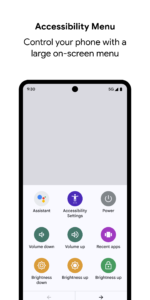
• Accessibility Menu: Use this large on-screen menu to lock your phone, control volume and brightness, take screenshots, and more.
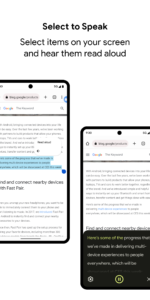
• Select to Speak: Select items on your screen and hear them read aloud.
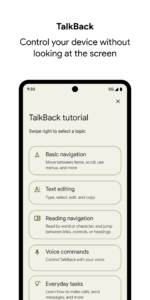
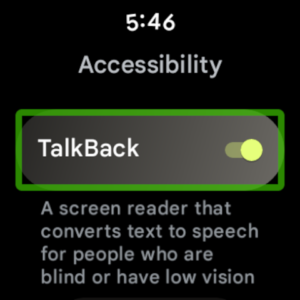
• TalkBack screen reader: Get spoken feedback, control your device with gestures, and type with the on-screen braille keyboard.
To get started:
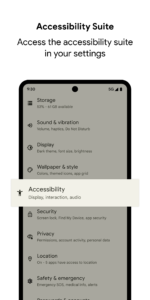
1. Open your device's Settings app.
2. Select Accessibility.
3. Select Accessibility Menu, Select to Speak, or TalkBack.
Android Accessibility Suite requires Android 6 (Android M) or later. To use TalkBack for Wear, you'll need Wear OS 3.0 or later.
Permissions Notice
• Phone: Android Accessibility Suite observes the phone state so it can adapt announcements to your call status.
• Accessibility Service: Because this app is an accessibility service, it can observe your actions, retrieve window content, and observe text that you type.
• Notifications: When you allow this permission, TalkBack can notify you about updates.
Android Accessibility Suite includes:
• Accessibility Menu: Use this large on-screen menu to lock your phone, control volume and brightness, take screenshots, and more.
• Select to Speak: Select items on your screen and hear them read aloud.
• TalkBack screen reader: Get spoken feedback, control your device with gestures, and type with the on-screen braille keyboard.
To get started:
1. Open your device's Settings app.
2. Select Accessibility.
3. Select Accessibility Menu, Select to Speak, or TalkBack.
Android Accessibility Suite requires Android 6 (Android M) or later. To use TalkBack for Wear, you'll need Wear OS 3.0 or later.
Permissions Notice
• Phone: Android Accessibility Suite observes the phone state so it can adapt announcements to your call status.
• Accessibility Service: Because this app is an accessibility service, it can observe your actions, retrieve window content, and observe text that you type.
• Notifications: When you allow this permission, TalkBack can notify you about updates.
Download Android Accessibility Suite APK
Fast, free and safe download.
APK Permissions 25
- android.permission.ACCESS_COARSE_LOCATION
- android.permission.ACCESS_FINE_LOCATION
- android.permission.ACCESS_NETWORK_STATE
- android.permission.ACCESS_NOTIFICATION_POLICY
- android.permission.BLUETOOTH
- android.permission.BLUETOOTH_ADMIN
- android.permission.BLUETOOTH_ADVERTISE
- android.permission.BLUETOOTH_CONNECT
- android.permission.BLUETOOTH_SCAN
- android.permission.CAMERA
- android.permission.CHANGE_COMPONENT_ENABLED_STATE
- android.permission.FOREGROUND_SERVICE
- android.permission.GET_PACKAGE_SIZE
- android.permission.INTERNET
- android.permission.MODIFY_AUDIO_SETTINGS
- android.permission.POST_NOTIFICATIONS
- android.permission.QUERY_ALL_PACKAGES
- android.permission.READ_PHONE_STATE
- android.permission.RECEIVE_BOOT_COMPLETED
- android.permission.RECORD_AUDIO
- android.permission.USE_FINGERPRINT
- android.permission.VIBRATE
- android.permission.WAKE_LOCK
- com.google.android.marvin.talkback.permission.ACCESS_AAS_SWITCH_ACCESS_MIGRATION
- com.google.android.providers.gsf.permission.READ_GSERVICES
APK Verified
The cryptographic signature guarantees that the file is safe to install and was not tampered with in any way.
Similar in Tools


Frequently Asked Questions about Android Accessibility Suite APK
This variant is built for 64-bit ARM (most Android phones made since 2017). If your device's CPU matches, this is the smallest, fastest version to install.
Yes — the APK's signature has been cryptographically verified against the publisher's signing key. The SHA-256 hash is shown in the File Information panel so you can independently confirm the file matches the original release.
Android 26 (API level 35) or newer. Older devices will refuse the install.
Install a free app like 'CPU-Z' or 'Droid Hardware Info' from the Play Store and look at the ABI / Instruction Set row. Most phones made after 2017 are arm64-v8a; if in doubt, download the universal variant.
All variants are functionally identical — same features, same version. They differ only in which CPU architectures the native code is compiled for, and (sometimes) which screen densities the included graphics target. Pick the one that matches your device for the smallest install size, or pick 'Universal' if you're unsure.