
This is the x86_64 build of Android Auto 14.1.651458-release. Intel-architecture builds are useful for Android emulators (BlueStacks, NoxPlayer, Android Studio AVD), Chromebooks running ARC, and the small number of Intel-CPU Android phones. Most physical Android phones should download the ARM variant instead.
File size: 45.0 MB • Min Android: 26 • Target Android: 36 • Version code: 141651458 • Framework: Native (Java/Kotlin) • Permissions: 68
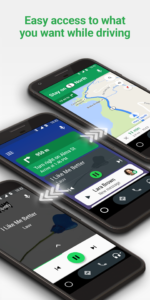
Screenshots
File Information
| Package Name | com.google.android.projection.gearhead |
|---|---|
| Version Name | 14.1.651458-release |
| Version Code | 141651458 |
| Architecture | x86_64 |
| Min Android Version | Android 26 (API 36) |
| Framework | Native (Java/Kotlin) |
| File Size | 45.00 MB |
| Signature (SHA1) | 9CA91F9E704D630EF67A23F52BF1577A92B9CA5D |
| File Hash (SHA256) | b8a7267489da91af44c7112c370d57d389007e0cbb02b253331b9e21eb91990b |
What's New
What's new?
• Bug fixes and other improvements.
• We want to hear from you! Join the conversation in our community
g.co/androidautocommunity
• Bug fixes and other improvements.
• We want to hear from you! Join the conversation in our community
g.co/androidautocommunity
App Description
Android Auto is your smart driving companion that helps you stay focused, connected, and entertained with the Google Assistant. With a simplified interface, large buttons, and powerful voice actions, Android Auto is designed to make it easier to use apps that you love from your phone while you’re on the road.
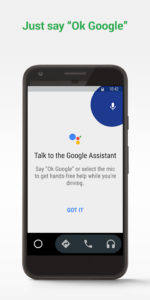
Just say “Ok Google” to...
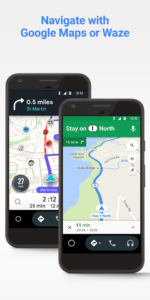
• Route to your next destination using Google Maps or Waze with real-time GPS navigation and traffic alerts.
• Get updates on your route, ETA, and hazards in real-time.
• Have the Google Assistant check your calendar for you so you know where you need to be.
• Set reminders, get updates on the news, and check last night’s score.
• Avoid distractions while driving by setting a custom do not disturb message while driving.
• Make calls using Google Assistant and answer incoming calls with just a tap.
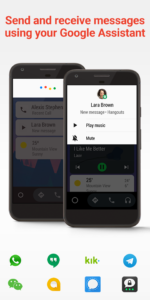
• Access your contacts folder and send and receive messages with the Google Assistant using SMS, Hangouts, WhatsApp, Skype, Telegram, WeChat, Kik, Google Allo, and many more messaging apps.
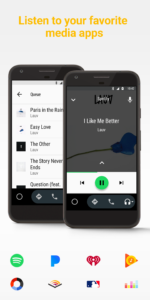
• Manage your infotainment system like never before. Listen to your favorite media apps including Spotify, Pandora, iHeartRadio, Google Play Music, Amazon Music, SiriusXM, TIDAL - High Fidelity Music Streaming, Napster Music, and Deezer. Many more music, radio, news, sports news, audiobook, and podcast apps are also supported.
The number of compatible apps is always growing! For a full list of compatible apps, go to
g.co/androidauto
To use Android Auto, you’ll need a phone running Android 6.0 or higher and an active data connection.
Over 400 car models now support Android Auto! To find out if your car display is compatible and how to enable it, check your owner’s manual or contact your car’s manufacturer. Once enabled, use a high quality USB cable to connect your phone to your car, then launch Android Auto to get going!
Learn more about Android Auto and compatible cars at
android.com/auto
For support:
support.google.com/androidauto
Get help from our community:
productforums.google.com/forum/#!forum/android-auto
Just say “Ok Google” to...
• Route to your next destination using Google Maps or Waze with real-time GPS navigation and traffic alerts.
• Get updates on your route, ETA, and hazards in real-time.
• Have the Google Assistant check your calendar for you so you know where you need to be.
• Set reminders, get updates on the news, and check last night’s score.
• Avoid distractions while driving by setting a custom do not disturb message while driving.
• Make calls using Google Assistant and answer incoming calls with just a tap.
• Access your contacts folder and send and receive messages with the Google Assistant using SMS, Hangouts, WhatsApp, Skype, Telegram, WeChat, Kik, Google Allo, and many more messaging apps.
• Manage your infotainment system like never before. Listen to your favorite media apps including Spotify, Pandora, iHeartRadio, Google Play Music, Amazon Music, SiriusXM, TIDAL - High Fidelity Music Streaming, Napster Music, and Deezer. Many more music, radio, news, sports news, audiobook, and podcast apps are also supported.
The number of compatible apps is always growing! For a full list of compatible apps, go to
g.co/androidauto
To use Android Auto, you’ll need a phone running Android 6.0 or higher and an active data connection.
Over 400 car models now support Android Auto! To find out if your car display is compatible and how to enable it, check your owner’s manual or contact your car’s manufacturer. Once enabled, use a high quality USB cable to connect your phone to your car, then launch Android Auto to get going!
Learn more about Android Auto and compatible cars at
android.com/auto
For support:
support.google.com/androidauto
Get help from our community:
productforums.google.com/forum/#!forum/android-auto
Download Android Auto APK
Fast, free and safe download.
APK Permissions 68
- android.permission.ACCESS_COARSE_LOCATION
- android.permission.ACCESS_FINE_LOCATION
- android.permission.ACCESS_NETWORK_STATE
- android.permission.ACCESS_NOTIFICATION_POLICY
- android.permission.ACCESS_WIFI_STATE
- android.permission.ACTIVITY_EMBEDDING
- android.permission.ADD_ALWAYS_UNLOCKED_DISPLAY
- android.permission.ADD_TRUSTED_DISPLAY
- android.permission.ASSOCIATE_COMPANION_DEVICES
- android.permission.BLUETOOTH
- android.permission.BLUETOOTH_ADMIN
- android.permission.BLUETOOTH_CONNECT
- android.permission.BLUETOOTH_PRIVILEGED
- android.permission.BLUETOOTH_SCAN
- android.permission.CALL_PHONE
- android.permission.CALL_PRIVILEGED
- android.permission.CAPTURE_SECURE_VIDEO_OUTPUT
- android.permission.CHANGE_COMPONENT_ENABLED_STATE
- android.permission.CHANGE_NETWORK_STATE
- android.permission.CHANGE_WIFI_STATE
- android.permission.COMPANION_APPROVE_WIFI_CONNECTIONS
- android.permission.CONTROL_INCALL_EXPERIENCE
- android.permission.CREATE_VIRTUAL_DEVICE
- android.permission.DUMP
- android.permission.ENTER_CAR_MODE_PRIORITIZED
- android.permission.FOREGROUND_SERVICE
- android.permission.FOREGROUND_SERVICE_CONNECTED_DEVICE
- android.permission.FOREGROUND_SERVICE_LOCATION
- android.permission.FOREGROUND_SERVICE_MICROPHONE
- android.permission.INTERACT_ACROSS_PROFILES
- android.permission.INTERNET
- android.permission.LOCAL_MAC_ADDRESS
- android.permission.LOCATION_HARDWARE
- android.permission.MANAGE_EXTERNAL_STORAGE
- android.permission.MANAGE_USB
- android.permission.MODIFY_AUDIO_ROUTING
- android.permission.MODIFY_DAY_NIGHT_MODE
- android.permission.MODIFY_PHONE_STATE
- android.permission.NEARBY_WIFI_DEVICES
- android.permission.POST_NOTIFICATIONS
- android.permission.QUERY_ALL_PACKAGES
- android.permission.READ_CALENDAR
- android.permission.READ_CALL_LOG
- android.permission.READ_CONTACTS
- android.permission.READ_PHONE_STATE
- android.permission.READ_PRIVILEGED_PHONE_STATE
- android.permission.RECEIVE_BOOT_COMPLETED
- android.permission.RECEIVE_SENSITIVE_NOTIFICATIONS
- android.permission.RECEIVE_SMS
- android.permission.RECORD_AUDIO
- android.permission.REQUEST_COMPANION_PROFILE_AUTOMOTIVE_PROJECTION
- android.permission.REQUEST_COMPANION_SELF_MANAGED
- android.permission.REQUEST_OBSERVE_COMPANION_DEVICE_PRESENCE
- android.permission.SEND_SMS
- android.permission.START_ACTIVITIES_FROM_BACKGROUND
- android.permission.SYSTEM_ALERT_WINDOW
- android.permission.TOGGLE_AUTOMOTIVE_PROJECTION
- android.permission.UPDATE_APP_OPS_STATS
- android.permission.VIBRATE
- android.permission.WAKE_LOCK
- android.permission.WRITE_SETTINGS
- androidx.car.app.ACCESS_SURFACE
- androidx.car.app.NAVIGATION_TEMPLATES
- com.google.android.finsky.permission.GEARHEAD_SERVICE
- com.google.android.gms.permission.CAR_SPEED
- com.google.android.projection.gearhead.DYNAMIC_RECEIVER_NOT_EXPORTED_PERMISSION
- com.google.android.projection.gearhead.permission.START_PROJECTED_ACTIVITY
- com.google.android.providers.gsf.permission.READ_GSERVICES
APK Verified
The cryptographic signature guarantees that the file is safe to install and was not tampered with in any way.
Other Variants
This release has multiple variants (e.g. diff architectures).
arm64-v8a arm64-v8a arm64-v8a arm64-v8a armeabi-v7a x86Similar in Auto & Vehicles


More by Google LLC


Frequently Asked Questions about Android Auto APK
This variant is built for 64-bit Intel (Android emulators, Chromebooks). If your device's CPU matches, this is the smallest, fastest version to install.
Yes — the APK's signature has been cryptographically verified against the publisher's signing key. The SHA-256 hash is shown in the File Information panel so you can independently confirm the file matches the original release.
Android 26 (API level 36) or newer. Older devices will refuse the install.
Install a free app like 'CPU-Z' or 'Droid Hardware Info' from the Play Store and look at the ABI / Instruction Set row. Most phones made after 2017 are arm64-v8a; if in doubt, download the universal variant.
All variants are functionally identical — same features, same version. They differ only in which CPU architectures the native code is compiled for, and (sometimes) which screen densities the included graphics target. Pick the one that matches your device for the smallest install size, or pick 'Universal' if you're unsure.