
Download Google Gemini on Wear OS APK 1.22.5.806441467.release armeabi-v7a · Android 30+
Download APK
Verified Safe
This is the armeabi-v7a build of Google Gemini on Wear OS 1.22.5.806441467.release, compiled for 32-bit ARM processors found in older Android phones (roughly 2013-2017). Use this build if your device's primary ABI is armeabi-v7a — modern 64-bit phones should pick the arm64-v8a or universal variant for better performance.
File size: 33.1 MB • Min Android: 30 • Target Android: 33 • Version code: 311035288 • Framework: Native (Java/Kotlin) • Permissions: 71
Screenshots
File Information
| Package Name | com.google.android.wearable.assistant |
|---|---|
| Version Name | 1.22.5.806441467.release |
| Version Code | 311035288 |
| Architecture | armeabi-v7a |
| Min Android Version | Android 30 (API 33) |
| Main Activity | com.google.android.wearable.assistant.ClassicAssistantActivity |
| Framework | Native (Java/Kotlin) |
| File Size | 33.07 MB |
| Signature (SHA1) | 18272FBE0E3A02A587759E5F9BDE45CA72C41841 |
| File Hash (SHA256) | 9641f667ad74edd0467bfc5a5d1daa3ef56295e0355f76f00ca24d9628e7d88f |
App Description
Google Gemini on Wear OS – your helpful AI assistant on your wrist
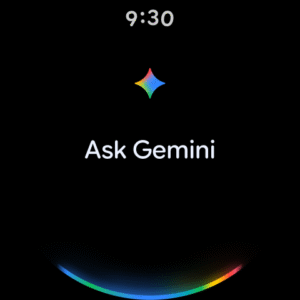
Gemini on Wear OS is our truly helpful AI assistant on your watch. Just speak naturally to get more done while you're on the go. Gemini can handle tasks across apps, answer questions and recall important details for you.
Try asking Gemini to:
Stay connected: 'Send a message to Nadia telling her sorry I'm late'
Get info: 'Where's the restaurant Emily emailed about for dinner tonight?'
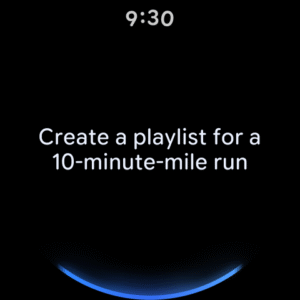
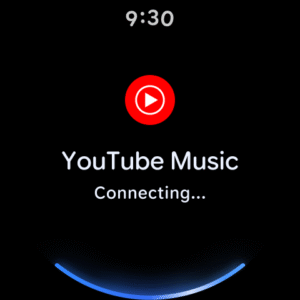
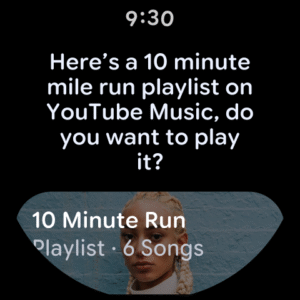
Control music: 'Create a playlist for a 10-minute-mile run'
Remember details: 'Remember I parked on level 2, space 403'
Gemini app available on selected devices, languages and countries. Requires compatible Wear OS watch to be connected to a compatible device. Check responses for accuracy. Internet connection and setup may be required. Results are for illustrative purposes and may vary.
Create responsibly:
policies.google.com/terms/generative-ai/use-policy
See the full list of supported languages and countries here:
support.google.com/?p=gemini_app_requirements_android
If you opt in to the Gemini app, it will replace your Google Assistant as the primary assistant on your watch. Some Google Assistant voice features aren't available through the Gemini app yet. You can switch back to Google Assistant in Settings.
Gemini on Wear OS is our truly helpful AI assistant on your watch. Just speak naturally to get more done while you're on the go. Gemini can handle tasks across apps, answer questions and recall important details for you.
Try asking Gemini to:
Stay connected: 'Send a message to Nadia telling her sorry I'm late'
Get info: 'Where's the restaurant Emily emailed about for dinner tonight?'
Control music: 'Create a playlist for a 10-minute-mile run'
Remember details: 'Remember I parked on level 2, space 403'
Gemini app available on selected devices, languages and countries. Requires compatible Wear OS watch to be connected to a compatible device. Check responses for accuracy. Internet connection and setup may be required. Results are for illustrative purposes and may vary.
Create responsibly:
policies.google.com/terms/generative-ai/use-policy
See the full list of supported languages and countries here:
support.google.com/?p=gemini_app_requirements_android
If you opt in to the Gemini app, it will replace your Google Assistant as the primary assistant on your watch. Some Google Assistant voice features aren't available through the Gemini app yet. You can switch back to Google Assistant in Settings.
Download Google Gemini on Wear OS APK
Fast, free and safe download.
APK Permissions 71
- android.permission.ACCESS_BACKGROUND_LOCATION
- android.permission.ACCESS_COARSE_LOCATION
- android.permission.ACCESS_FINE_LOCATION
- android.permission.ACCESS_NETWORK_STATE
- android.permission.ACCESS_WIFI_STATE
- android.permission.BLUETOOTH
- android.permission.BLUETOOTH_ADMIN
- android.permission.BLUETOOTH_ADVERTISE
- android.permission.BLUETOOTH_CONNECT
- android.permission.BLUETOOTH_SCAN
- android.permission.CALL_PHONE
- android.permission.CALL_PRIVILEGED
- android.permission.CAPTURE_AUDIO_HOTWORD
- android.permission.DOWNLOAD_WITHOUT_NOTIFICATION
- android.permission.EXECUTE_APP_FUNCTIONS
- android.permission.FOREGROUND_SERVICE
- android.permission.GET_ACCOUNTS
- android.permission.GET_ACCOUNTS_PRIVILEGED
- android.permission.GET_PACKAGE_SIZE
- android.permission.INTERNET
- android.permission.LOCAL_MAC_ADDRESS
- android.permission.MANAGE_SOUND_TRIGGER
- android.permission.MANAGE_VOICE_KEYPHRASES
- android.permission.MEDIA_CONTENT_CONTROL
- android.permission.MODIFY_AUDIO_ROUTING
- android.permission.MODIFY_AUDIO_SETTINGS
- android.permission.POST_NOTIFICATIONS
- android.permission.QUERY_ALL_PACKAGES
- android.permission.READ_CALENDAR
- android.permission.READ_CONTACTS
- android.permission.READ_EXTERNAL_STORAGE
- android.permission.READ_PHONE_STATE
- android.permission.READ_SMS
- android.permission.RECEIVE_BOOT_COMPLETED
- android.permission.RECORD_AUDIO
- android.permission.SCHEDULE_EXACT_ALARM
- android.permission.SEND_SMS
- android.permission.START_ACTIVITIES_FROM_BACKGROUND
- android.permission.STOP_APP_SWITCHES
- android.permission.SUBSCRIBE_TO_KEYGUARD_LOCKED_STATE
- android.permission.VIBRATE
- android.permission.WAKE_LOCK
- android.permission.WRITE_EXTERNAL_STORAGE
- android.permission.WRITE_SECURE_SETTINGS
- android.permission.WRITE_SETTINGS
- com.android.alarm.permission.SET_ALARM
- com.android.setupwizard.permission.PAIRED_PHONE_CHANGED
- com.google.android.apps.gsa.binaries.clockwork.migration.READ_ASSISTANT_MIGRATION
- com.google.android.clockwork.settings.END_WET_MODE
- com.google.android.permission.TAKE_WEARABLE_BUGREPORT
- com.google.android.providers.gsf.permission.READ_GSERVICES
- com.google.android.wearable.deskclock.permission.MUTATE_TIMER
- com.google.android.wearable.deskclock.permission.REMOVE_ALARM
- com.google.android.wearable.deskclock.READ_PERMISSION
- com.google.android.wearable.READ_SETTINGS
- com.google.android.wearable.WRITE_SETTINGS
- com.google.pixelwatch.permission.READ_PRIVATE_SENSORS
- com.google.wear.permission.READ_BATTERY_SAVER
- com.google.wear.permission.READ_DISPLAY_CONFIG
- com.google.wear.permission.READ_FOCUS_MODES
- com.google.wear.permission.READ_TOUCH_LOCK
- com.google.wear.permission.SET_COMPLICATION_APP_LABEL
- com.google.wear.permission.WRITE_BATTERY_SAVER
- com.google.wear.permission.WRITE_DISPLAY_CONFIG
- com.google.wear.permission.WRITE_FOCUS_MODES
- com.google.wear.permission.WRITE_TOUCH_LOCK
- com.samsung.android.watch.alarm.permission.EDIT_ALARM
- com.samsung.android.watch.alarm.permission.READ_ALARM
- com.samsung.android.watch.timer.permission.EDIT_TIMER
- com.samsung.android.watch.timer.permission.READ_TIMER
- Settings.System.SCREEN_BRIGHTNESS_MODE
APK Verified
The cryptographic signature guarantees that the file is safe to install and was not tampered with in any way.
Similar in Tools


Frequently Asked Questions about Google Gemini on Wear OS APK
This variant is built for 32-bit ARM (older Android phones, ~2013–2017). If your device's CPU matches, this is the smallest, fastest version to install.
Yes — the APK's signature has been cryptographically verified against the publisher's signing key. The SHA-256 hash is shown in the File Information panel so you can independently confirm the file matches the original release.
Android 30 (API level 33) or newer. Older devices will refuse the install.
Install a free app like 'CPU-Z' or 'Droid Hardware Info' from the Play Store and look at the ABI / Instruction Set row. Most phones made after 2017 are arm64-v8a; if in doubt, download the universal variant.
All variants are functionally identical — same features, same version. They differ only in which CPU architectures the native code is compiled for, and (sometimes) which screen densities the included graphics target. Pick the one that matches your device for the smallest install size, or pick 'Universal' if you're unsure.