
Screenshots
File Information
| Package Name | com.google.android.apps.docs.editors.docs |
|---|---|
| Version Name | 1.25.052.01.90 |
| Version Code | 220638358 |
| Architecture | Universal |
| Min Android Version | Android 26 (API 35) |
| Main Activity | com.google.android.apps.docs.app.NewMainProxyActivity |
| Framework | Native (Java/Kotlin) |
| File Size | 75.50 MB |
| Signature (SHA1) | 24BB24C05E47E0AEFA68A58A766179D9B613A600 |
| File Hash (SHA256) | 4fa06d33409a304576c961b3bf8c407c9ee1ca377decb60a2505fab9ff1457c5 |
What's New
* Bug fixes and performance improvements
App Description
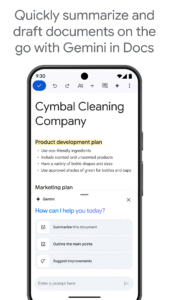
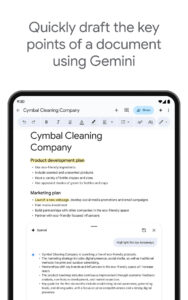
Create, edit, and collaborate with others on documents from your Android phone or tablet with the Google Docs app. With Docs you can:
- Create new documents or edit existing files
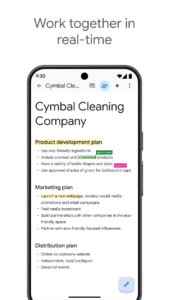
- Share documents and collaborate in the same document at the same time.
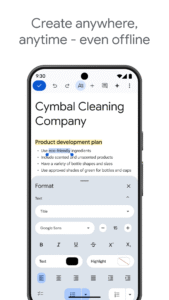
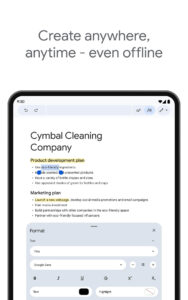
- Work anywhere, anytime - even offline
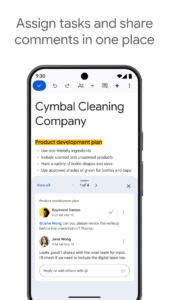
- Add and respond to comments.
- Never worry about losing your work – everything is saved automatically as you type.
- Search the web and your files in Drive, right from Docs
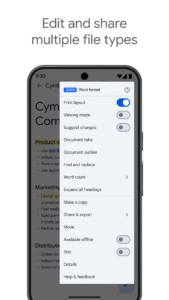
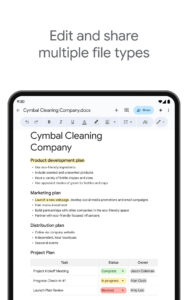
- Open, edit, and save Word documents and PDFs.
Google Docs is part of Google Workspace: where teams of any size can chat, create, and collaborate.
Google Workspace subscribers have access to additional Google Docs features, including:
- Working in a single document with teammates or people outside your company. See edits as others type, communicate through built-in chat, and leave feedback through comments and suggestions
- Importing your documents to make them instantly editable, including Microsoft® Word and PDF files. Export your work in .docx, .pdf, .odt, .rtf, .txt or .html format
- Unlimited version history. Track changes made to your documents and undo anything you choose.
- Working across devices, with or without Internet
Learn more about Google Workspace:
workspace.google.com/products/docs/
Follow us for more:
Twitter:
twitter.com/googleworkspace
Linkedin:
www.linkedin.com/showcase/googleworkspace
Facebook:
www.facebook.com/googleworkspace/
.
- Create new documents or edit existing files
- Share documents and collaborate in the same document at the same time.
- Work anywhere, anytime - even offline
- Add and respond to comments.
- Never worry about losing your work – everything is saved automatically as you type.
- Search the web and your files in Drive, right from Docs
- Open, edit, and save Word documents and PDFs.
Google Docs is part of Google Workspace: where teams of any size can chat, create, and collaborate.
Google Workspace subscribers have access to additional Google Docs features, including:
- Working in a single document with teammates or people outside your company. See edits as others type, communicate through built-in chat, and leave feedback through comments and suggestions
- Importing your documents to make them instantly editable, including Microsoft® Word and PDF files. Export your work in .docx, .pdf, .odt, .rtf, .txt or .html format
- Unlimited version history. Track changes made to your documents and undo anything you choose.
- Working across devices, with or without Internet
Learn more about Google Workspace:
workspace.google.com/products/docs/
Follow us for more:
Twitter:
twitter.com/googleworkspace
Linkedin:
www.linkedin.com/showcase/googleworkspace
Facebook:
www.facebook.com/googleworkspace/
.
Download Google Docs APK
Fast, free and safe download.
APK Permissions 33
- android.permission.ACCESS_NETWORK_STATE
- android.permission.ACCESS_WIFI_STATE
- android.permission.FOREGROUND_SERVICE
- android.permission.FOREGROUND_SERVICE_DATA_SYNC
- android.permission.GET_ACCOUNTS
- android.permission.GET_PACKAGE_SIZE
- android.permission.INTERNET
- android.permission.MANAGE_ACCOUNTS
- android.permission.POST_NOTIFICATIONS
- android.permission.READ_CONTACTS
- android.permission.READ_SYNC_SETTINGS
- android.permission.READ_SYNC_STATS
- android.permission.RECEIVE_BOOT_COMPLETED
- android.permission.RUN_USER_INITIATED_JOBS
- android.permission.SUBSCRIBED_FEEDS_READ
- android.permission.SUBSCRIBED_FEEDS_WRITE
- android.permission.USE_CREDENTIALS
- android.permission.VIBRATE
- android.permission.WAKE_LOCK
- android.permission.WRITE_EXTERNAL_STORAGE
- android.permission.WRITE_SYNC_SETTINGS
- com.android.launcher.permission.INSTALL_SHORTCUT
- com.google.android.apps.docs.editors.docs.DYNAMIC_RECEIVER_NOT_EXPORTED_PERMISSION
- com.google.android.apps.docs.editors.kix.permission.READ_MY_DATA
- com.google.android.apps.docs.editors.kix.permission.SYNC_STATUS
- com.google.android.apps.docs.editors.kix.permission.WRITE_IMAGES
- com.google.android.gm.permission.READ_GMAIL
- com.google.android.googleapps.permission.GOOGLE_AUTH
- com.google.android.googleapps.permission.GOOGLE_AUTH.ALL_SERVICES
- com.google.android.googleapps.permission.GOOGLE_AUTH.OTHER_SERVICES
- com.google.android.googleapps.permission.GOOGLE_AUTH.wise
- com.google.android.googleapps.permission.GOOGLE_AUTH.writely
- com.google.android.providers.gsf.permission.READ_GSERVICES
APK Verified
The cryptographic signature guarantees that the file is safe to install and was not tampered with in any way.


