
Download Google Assistant Go APK 2.18.0.769468747.arm64-v8a.31release arm64-v8a · Android 31+
Download APK
Verified Safe
This is the arm64-v8a build of Google Assistant Go 2.18.0.769468747.arm64-v8a.31release — the modern 64-bit ARM build that runs on virtually every Android phone released since 2017. It's smaller and faster than the universal variant because Android only loads the native code your CPU actually needs. If your phone is from the last 8 years, this is the right pick.
File size: 16.5 MB • Min Android: 31 • Target Android: 35 • Version code: 40199 • Framework: Native (Java/Kotlin) • Permissions: 23
Screenshots
File Information
| Package Name | com.google.android.apps.assistant |
|---|---|
| Version Name | 2.18.0.769468747.arm64-v8a.31release |
| Version Code | 40199 |
| Architecture | arm64-v8a |
| Min Android Version | Android 31 (API 35) |
| Main Activity | com.google.android.apps.assistant.go.MainActivity |
| Framework | Native (Java/Kotlin) |
| File Size | 16.53 MB |
| Signature (SHA1) | B1D55E65E686727FA9561F08DE829C80DE07FBCE |
| File Hash (SHA256) | d2408f2c32265467ef8c3c6aa67b478222691987e9a8396bbb029a005dd4f506 |
What's New
• General bug fixes and improvements.
App Description
Lightweight and fast, yet still packed with your favorite features, the Google Assistant is now available on Android (Go edition).
Use your voice to get directions to the nearest coffee shop, make calls hands free during your commute, and unwind by playing your favorite tunes. You personal Google is here to help. Ask your Google Assistant questions and get things done. Use it anytime, anywhere.
With the Google Assistant Go, you can:
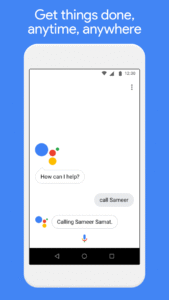
• Make quick phone calls on the go (“Call Sameer”)
• Send text messages (“Text Sara I am running late”)
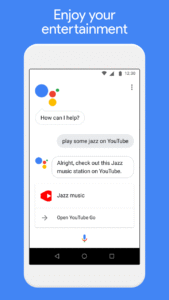
• Play music (“Play some jazz on YouTube”)
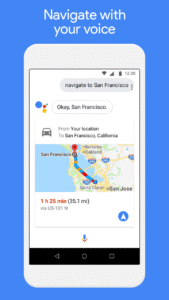
• Navigate places (“Get me directions to the nearest coffee shop”)
• Preview your upcoming events (“Tell me about my day”)
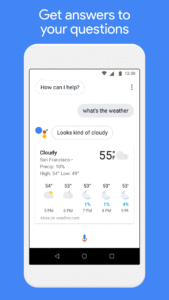
• Weather information (“Do I need an umbrella today?”)
• Answers (“How tall is Mount Everest?”)
* You can quickly access the Google Assistant for Android (Go edition) by tapping on the Assistant app icon or long-pressing the home button on your phone running Android (Go edition).
* Certain features available on the Google Assistant for standard Android phones are currently not supported on the Google Assistant for Android (Go edition), such as reminders, controls for smart home devices, Actions on Google, and Device Actions.
* The Google Assistant for Android (Go edition) currently supports English.
Use your voice to get directions to the nearest coffee shop, make calls hands free during your commute, and unwind by playing your favorite tunes. You personal Google is here to help. Ask your Google Assistant questions and get things done. Use it anytime, anywhere.
With the Google Assistant Go, you can:
• Make quick phone calls on the go (“Call Sameer”)
• Send text messages (“Text Sara I am running late”)
• Play music (“Play some jazz on YouTube”)
• Navigate places (“Get me directions to the nearest coffee shop”)
• Preview your upcoming events (“Tell me about my day”)
• Weather information (“Do I need an umbrella today?”)
• Answers (“How tall is Mount Everest?”)
* You can quickly access the Google Assistant for Android (Go edition) by tapping on the Assistant app icon or long-pressing the home button on your phone running Android (Go edition).
* Certain features available on the Google Assistant for standard Android phones are currently not supported on the Google Assistant for Android (Go edition), such as reminders, controls for smart home devices, Actions on Google, and Device Actions.
* The Google Assistant for Android (Go edition) currently supports English.
Download Google Assistant Go APK
Fast, free and safe download.
APK Permissions 23
- android.permission.ACCESS_NETWORK_STATE
- android.permission.ACCESS_WIFI_STATE
- android.permission.BLUETOOTH
- android.permission.BLUETOOTH_ADMIN
- android.permission.BLUETOOTH_CONNECT
- android.permission.BLUETOOTH_SCAN
- android.permission.CALL_PHONE
- android.permission.CALL_PRIVILEGED
- android.permission.CHANGE_WIFI_STATE
- android.permission.FOREGROUND_SERVICE
- android.permission.GET_ACCOUNTS
- android.permission.GET_PACKAGE_SIZE
- android.permission.INTERNET
- android.permission.MEDIA_CONTENT_CONTROL
- android.permission.READ_CONTACTS
- android.permission.READ_PHONE_STATE
- android.permission.RECEIVE_BOOT_COMPLETED
- android.permission.RECORD_AUDIO
- android.permission.WAKE_LOCK
- com.android.alarm.permission.SET_ALARM
- com.google.android.c2dm.permission.RECEIVE
- com.google.android.providers.gsf.permission.READ_GSERVICES
- com.google.android.providers.gsf.permission.WRITE_GSERVICES
APK Verified
The cryptographic signature guarantees that the file is safe to install and was not tampered with in any way.
Other Variants
This release has multiple variants (e.g. diff architectures).
arm64-v8a armeabi-v7a armeabi-v7aSimilar in Tools


Frequently Asked Questions about Google Assistant Go APK
This variant is built for 64-bit ARM (most Android phones made since 2017). If your device's CPU matches, this is the smallest, fastest version to install.
Yes — the APK's signature has been cryptographically verified against the publisher's signing key. The SHA-256 hash is shown in the File Information panel so you can independently confirm the file matches the original release.
Android 31 (API level 35) or newer. Older devices will refuse the install.
Install a free app like 'CPU-Z' or 'Droid Hardware Info' from the Play Store and look at the ABI / Instruction Set row. Most phones made after 2017 are arm64-v8a; if in doubt, download the universal variant.
All variants are functionally identical — same features, same version. They differ only in which CPU architectures the native code is compiled for, and (sometimes) which screen densities the included graphics target. Pick the one that matches your device for the smallest install size, or pick 'Universal' if you're unsure.