
Screenshots


File Information
| Package Name | com.google.android.apps.automotive.inputmethod |
|---|---|
| Version Name | 25.42.03 |
| Version Code | 24251954 |
| Architecture | arm64-v8a |
| Min Android Version | Android 29 (API 34) |
| Framework | Native (Java/Kotlin) |
| File Size | 68.28 MB |
| Signature (SHA1) | 9C94132D362167D5623C17B5C0322B5651F364B3 |
| File Hash (SHA256) | c9257044cfb81ac60c860931eed9b896eb4bd3e69b608ea650134e686c1484d8 |
What's New
• Improvements to the keyboard latency and startup-time
• Enables keyboard borders for tablets
• Adds support for next word prediction and spelling correction for handwriting keyboards for faster typing. (En-US only)
• Adds support for handwriting layout for Tibetan
• Download the beta version to give feedback on upcoming improvements
goo.gl/8Ksj7x
• Enables keyboard borders for tablets
• Adds support for next word prediction and spelling correction for handwriting keyboards for faster typing. (En-US only)
• Adds support for handwriting layout for Tibetan
• Download the beta version to give feedback on upcoming improvements
goo.gl/8Ksj7x
App Description
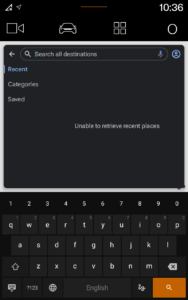
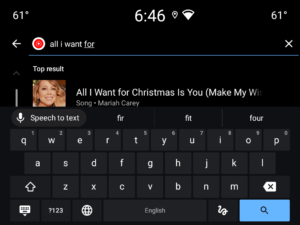
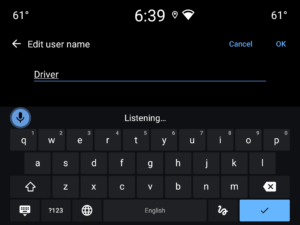
Google Automotive Keyboard has everything you love about Google Keyboard: Speed, Reliability, Glide Typing, Voice Typing, Handwriting, and more
Voice typing
— Easily dictate text on the go
Glide Typing
— Type faster by sliding your finger from letter to letter
Handwriting
— Write in cursive and printed letters
Language support including:
Arabic, Chinese, Czech, Dutch, English, French, German, Greek, Indonesian, Italian, Japanese, Norwegian, Polish, Portuguese, Romanian, Russian, Spanish, Swedish, Thai, Turkish, Ukrainian, and
many more
!
Pro tips:
•
Cursor movement:
Slide your finger across the space bar to move the cursor
•
Adding a language:
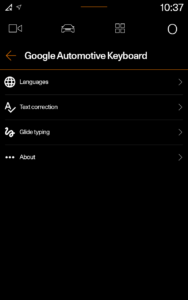
1. Go to Settings → System → Languages & input → Keyboard → Google Automotive Keyboard
2. Select a language to add. A globe icon will appear on the keyboard
•
Switching languages:
Tap the globe icon to switch between enabled languages
•
Viewing all languages
Long-press the globe icon to view a list of all languages enabled on the keyboard
Voice typing
— Easily dictate text on the go
Glide Typing
— Type faster by sliding your finger from letter to letter
Handwriting
— Write in cursive and printed letters
Language support including:
Arabic, Chinese, Czech, Dutch, English, French, German, Greek, Indonesian, Italian, Japanese, Norwegian, Polish, Portuguese, Romanian, Russian, Spanish, Swedish, Thai, Turkish, Ukrainian, and
many more
!
Pro tips:
•
Cursor movement:
Slide your finger across the space bar to move the cursor
•
Adding a language:
1. Go to Settings → System → Languages & input → Keyboard → Google Automotive Keyboard
2. Select a language to add. A globe icon will appear on the keyboard
•
Switching languages:
Tap the globe icon to switch between enabled languages
•
Viewing all languages
Long-press the globe icon to view a list of all languages enabled on the keyboard
Download Google Automotive Keyboard (Android Automotive) APK
Fast, free and safe download.
APK Permissions 9
- android.permission.ACCESS_NETWORK_STATE
- android.permission.ACCESS_WIFI_STATE
- android.permission.FOREGROUND_SERVICE
- android.permission.INTERNET
- android.permission.READ_USER_DICTIONARY
- android.permission.RECEIVE_BOOT_COMPLETED
- android.permission.RECORD_AUDIO
- android.permission.WRITE_USER_DICTIONARY
- com.android.car.ui.READ_SEARCH_RESULTS
APK Verified
The cryptographic signature guarantees that the file is safe to install and was not tampered with in any way.


