
Download Google Family Link APK 2.47.0.Y.733300206 Universal · Android 21+
Download APK
Verified Safe
This is the universal build of Google Family Link 2.47.0.Y.733300206. It contains native libraries for every CPU architecture (arm64-v8a, armeabi-v7a, x86, x86_64), so it installs on any Android device. The trade-off is size — it's larger than per-architecture variants. Pick this one if you're unsure which CPU your phone has, or if you plan to share the APK with multiple devices.
File size: 50.6 MB • Min Android: 21 • Target Android: 35 • Version code: 817701 • Framework: Native (Java/Kotlin) • Permissions: 17
Screenshots
File Information
| Package Name | com.google.android.apps.kids.familylink |
|---|---|
| Version Name | 2.47.0.Y.733300206 |
| Version Code | 817701 |
| Architecture | Universal |
| Min Android Version | Android 21 (API 35) |
| Main Activity | com.google.android.apps.kids.familylink.flutter.standalone.HomeActivity |
| Framework | Native (Java/Kotlin) |
| File Size | 50.62 MB |
| Signature (SHA1) | 88652B8464743E5CE80DA0D4B890D13F9B1873DF |
| File Hash (SHA256) | 3778a17b405133a5ef9f5bb929d9a5da6dfd44b987be20ba4917b8635ffd5c91 |
What's New
Several stability improvements and bug fixes.
App Description
Google Family Link is a parental controls app that helps you keep your family safer online. We know that every family’s relationship with technology is unique, so we designed tools like Family Link that give you the flexibility to choose the right balance for your family, and help them create healthy digital habits. Family Link’s easy to use tools allow you to understand how your child is spending time on their device, see their device location, manage privacy settings, and more.
With Family Link, you can:
Establish Digital Ground Rules
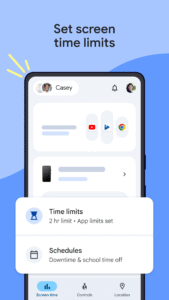
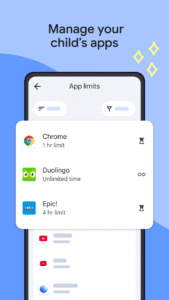
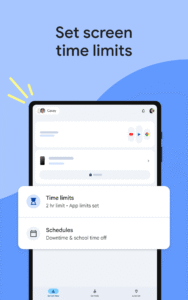
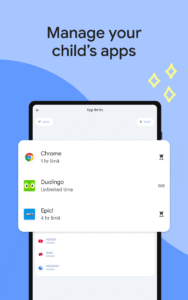
• Set screen time limits — Family Link lets you set downtime for your child’s device and time limits for apps, so you can help them find a healthy balance.
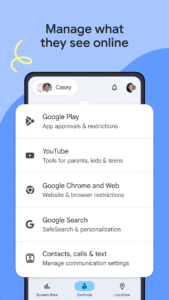
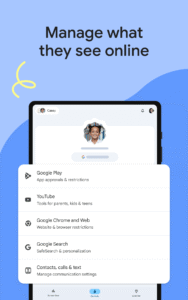
• Guide them to age-appropriate content — Approve or block apps your child wants to download. Family Link also allows you to choose the right YouTube experience for your child: a supervised experience on YouTube, or YouTube Kids.
Manage and secure your child’s account
• Protect their privacy — Permissions management in Family Link allow you to make meaningful choices about your child’s data. View and manage permissions for websites and extensions accessed through Chrome as well as apps downloaded on your child’s device.
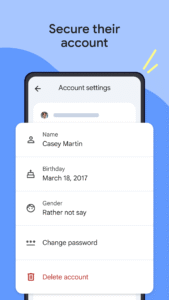
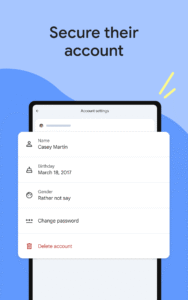
• Secure their account — Family Link gives you access to manage your child's account and data settings. As a parent, you can help change or reset your child’s password if they forget it, edit their personal information or even delete their account if you feel necessary.
Stay connected on the go
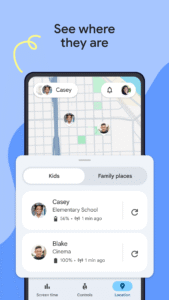
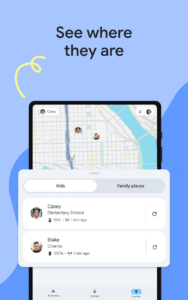
• See where they are — It’s helpful to be able to find your family when they’re on the go. With Family Link, you can locate your children on one map, as long as they’re carrying their device.
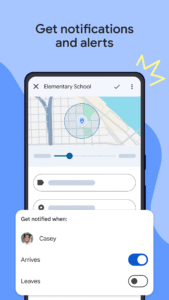
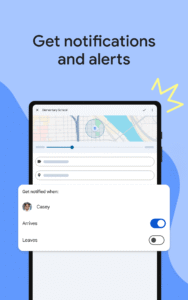
• Get notifications and alerts — Family Link delivers critical notifications including when your child arrives or leaves a certain location. You can also ring devices and view the device’s remaining battery life.
Important Information
• Family Link’s tools vary depending on your child’s device. See a list of compatible devices at
families.google/familylink/device-compatibility/
• While Family Link helps you manage your child's purchases and downloads from Google Play, they will not need approval to install app updates (including updates that expand permissions), apps you have previously approved, or apps that have been shared in Family Library. In addition, purchase approvals will apply only when your child makes a purchase through Google Play’s billing system and will not apply to purchases made through alternate billing systems. Parents should regularly review their child’s installed apps and app permissions in Family Link.
• You should carefully review the apps on your child’s supervised device and disable those you don’t want them to use. Note that you may not be able to disable some pre-installed apps such as Play, Google, etc.
• To see the location of your child or teen’s device, the device must be powered on, recently active, and connected to the internet through data or wifi.
• Family Link parental controls are only available for supervised Google accounts. With supervised Google Accounts, children get access to Google products like Search, Chrome, and Gmail, and parents can set up basic digital ground rules to supervise them.
• While Family Link provides tools to manage your child’s online experience and keep them safer online, it does not make the internet safe. Family Link can not determine the content on the internet, but it can give parents the opportunity to make decisions about how their child spends time on their device, and determine what path to online safety looks best for your family.
With Family Link, you can:
Establish Digital Ground Rules
• Set screen time limits — Family Link lets you set downtime for your child’s device and time limits for apps, so you can help them find a healthy balance.
• Guide them to age-appropriate content — Approve or block apps your child wants to download. Family Link also allows you to choose the right YouTube experience for your child: a supervised experience on YouTube, or YouTube Kids.
Manage and secure your child’s account
• Protect their privacy — Permissions management in Family Link allow you to make meaningful choices about your child’s data. View and manage permissions for websites and extensions accessed through Chrome as well as apps downloaded on your child’s device.
• Secure their account — Family Link gives you access to manage your child's account and data settings. As a parent, you can help change or reset your child’s password if they forget it, edit their personal information or even delete their account if you feel necessary.
Stay connected on the go
• See where they are — It’s helpful to be able to find your family when they’re on the go. With Family Link, you can locate your children on one map, as long as they’re carrying their device.
• Get notifications and alerts — Family Link delivers critical notifications including when your child arrives or leaves a certain location. You can also ring devices and view the device’s remaining battery life.
Important Information
• Family Link’s tools vary depending on your child’s device. See a list of compatible devices at
families.google/familylink/device-compatibility/
• While Family Link helps you manage your child's purchases and downloads from Google Play, they will not need approval to install app updates (including updates that expand permissions), apps you have previously approved, or apps that have been shared in Family Library. In addition, purchase approvals will apply only when your child makes a purchase through Google Play’s billing system and will not apply to purchases made through alternate billing systems. Parents should regularly review their child’s installed apps and app permissions in Family Link.
• You should carefully review the apps on your child’s supervised device and disable those you don’t want them to use. Note that you may not be able to disable some pre-installed apps such as Play, Google, etc.
• To see the location of your child or teen’s device, the device must be powered on, recently active, and connected to the internet through data or wifi.
• Family Link parental controls are only available for supervised Google accounts. With supervised Google Accounts, children get access to Google products like Search, Chrome, and Gmail, and parents can set up basic digital ground rules to supervise them.
• While Family Link provides tools to manage your child’s online experience and keep them safer online, it does not make the internet safe. Family Link can not determine the content on the internet, but it can give parents the opportunity to make decisions about how their child spends time on their device, and determine what path to online safety looks best for your family.
Download Google Family Link APK
Fast, free and safe download.
APK Permissions 17
- android.permission.ACCESS_NETWORK_STATE
- android.permission.GET_ACCOUNTS
- android.permission.GET_PACKAGE_SIZE
- android.permission.INTERNET
- android.permission.MANAGE_ACCOUNTS
- android.permission.POST_NOTIFICATIONS
- android.permission.READ_CONTACTS
- android.permission.READ_EXTERNAL_STORAGE
- android.permission.READ_MEDIA_IMAGES
- android.permission.RECEIVE_BOOT_COMPLETED
- android.permission.USE_CREDENTIALS
- android.permission.WAKE_LOCK
- com.google.android.apps.kids.familylink.DYNAMIC_RECEIVER_NOT_EXPORTED_PERMISSION
- com.google.android.apps.kids.familylink.permission.C2D_MESSAGE
- com.google.android.c2dm.permission.RECEIVE
- com.google.android.finsky.permission.BIND_GET_INSTALL_REFERRER_SERVICE
- com.google.android.providers.gsf.permission.READ_GSERVICES
APK Verified
The cryptographic signature guarantees that the file is safe to install and was not tampered with in any way.
Similar in Tools


Frequently Asked Questions about Google Family Link APK
This is the universal variant — a single APK that contains native libraries for every CPU architecture. It installs on any Android device but is larger than per-architecture variants.
Yes — the APK's signature has been cryptographically verified against the publisher's signing key. The SHA-256 hash is shown in the File Information panel so you can independently confirm the file matches the original release.
Android 21 (API level 35) or newer. Older devices will refuse the install.
Install a free app like 'CPU-Z' or 'Droid Hardware Info' from the Play Store and look at the ABI / Instruction Set row. Most phones made after 2017 are arm64-v8a; if in doubt, download the universal variant.
All variants are functionally identical — same features, same version. They differ only in which CPU architectures the native code is compiled for, and (sometimes) which screen densities the included graphics target. Pick the one that matches your device for the smallest install size, or pick 'Universal' if you're unsure.