
Download Phone by Google (Wear OS) APK 189.0.798816824-pixel2024 arm64-v8a · Android 30+
Download APK
Verified Safe
This is the arm64-v8a build of Phone by Google (Wear OS) 189.0.798816824-pixel2024 — the modern 64-bit ARM build that runs on virtually every Android phone released since 2017. It's smaller and faster than the universal variant because Android only loads the native code your CPU actually needs. If your phone is from the last 8 years, this is the right pick.
File size: 83.8 MB • Min Android: 30 • Target Android: 36 • Version code: 19024788 • Framework: Native (Java/Kotlin) • Permissions: 88
Screenshots
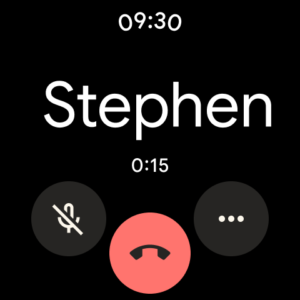
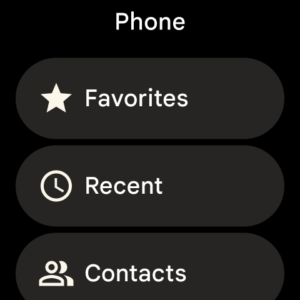
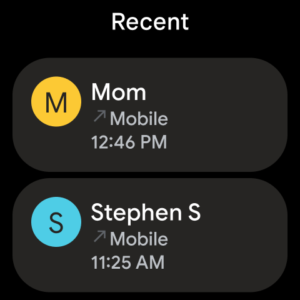
File Information
| Package Name | com.google.android.dialer |
|---|---|
| Version Name | 189.0.798816824-pixel2024 |
| Version Code | 19024788 |
| Architecture | arm64-v8a |
| Min Android Version | Android 30 (API 36) |
| Main Activity | com.google.android.dialer.extensions.GoogleDialtactsActivity |
| Framework | Native (Java/Kotlin) |
| File Size | 83.81 MB |
| Signature (SHA1) | 203997BC46B8792DC9747ABD230569071F9A0439 |
| File Hash (SHA256) | 2522b8275e683e6159e3ba50fd974d89cd241358efe01a0a1400fbee4b9a444e |
What's New
With our latest update to Call Screen on Pixel devices in the US, the Google Assistant now helps you automatically screen unknown callers and filter out detected robocalls before your phone ever rings. And when it’s not a robocall, your phone rings a few moments later with helpful context about who is calling and why.
App Description
Google’s official phone calling app is now available to download for the first time. Phone helps you easily connect with family and friends, block spam callers, and know who’s calling before you answer – all with a simple, intuitive design.
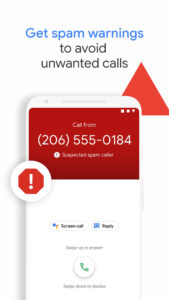
Powerful spam protection
See warnings about suspicious callers that help you avoid unwanted calls from spammers, telemarketers and scammers. Block numbers to prevent them from calling you again.
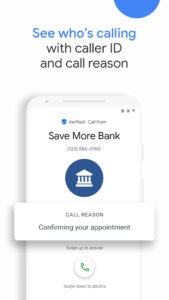
Know who’s calling you
Google’s extensive caller ID coverage lets you know the business that’s calling so that you can answer with confidence.
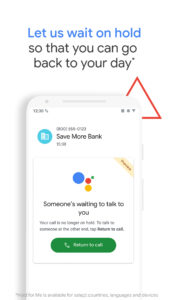
No more waiting on hold
1, 5
Hold for Me lets you go back to your day. If a business puts you on hold, Google Assistant can wait on the line for you and let you know when someone is ready to talk.
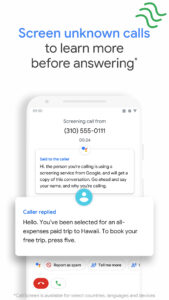
Screen unknown callers
1, 2
Call Screen answers unknown callers, filters out detected spammers without interrupting you, and helps you learn more about callers you don’t recognize before you pick up.
Visual voicemail
1, 3
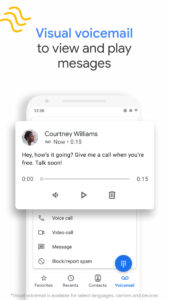
Check your messages without needing to call your voicemail – view and play them in any order, read transcriptions, and delete or save them right from the app.
Call recording
1
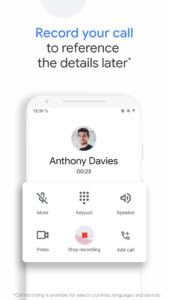
Record your phone calls to capture important information for reference later. Everyone hears a disclosure when the recording starts so they’re aware, and recordings are saved on your phone.
Intuitive design
Our simple, lightweight design keeps your favorite people just a tap away. Plus, switch to dark mode to save battery and reduce eye strain at night.
Emergency support
1, 4
See your current location when you make an emergency call, and share information about the assistance you require, along with your location, to the emergency operator without speaking.
Phone app is available on most Android devices running Android
™
9.0 and above.
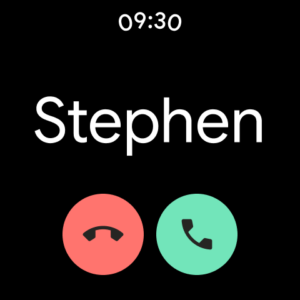
Also available for Wear OS.
1
Available only on some devices that have Phone pre-installed.
2
Manual screening is not available in all languages or countries. For more information, see g.co/help/callscreen. Automatic screening is available in the US only, English only. Call Screen may not detect all spam calls.
3
Transcription is available in the US only, English only.
4
Available in Australia, United Kingdom and the US only, English only.
5
Available in the US only, English only. Pixel 2+ devices only. Toll-free numbers only. May not detect every on-hold scenario.
Powerful spam protection
See warnings about suspicious callers that help you avoid unwanted calls from spammers, telemarketers and scammers. Block numbers to prevent them from calling you again.
Know who’s calling you
Google’s extensive caller ID coverage lets you know the business that’s calling so that you can answer with confidence.
No more waiting on hold
1, 5
Hold for Me lets you go back to your day. If a business puts you on hold, Google Assistant can wait on the line for you and let you know when someone is ready to talk.
Screen unknown callers
1, 2
Call Screen answers unknown callers, filters out detected spammers without interrupting you, and helps you learn more about callers you don’t recognize before you pick up.
Visual voicemail
1, 3
Check your messages without needing to call your voicemail – view and play them in any order, read transcriptions, and delete or save them right from the app.
Call recording
1
Record your phone calls to capture important information for reference later. Everyone hears a disclosure when the recording starts so they’re aware, and recordings are saved on your phone.
Intuitive design
Our simple, lightweight design keeps your favorite people just a tap away. Plus, switch to dark mode to save battery and reduce eye strain at night.
Emergency support
1, 4
See your current location when you make an emergency call, and share information about the assistance you require, along with your location, to the emergency operator without speaking.
Phone app is available on most Android devices running Android
™
9.0 and above.
Also available for Wear OS.
1
Available only on some devices that have Phone pre-installed.
2
Manual screening is not available in all languages or countries. For more information, see g.co/help/callscreen. Automatic screening is available in the US only, English only. Call Screen may not detect all spam calls.
3
Transcription is available in the US only, English only.
4
Available in Australia, United Kingdom and the US only, English only.
5
Available in the US only, English only. Pixel 2+ devices only. Toll-free numbers only. May not detect every on-hold scenario.
Download Phone by Google (Wear OS) APK
Fast, free and safe download.
APK Permissions 88
- android.permission.ACCESS_COARSE_LOCATION
- android.permission.ACCESS_FINE_LOCATION
- android.permission.ACCESS_NETWORK_STATE
- android.permission.ACCESS_NOTIFICATION_POLICY
- android.permission.ACCESS_RCS_USER_CAPABILITY_EXCHANGE
- android.permission.ACCESS_WIFI_STATE
- android.permission.ALLOW_ANY_CODEC_FOR_PLAYBACK
- android.permission.BLUETOOTH
- android.permission.BLUETOOTH_ADMIN
- android.permission.BLUETOOTH_CONNECT
- android.permission.BROADCAST_CLOSE_SYSTEM_DIALOGS
- android.permission.CALL_PHONE
- android.permission.CAMERA
- android.permission.CAPTURE_AUDIO_OUTPUT
- android.permission.CAPTURE_VOICE_COMMUNICATION_OUTPUT
- android.permission.CHANGE_NETWORK_STATE
- android.permission.CONNECTIVITY_USE_RESTRICTED_NETWORKS
- android.permission.CONTROL_INCALL_EXPERIENCE
- android.permission.FOREGROUND_SERVICE
- android.permission.FOREGROUND_SERVICE_DATA_SYNC
- android.permission.FOREGROUND_SERVICE_MICROPHONE
- android.permission.FOREGROUND_SERVICE_PHONE_CALL
- android.permission.GET_ACCOUNTS
- android.permission.GET_ACCOUNTS_PRIVILEGED
- android.permission.GET_PACKAGE_SIZE
- android.permission.HIGH_SAMPLING_RATE_SENSORS
- android.permission.INTERACT_ACROSS_USERS
- android.permission.INTERNET
- android.permission.LOCATION_BYPASS
- android.permission.MANAGE_ACCOUNTS
- android.permission.MANAGE_OWN_CALLS
- android.permission.MODIFY_AUDIO_ROUTING
- android.permission.MODIFY_AUDIO_SETTINGS
- android.permission.MODIFY_PHONE_STATE
- android.permission.NFC
- android.permission.POST_NOTIFICATIONS
- android.permission.QUERY_ADVANCED_PROTECTION_MODE
- android.permission.QUERY_ALL_PACKAGES
- android.permission.READ_APP_BADGE
- android.permission.READ_CALL_LOG
- android.permission.READ_CONTACTS
- android.permission.READ_PHONE_NUMBERS
- android.permission.READ_PHONE_STATE
- android.permission.READ_PRIVILEGED_PHONE_STATE
- android.permission.READ_PROFILE
- android.permission.READ_SYNC_SETTINGS
- android.permission.READ_SYSTEM_GRAMMATICAL_GENDER
- android.permission.RECEIVE_BOOT_COMPLETED
- android.permission.RECEIVE_SMS
- android.permission.RECORD_AUDIO
- android.permission.SATELLITE_COMMUNICATION
- android.permission.SEND_SMS
- android.permission.STATUS_BAR
- android.permission.STOP_APP_SWITCHES
- android.permission.SYSTEM_ALERT_WINDOW
- android.permission.USE_FULL_SCREEN_INTENT
- android.permission.VIBRATE
- android.permission.WAKE_LOCK
- android.permission.WRITE_CALL_LOG
- android.permission.WRITE_CONTACTS
- android.permission.WRITE_EXTERNAL_STORAGE
- android.permission.WRITE_SECURE_SETTINGS
- android.permission.WRITE_SETTINGS
- com.anddoes.launcher.permission.UPDATE_COUNT
- com.android.launcher.permission.INSTALL_SHORTCUT
- com.android.voicemail.permission.ADD_VOICEMAIL
- com.android.voicemail.permission.READ_VOICEMAIL
- com.android.voicemail.permission.WRITE_VOICEMAIL
- com.cequint.ecid.CALLER_ID_LOOKUP
- com.google.android.apps.aicore.service.BIND_SERVICE
- com.google.android.apps.tycho#com.google.android.ims.providers.ACCESS_DATA
- com.google.android.dialer.DYNAMIC_RECEIVER_NOT_EXPORTED_PERMISSION
- com.google.android.ims.receivers.FEEDBACK_SETTING
- com.google.android.providers.gsf.permission.READ_GSERVICES
- com.htc.launcher.permission.READ_SETTINGS
- com.htc.launcher.permission.UPDATE_SHORTCUT
- com.huawei.android.launcher.permission.CHANGE_BADGE
- com.huawei.android.launcher.permission.READ_SETTINGS
- com.huawei.android.launcher.permission.WRITE_SETTINGS
- com.majeur.launcher.permission.UPDATE_BADGE
- com.motorola.android.permission.USERPREFERREDSIM
- com.motorola.incallui.permission.INCOMING_CALL_VISIBILITY_CHANGED
- com.oppo.launcher.permission.READ_SETTINGS
- com.oppo.launcher.permission.WRITE_SETTINGS
- com.sec.android.provider.badge.permission.READ
- com.sec.android.provider.badge.permission.WRITE
- com.sonyericsson.home.permission.BROADCAST_BADGE
- com.sonymobile.home.permission.PROVIDER_INSERT_BADGE
APK Verified
The cryptographic signature guarantees that the file is safe to install and was not tampered with in any way.
Similar in Tools


Frequently Asked Questions about Phone by Google (Wear OS) APK
This variant is built for 64-bit ARM (most Android phones made since 2017). If your device's CPU matches, this is the smallest, fastest version to install.
Yes — the APK's signature has been cryptographically verified against the publisher's signing key. The SHA-256 hash is shown in the File Information panel so you can independently confirm the file matches the original release.
Android 30 (API level 36) or newer. Older devices will refuse the install.
Install a free app like 'CPU-Z' or 'Droid Hardware Info' from the Play Store and look at the ABI / Instruction Set row. Most phones made after 2017 are arm64-v8a; if in doubt, download the universal variant.
All variants are functionally identical — same features, same version. They differ only in which CPU architectures the native code is compiled for, and (sometimes) which screen densities the included graphics target. Pick the one that matches your device for the smallest install size, or pick 'Universal' if you're unsure.