
Download Google Play Books & Audiobooks APK 2.2.0 Universal · Android 11+
Download APK
Verified Safe
This is the universal build of Google Play Books & Audiobooks 2.2.0. It contains native libraries for every CPU architecture (arm64-v8a, armeabi-v7a, x86, x86_64), so it installs on any Android device. The trade-off is size — it's larger than per-architecture variants. Pick this one if you're unsure which CPU your phone has, or if you plan to share the APK with multiple devices.
File size: 4.1 MB • Min Android: 11 • Target Android: 11 • Version code: 20200 • Framework: Native (Java/Kotlin) • Permissions: 12
Screenshots
File Information
| Package Name | com.google.android.apps.books |
|---|---|
| Version Name | 2.2.0 |
| Version Code | 20200 |
| Architecture | Universal |
| Min Android Version | Android 11 (API 11) |
| Main Activity | com.google.android.apps.books.app.BooksActivity |
| Framework | Native (Java/Kotlin) |
| File Size | 4.10 MB |
| Signature (SHA1) | 58E1C4133F7441EC3D2C270270A14802DA47BA0E |
| File Hash (SHA256) | d7cf122927790dac66d23f9c0905bb12ab86c2a08394cf1ce2c2f2936dc3763b |
What's New
New in version 2025.1.10
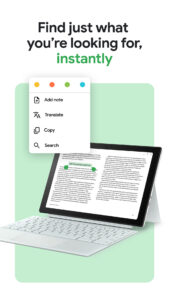
• Improved ease-of-use in ebook text selection menu
Check out these features
• Upload EPUB and PDF files and read them on all of your devices
• Download purchased ebooks and audiobooks (DRM-free if allowed by the publisher) to read on other devices such as Nook, Sony Reader, Kobo
• Improved ease-of-use in ebook text selection menu
Check out these features
• Upload EPUB and PDF files and read them on all of your devices
• Download purchased ebooks and audiobooks (DRM-free if allowed by the publisher) to read on other devices such as Nook, Sony Reader, Kobo
App Description
Dive into a world of stories with Google Play Books! Explore millions of ebooks, audiobooks, comics, and manga — all in one app.
Key Features:
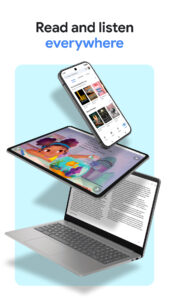
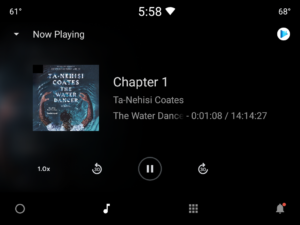
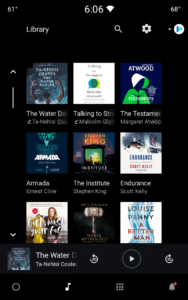
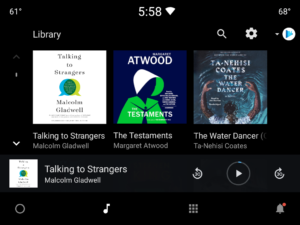
• Your library, anywhere: Enjoy books on your phone, tablet, computer, or even in your car with Android Auto. Plus, you can download books to read offline.
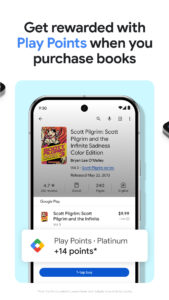
• Earn Google Play Points: Get rewarded with Play Points when you purchase books. Note: Play Points availability, award levels, and multiplier rates differ by country. Play Points isn’t available in all countries.
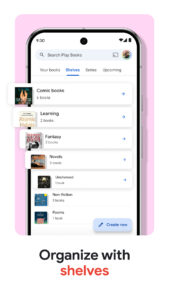
• Organize with shelves: Personalize your digital library with custom shelves to categorize your books by genre, author, or any theme you’d like.
• Smart notes: Jot down notes that sync with your Google Drive and can be shared for easy collaboration.
• No subscription needed: Buy only the books you want, when you want them.
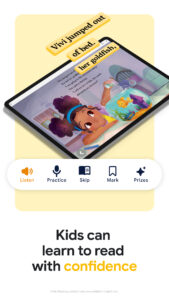
• Kid–friendly reading tools: Let kids explore word definitions and listen to books aloud. Note: Reading practice tools are available in English only.
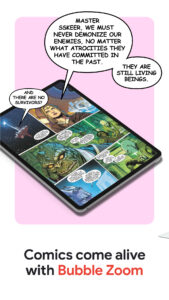
• Immersive comics: Experience Bubble Zoom for a specialized comic and manga reading experience.
• Preview before you buy: Check out samples to make sure it’s the perfect book for you.
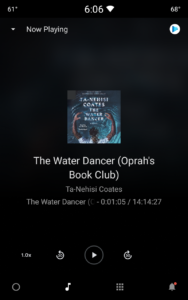
• Hands–free reading: Control your audiobook with your voice using Google Assistant.
• Read your way: Customize your reading experience by adjusting the font, text size, brightness, and more.
Millions of stories await on Google Play Books! Download now and start reading.
Key Features:
• Your library, anywhere: Enjoy books on your phone, tablet, computer, or even in your car with Android Auto. Plus, you can download books to read offline.
• Earn Google Play Points: Get rewarded with Play Points when you purchase books. Note: Play Points availability, award levels, and multiplier rates differ by country. Play Points isn’t available in all countries.
• Organize with shelves: Personalize your digital library with custom shelves to categorize your books by genre, author, or any theme you’d like.
• Smart notes: Jot down notes that sync with your Google Drive and can be shared for easy collaboration.
• No subscription needed: Buy only the books you want, when you want them.
• Kid–friendly reading tools: Let kids explore word definitions and listen to books aloud. Note: Reading practice tools are available in English only.
• Immersive comics: Experience Bubble Zoom for a specialized comic and manga reading experience.
• Preview before you buy: Check out samples to make sure it’s the perfect book for you.
• Hands–free reading: Control your audiobook with your voice using Google Assistant.
• Read your way: Customize your reading experience by adjusting the font, text size, brightness, and more.
Millions of stories await on Google Play Books! Download now and start reading.
Download Google Play Books & Audiobooks APK
Fast, free and safe download.
APK Permissions 12
- android.permission.ACCESS_NETWORK_STATE
- android.permission.GET_ACCOUNTS
- android.permission.INTERNET
- android.permission.MANAGE_ACCOUNTS
- android.permission.READ_SYNC_SETTINGS
- android.permission.SUBSCRIBED_FEEDS_READ
- android.permission.SUBSCRIBED_FEEDS_WRITE
- android.permission.USE_CREDENTIALS
- android.permission.WAKE_LOCK
- android.permission.WRITE_EXTERNAL_STORAGE
- android.permission.WRITE_SYNC_SETTINGS
- com.google.android.providers.gsf.permission.READ_GSERVICES
APK Verified
The cryptographic signature guarantees that the file is safe to install and was not tampered with in any way.
Similar in Books & Reference


Frequently Asked Questions about Google Play Books & Audiobooks APK
This is the universal variant — a single APK that contains native libraries for every CPU architecture. It installs on any Android device but is larger than per-architecture variants.
Yes — the APK's signature has been cryptographically verified against the publisher's signing key. The SHA-256 hash is shown in the File Information panel so you can independently confirm the file matches the original release.
Android 11 (API level 11) or newer. Older devices will refuse the install.
Install a free app like 'CPU-Z' or 'Droid Hardware Info' from the Play Store and look at the ABI / Instruction Set row. Most phones made after 2017 are arm64-v8a; if in doubt, download the universal variant.
All variants are functionally identical — same features, same version. They differ only in which CPU architectures the native code is compiled for, and (sometimes) which screen densities the included graphics target. Pick the one that matches your device for the smallest install size, or pick 'Universal' if you're unsure.