
Download Speech Recognition & Synthesis speech.tts.android.wear_20240722_RC00.654970973 (arm-v7a) (nodpi) (Android APK googletts.google-speech-apk_20241125.02_p2.702443970 armeabi-v7a · Android 26+
Download APK
Verified Safe
This is the armeabi-v7a build of Speech Recognition & Synthesis speech.tts.android.wear_20240722_RC00.654970973 (arm-v7a) (nodpi) (Android googletts.google-speech-apk_20241125.02_p2.702443970, compiled for 32-bit ARM processors found in older Android phones (roughly 2013-2017). Use this build if your device's primary ABI is armeabi-v7a — modern 64-bit phones should pick the arm64-v8a or universal variant for better performance.
File size: 54.8 MB • Min Android: 26 • Target Android: 35 • Version code: 210526443 • Framework: Native (Java/Kotlin) • Permissions: 15
Screenshots
File Information
| Package Name | com.google.android.tts |
|---|---|
| Version Name | googletts.google-speech-apk_20241125.02_p2.702443970 |
| Version Code | 210526443 |
| Architecture | armeabi-v7a |
| Min Android Version | Android 26 (API 35) |
| Framework | Native (Java/Kotlin) |
| File Size | 54.82 MB |
| Signature (SHA1) | 38918A453D07199354F8B19AF05EC6562CED5788 |
| File Hash (SHA256) | 79252153c5418440595b681546ac64334225373a69fc4735670f8e7fb317dea0 |
What's New
Your app has a new name: “Speech Recognition and Synthesis from Google”. The Speech Recognition and Synthesis from Google app not only provides text-to-speech but also empowers applications with speech-to-text functionality to convert your voice to text. Read more in the “About this app” section.
App Description
Power your device with the magic of Google’s text-to-speech and speech-to-text technology.
Google Speech-to-Text functionality
Speech Recognition provides speech-to-text functionality to Google and other third party apps to convert what you say to text. For example, it can be used by:
• Google Maps when you use your voice to search places
• Recorder App to transcribe your recordings on device
• Phone App Call Screen feature to get a real-time transcription of your caller
• Accessibility apps like Voice Access for operating your device through voice
• Dictation or keyboard apps you might use to dictate text messages through voice
• Apps that contain a search by voice feature so that you can quickly search for your favorite shows or songs
• Language learning apps that recognize what you say as you practice a new language
• …and many other applications in Play Store
To use Google Speech-to-Text functionality on your Android device, go to Settings > Apps & notifications > Default apps > Assist App. Select Speech Recognition and Synthesis from Google as your preferred voice input engine.
Google Text-to-Speech functionality
Speech Services powers applications to read the text on your screen aloud. For example, it can be used by:
• Google Play Books to “Read Aloud” your favorite book
• Google Translate to speak translations aloud so you can hear the pronunciation of a word
• Talkback and accessibility applications for spoken feedback across your device
• …and many other applications in Play Store
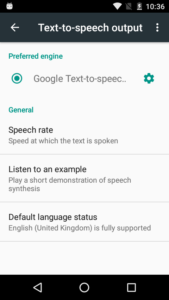
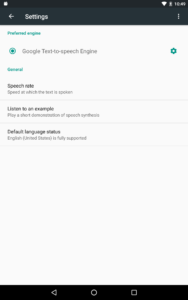
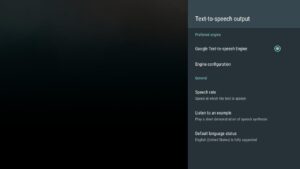
To use Google Text-to-Speech functionality on your Android device, go to Settings > Languages & Input > Text-to-Speech output. Select Speech Recognition and Synthesis from Google as your preferred engine.
Note, on many Android devices, Speech Recognition and Synthesis from Google is already available, but you can update to the latest version here.
Google Speech-to-Text functionality
Speech Recognition provides speech-to-text functionality to Google and other third party apps to convert what you say to text. For example, it can be used by:
• Google Maps when you use your voice to search places
• Recorder App to transcribe your recordings on device
• Phone App Call Screen feature to get a real-time transcription of your caller
• Accessibility apps like Voice Access for operating your device through voice
• Dictation or keyboard apps you might use to dictate text messages through voice
• Apps that contain a search by voice feature so that you can quickly search for your favorite shows or songs
• Language learning apps that recognize what you say as you practice a new language
• …and many other applications in Play Store
To use Google Speech-to-Text functionality on your Android device, go to Settings > Apps & notifications > Default apps > Assist App. Select Speech Recognition and Synthesis from Google as your preferred voice input engine.
Google Text-to-Speech functionality
Speech Services powers applications to read the text on your screen aloud. For example, it can be used by:
• Google Play Books to “Read Aloud” your favorite book
• Google Translate to speak translations aloud so you can hear the pronunciation of a word
• Talkback and accessibility applications for spoken feedback across your device
• …and many other applications in Play Store
To use Google Text-to-Speech functionality on your Android device, go to Settings > Languages & Input > Text-to-Speech output. Select Speech Recognition and Synthesis from Google as your preferred engine.
Note, on many Android devices, Speech Recognition and Synthesis from Google is already available, but you can update to the latest version here.
Download Speech Recognition & Synthesis speech.tts.android.wear_20240722_RC00.654970973 (arm-v7a) (nodpi) (Android APK
Fast, free and safe download.
APK Permissions 15
- android.permission.ACCESS_NETWORK_STATE
- android.permission.DOWNLOAD_WITHOUT_NOTIFICATION
- android.permission.FOREGROUND_SERVICE
- android.permission.FOREGROUND_SERVICE_DATA_SYNC
- android.permission.GET_PACKAGE_SIZE
- android.permission.INTERNET
- android.permission.QUERY_ALL_PACKAGES
- android.permission.RECEIVE_BOOT_COMPLETED
- android.permission.RECORD_AUDIO
- android.permission.START_ACTIVITIES_FROM_BACKGROUND
- android.permission.SYSTEM_ALERT_WINDOW
- android.permission.UPDATE_APP_OPS_STATS
- android.permission.WAKE_LOCK
- com.google.android.apps.aicore.service.BIND_SERVICE
- com.google.android.providers.gsf.permission.READ_GSERVICES


Frequently Asked Questions about Speech Recognition & Synthesis speech.tts.android.wear_20240722_RC00.654970973 (arm-v7a) (nodpi) (Android APK
This variant is built for 32-bit ARM (older Android phones, ~2013–2017). If your device's CPU matches, this is the smallest, fastest version to install.
Yes — the APK's signature has been cryptographically verified against the publisher's signing key. The SHA-256 hash is shown in the File Information panel so you can independently confirm the file matches the original release.
Android 26 (API level 35) or newer. Older devices will refuse the install.
Install a free app like 'CPU-Z' or 'Droid Hardware Info' from the Play Store and look at the ABI / Instruction Set row. Most phones made after 2017 are arm64-v8a; if in doubt, download the universal variant.
All variants are functionally identical — same features, same version. They differ only in which CPU architectures the native code is compiled for, and (sometimes) which screen densities the included graphics target. Pick the one that matches your device for the smallest install size, or pick 'Universal' if you're unsure.