
This is the universal build of Google Voice 0.1.415.742.2130. It contains native libraries for every CPU architecture (arm64-v8a, armeabi-v7a, x86, x86_64), so it installs on any Android device. The trade-off is size — it's larger than per-architecture variants. Pick this one if you're unsure which CPU your phone has, or if you plan to share the APK with multiple devices.
File size: 0.4 MB • Min Android: 1 • Version code: 2 • Framework: Native (Java/Kotlin) • Permissions: 12
Screenshots
File Information
| Package Name | com.google.android.apps.googlevoice |
|---|---|
| Version Name | 0.1.415.742.2130 |
| Version Code | 2 |
| Architecture | Universal |
| Min Android Version | Android 1 (API None) |
| Main Activity | com.google.android.apps.googlevoice.SplashActivity |
| Framework | Native (Java/Kotlin) |
| File Size | 445.62 KB |
| Signature (SHA1) | 24BB24C05E47E0AEFA68A58A766179D9B613A600 |
| File Hash (SHA256) | 16af984b8641daa5ddf0b0946ea5614de52b99835ccd56d8f080ec3678410052 |
What's New
• Stability and performance improvements
App Description
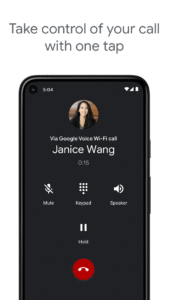
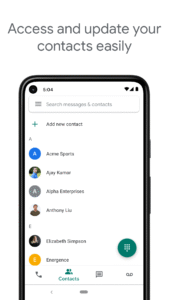
Google Voice gives you a phone number for calling, text messaging, and voicemail. It works on smartphones and computers, and syncs across your devices so you can use the app in the office, at home, or on the go.
NOTE: Google Voice only works for personal Google Accounts in the US and Google Workspace accounts in select markets. Text messaging is not supported in all markets.
You're in control
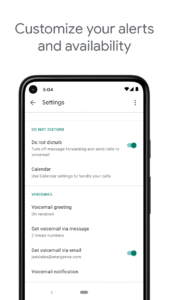
Get spam filtered automatically and block numbers you don’t want to hear from. Manage your time with personalized settings for forwarding calls, text messages, and voicemail.
Backed up and searchable
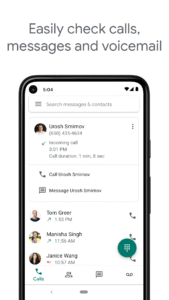
Calls, text messages, and voicemails are stored and backed up to make it easy for you to search your history.
Manage messages across devices
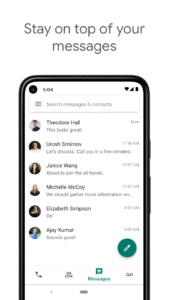
Send and receive individual and group SMS messages from all your devices.
Your voicemail, transcribed
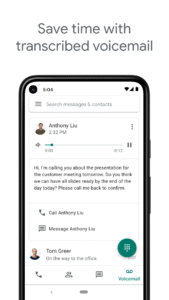
Google Voice provides advanced voicemail transcriptions that you can read in the app and/or have sent to your email.
Save on international calling
Make international calls at competitive rates without paying extra for international minutes with your mobile carrier.
Keep in mind:
• Google Voice is currently only available in the US. Google Voice for Google Workspace users is available in select countries. Check with your administrator for access.
• Calls made using Google Voice for Android can be placed through a Google Voice access number. All access number based calls use the standard minutes from your cell phone plan and may incur costs (e.g. when traveling internationally).
NOTE: Google Voice only works for personal Google Accounts in the US and Google Workspace accounts in select markets. Text messaging is not supported in all markets.
You're in control
Get spam filtered automatically and block numbers you don’t want to hear from. Manage your time with personalized settings for forwarding calls, text messages, and voicemail.
Backed up and searchable
Calls, text messages, and voicemails are stored and backed up to make it easy for you to search your history.
Manage messages across devices
Send and receive individual and group SMS messages from all your devices.
Your voicemail, transcribed
Google Voice provides advanced voicemail transcriptions that you can read in the app and/or have sent to your email.
Save on international calling
Make international calls at competitive rates without paying extra for international minutes with your mobile carrier.
Keep in mind:
• Google Voice is currently only available in the US. Google Voice for Google Workspace users is available in select countries. Check with your administrator for access.
• Calls made using Google Voice for Android can be placed through a Google Voice access number. All access number based calls use the standard minutes from your cell phone plan and may incur costs (e.g. when traveling internationally).
Download Google Voice APK
Fast, free and safe download.
APK Permissions 12
- android.permission.CALL_PHONE
- android.permission.INTERNET
- android.permission.MODIFY_AUDIO_SETTINGS
- android.permission.PROCESS_OUTGOING_CALLS
- android.permission.READ_CONTACTS
- android.permission.READ_PHONE_STATE
- android.permission.RECEIVE_BOOT_COMPLETED
- android.permission.RECEIVE_SMS
- android.permission.VIBRATE
- android.permission.WRITE_CONTACTS
- com.google.android.googleapps.permission.GOOGLE_AUTH
- com.google.android.googleapps.permission.GOOGLE_AUTH.grandcentral
APK Verified
The cryptographic signature guarantees that the file is safe to install and was not tampered with in any way.
Similar in Communication


Frequently Asked Questions about Google Voice APK
This is the universal variant — a single APK that contains native libraries for every CPU architecture. It installs on any Android device but is larger than per-architecture variants.
Yes — the APK's signature has been cryptographically verified against the publisher's signing key. The SHA-256 hash is shown in the File Information panel so you can independently confirm the file matches the original release.
Android 1 (API level None) or newer. Older devices will refuse the install.
Install a free app like 'CPU-Z' or 'Droid Hardware Info' from the Play Store and look at the ABI / Instruction Set row. Most phones made after 2017 are arm64-v8a; if in doubt, download the universal variant.
All variants are functionally identical — same features, same version. They differ only in which CPU architectures the native code is compiled for, and (sometimes) which screen densities the included graphics target. Pick the one that matches your device for the smallest install size, or pick 'Universal' if you're unsure.