
Download Health Connect APK 2025.08.07.00.release Universal · Android 28+
Download APK
Verified Safe
This is the universal build of Health Connect 2025.08.07.00.release. It contains native libraries for every CPU architecture (arm64-v8a, armeabi-v7a, x86, x86_64), so it installs on any Android device. The trade-off is size — it's larger than per-architecture variants. Pick this one if you're unsure which CPU your phone has, or if you plan to share the APK with multiple devices.
File size: 7.2 MB • Min Android: 28 • Target Android: 35 • Version code: 207759 • Framework: Native (Java/Kotlin) • Permissions: 12
Screenshots
File Information
| Package Name | com.google.android.apps.healthdata |
|---|---|
| Version Name | 2025.08.07.00.release |
| Version Code | 207759 |
| Architecture | Universal |
| Min Android Version | Android 28 (API 35) |
| Framework | Native (Java/Kotlin) |
| File Size | 7.20 MB |
| Signature (SHA1) | 2E14D810F4F0246F4B6612A011933E0A3164B8D4 |
| File Hash (SHA256) | fa64795755514e91f0a30b04265355a174eb4d567ce368067f86750a85287d00 |
What's New
Try Health Connect out with your compatible health and fitness apps:
g.co/android/CompatibleWithHealthConnect
g.co/android/CompatibleWithHealthConnect
App Description
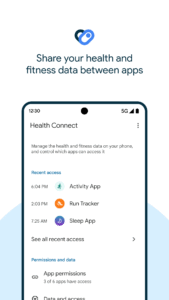
Health Connect by Android gives you a simple way to share data between your health, fitness, and wellbeing apps without compromising on privacy.
Once you've downloaded Health Connect, you can access it through your settings by going to Settings > Apps > Health Connect, or from your Quick Settings menu.
Get more from your favorite apps.
Whether you're focused on activity or sleep, nutrition or vitals, sharing data between your apps can help you better understand your health. Health Connect gives you simple controls, so you only share the data you want to.
Keep your health and fitness data in one place.
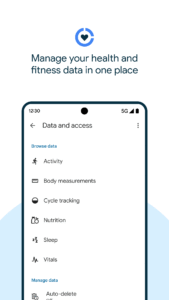
Health Connect stores the health and fitness data from your apps in one place, offline and on your device, so you can easily manage the data from your different apps.
Update privacy settings in a few taps.
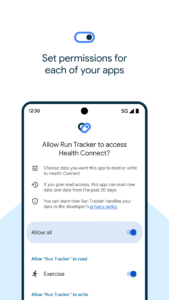
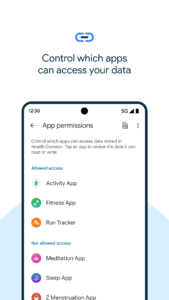
Before a new app can access your data, you can review and choose what you want to share. If you change your mind, or want to see which apps recently accessed your data, find it all in Health Connect.
Once you've downloaded Health Connect, you can access it through your settings by going to Settings > Apps > Health Connect, or from your Quick Settings menu.
Get more from your favorite apps.
Whether you're focused on activity or sleep, nutrition or vitals, sharing data between your apps can help you better understand your health. Health Connect gives you simple controls, so you only share the data you want to.
Keep your health and fitness data in one place.
Health Connect stores the health and fitness data from your apps in one place, offline and on your device, so you can easily manage the data from your different apps.
Update privacy settings in a few taps.
Before a new app can access your data, you can review and choose what you want to share. If you change your mind, or want to see which apps recently accessed your data, find it all in Health Connect.
Download Health Connect APK
Fast, free and safe download.
APK Permissions 12
- android.permission.ACCESS_NETWORK_STATE
- android.permission.FOREGROUND_SERVICE
- android.permission.GET_PACKAGE_SIZE
- android.permission.INTERNET
- android.permission.MIGRATE_HEALTH_CONNECT_DATA
- android.permission.PACKAGE_USAGE_STATS
- android.permission.POST_NOTIFICATIONS
- android.permission.RECEIVE_BOOT_COMPLETED
- android.permission.REQUEST_DELETE_PACKAGES
- android.permission.WAKE_LOCK
- com.google.android.apps.healthdata.permission.START_ONBOARDING
- com.google.android.providers.gsf.permission.READ_GSERVICES
APK Verified
The cryptographic signature guarantees that the file is safe to install and was not tampered with in any way.
Similar in Health & Fitness


Frequently Asked Questions about Health Connect APK
This is the universal variant — a single APK that contains native libraries for every CPU architecture. It installs on any Android device but is larger than per-architecture variants.
Yes — the APK's signature has been cryptographically verified against the publisher's signing key. The SHA-256 hash is shown in the File Information panel so you can independently confirm the file matches the original release.
Android 28 (API level 35) or newer. Older devices will refuse the install.
Install a free app like 'CPU-Z' or 'Droid Hardware Info' from the Play Store and look at the ABI / Instruction Set row. Most phones made after 2017 are arm64-v8a; if in doubt, download the universal variant.
All variants are functionally identical — same features, same version. They differ only in which CPU architectures the native code is compiled for, and (sometimes) which screen densities the included graphics target. Pick the one that matches your device for the smallest install size, or pick 'Universal' if you're unsure.