
This is the universal build of DMSS 2.2.1. It contains native libraries for every CPU architecture (arm64-v8a, armeabi-v7a, x86, x86_64), so it installs on any Android device. The trade-off is size — it's larger than per-architecture variants. Pick this one if you're unsure which CPU your phone has, or if you plan to share the APK with multiple devices.
File size: 240.4 MB • Min Android: 24 • Target Android: 34 • Version code: 354 • Framework: Native (Java/Kotlin) • Permissions: 42
Screenshots
File Information
| Package Name | com.mm.android.DMSS |
|---|---|
| Version Name | 2.2.1 |
| Version Code | 354 |
| Architecture | Universal |
| Min Android Version | Android 24 (API 34) |
| Main Activity | com.mm.android.base.devicemain.SplashActivity |
| Framework | Native (Java/Kotlin) |
| File Size | 240.38 MB |
| Signature (SHA1) | 2487DA2E9D38EC3645404F392CB0D1B4650254CB |
| File Hash (SHA256) | 8220e7897fdd422c1c1a56f2710e62c7967df1a1969a123b9b5bc51ca3d48f49 |
What's New
Squashed bugs for better experience.
App Description
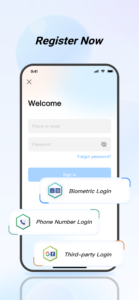
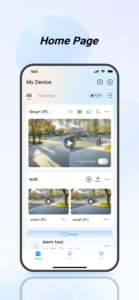
The DMSS app can enhance your security management efficiency. You can watch real-time surveillance videos and play them back anytime, anywhere, via Wi-Fi or cellular networks. If a device alarm is triggered, DMSS will immediately push an instant notification to you.
The app supports Android 5.0 or above systems.
DMSS offers:
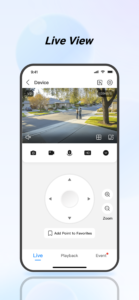
1. Real-time Live View:
You can view real-time surveillance videos from the added devices anytime, anywhere, to help you better monitor the safety of your home environment.
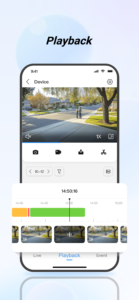
2. Video Playback:
You can quickly find the events you care about by date and event category, and playback the required historical video footage.
3. Instant Alarm Notifications:
You can subscribe to different alarm events according to your needs. When an event is triggered, you will immediately receive the message notification.
4. Device Sharing
You can share the device with family members for shared use and assign them different usage permissions.
5. Alarm Hub
You can add a variety of peripheral accessories to the alarm hub to provide warnings for potential theft, intrusion, fire, water damage, and other situations. In case of an unforeseen event, DMSS can immediately activate alarms and send out danger notifications.
6. Visual Intercom
You can add visual intercom devices to engage in video calls between the device and the DMSS, as well as perform functions like locking and unlocking.
7. Access Control
You can add access control devices to check the current status of doors and view unlock records, as well as perform remote unlocking operations on the doors.
The app supports Android 5.0 or above systems.
DMSS offers:
1. Real-time Live View:
You can view real-time surveillance videos from the added devices anytime, anywhere, to help you better monitor the safety of your home environment.
2. Video Playback:
You can quickly find the events you care about by date and event category, and playback the required historical video footage.
3. Instant Alarm Notifications:
You can subscribe to different alarm events according to your needs. When an event is triggered, you will immediately receive the message notification.
4. Device Sharing
You can share the device with family members for shared use and assign them different usage permissions.
5. Alarm Hub
You can add a variety of peripheral accessories to the alarm hub to provide warnings for potential theft, intrusion, fire, water damage, and other situations. In case of an unforeseen event, DMSS can immediately activate alarms and send out danger notifications.
6. Visual Intercom
You can add visual intercom devices to engage in video calls between the device and the DMSS, as well as perform functions like locking and unlocking.
7. Access Control
You can add access control devices to check the current status of doors and view unlock records, as well as perform remote unlocking operations on the doors.
Download DMSS APK
Fast, free and safe download.
APK Permissions 42
- android.permission.ACCESS_COARSE_LOCATION
- android.permission.ACCESS_FINE_LOCATION
- android.permission.ACCESS_NETWORK_STATE
- android.permission.ACCESS_WIFI_STATE
- android.permission.BLUETOOTH
- android.permission.BLUETOOTH_ADMIN
- android.permission.BLUETOOTH_ADVERTISE
- android.permission.BLUETOOTH_CONNECT
- android.permission.BLUETOOTH_SCAN
- android.permission.CAMERA
- android.permission.CHANGE_NETWORK_STATE
- android.permission.CHANGE_WIFI_STATE
- android.permission.DISABLE_KEYGUARD
- android.permission.FLASHLIGHT
- android.permission.FOREGROUND_SERVICE
- android.permission.INTERNET
- android.permission.MODIFY_AUDIO_SETTINGS
- android.permission.MOUNT_UNMOUNT_FILESYSTEMS
- android.permission.NEARBY_WIFI_DEVICES
- android.permission.POST_NOTIFICATIONS
- android.permission.READ_EXTERNAL_STORAGE
- android.permission.READ_MEDIA_AUDIO
- android.permission.READ_MEDIA_IMAGES
- android.permission.READ_MEDIA_VIDEO
- android.permission.READ_MEDIA_VISUAL_USER_SELECTED
- android.permission.RECORD_AUDIO
- android.permission.REORDER_TASKS
- android.permission.SYSTEM_ALERT_WINDOW
- android.permission.USE_BIOMETRIC
- android.permission.USE_FINGERPRINT
- android.permission.VIBRATE
- android.permission.WAKE_LOCK
- android.permission.WRITE_EXTERNAL_STORAGE
- android.permission.WRITE_MEDIA_STORAGE
- android.permission.WRITE_SETTINGS
- com.android.alarm.permission.SET_ALARM
- com.android.vending.BILLING
- com.google.android.c2dm.permission.RECEIVE
- com.google.android.finsky.permission.BIND_GET_INSTALL_REFERRER_SERVICE
- com.google.android.gms.permission.AD_ID
- com.mm.android.DMSS.DYNAMIC_RECEIVER_NOT_EXPORTED_PERMISSION
- com.mm.android.DMSS.permission.PROCESS_PUSH_MSG
APK Verified
The cryptographic signature guarantees that the file is safe to install and was not tampered with in any way.
Developer
Name: Hangzhou Dong Bin Information Technology Co., Ltd.
See All Versions View on Google PlaySimilar in Lifestyle


More by Hangzhou Dong Bin Information Technology Co., Ltd.

Frequently Asked Questions about DMSS APK
This is the universal variant — a single APK that contains native libraries for every CPU architecture. It installs on any Android device but is larger than per-architecture variants.
Yes — the APK's signature has been cryptographically verified against the publisher's signing key. The SHA-256 hash is shown in the File Information panel so you can independently confirm the file matches the original release.
Android 24 (API level 34) or newer. Older devices will refuse the install.
Install a free app like 'CPU-Z' or 'Droid Hardware Info' from the Play Store and look at the ABI / Instruction Set row. Most phones made after 2017 are arm64-v8a; if in doubt, download the universal variant.
All variants are functionally identical — same features, same version. They differ only in which CPU architectures the native code is compiled for, and (sometimes) which screen densities the included graphics target. Pick the one that matches your device for the smallest install size, or pick 'Universal' if you're unsure.