
Download HERE WeGo: Maps & Navigation APK 4.17.000 arm64-v8a, armeabi-v7a, x86_64 · Android 26+
Download APK
Verified Safe
This is the arm64-v8a, armeabi-v7a, x86_64 build of HERE WeGo: Maps & Navigation 4.17.000. Pick this build if your device's primary ABI matches.
File size: 154.2 MB • Min Android: 26 • Target Android: 35 • Version code: 8352000 • Framework: Flutter • Permissions: 27
Screenshots





File Information
| Package Name | com.here.app.maps |
|---|---|
| Version Name | 4.17.000 |
| Version Code | 8352000 |
| Architecture | arm64-v8a, armeabi-v7a, x86_64 |
| Min Android Version | Android 26 (API 35) |
| Main Activity | com.here.app.wego.MainActivity |
| Framework | Flutter |
| File Size | 154.21 MB |
| Signature (SHA1) | 6D256640C0EFF26CCB3A8B817CDC901F3D1D77B4 |
| File Hash (SHA256) | 0300079060499552375341738cb9552d8d3da52e465b4b605a1c46f873213bc8 |
What's New
Improvements made for an even better HERE WeGo experience.
App Description
Welcome to the new HERE WeGo!
HERE WeGo is a free navigation app that guides local and global travelers on journeys both familiar and foreign. The app now has a fresh, new design and clearer, easier to use navigation.
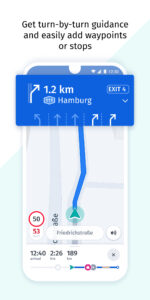
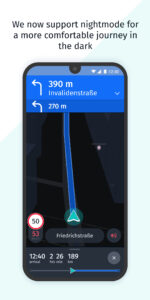
Enjoy a more carefree journey and reach your destination effortlessly, however you need to get there. Get there on foot with easy-to-follow walk guidance. Take public transport in more than 1,900 cities around the world. Or use turn-by-turn voice guidance with accurate driving directions and go by car. You can even find parking at your destination and get guided directly to it.
Visit the same places often? Save them in a collection to stay organised and find them easier. Or use shortcuts to get directions to them in one click
Need to make an extra stop or want to go a specific way? Simply add waypoints to your routes and HERE WeGo guides you there.
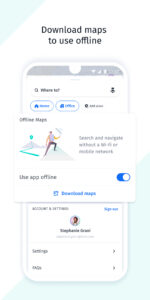
Want to save your mobile data and stay on course even without an internet connection when travelling? Download a map of a region, country or continent and complete your journey while staying totally offline.
And what's next
- More ways to get around, such as bike and car-sharing
- Services you can enjoy on the go, such as hotel booking and parking
- A way to find places of common interest and organise trips with others
- And much more!
Stay tuned, and don't forget to send your feedback to
appsupport@here.com
. We hope you enjoy your journey with HERE WeGo
HERE WeGo is a free navigation app that guides local and global travelers on journeys both familiar and foreign. The app now has a fresh, new design and clearer, easier to use navigation.
Enjoy a more carefree journey and reach your destination effortlessly, however you need to get there. Get there on foot with easy-to-follow walk guidance. Take public transport in more than 1,900 cities around the world. Or use turn-by-turn voice guidance with accurate driving directions and go by car. You can even find parking at your destination and get guided directly to it.
Visit the same places often? Save them in a collection to stay organised and find them easier. Or use shortcuts to get directions to them in one click
Need to make an extra stop or want to go a specific way? Simply add waypoints to your routes and HERE WeGo guides you there.
Want to save your mobile data and stay on course even without an internet connection when travelling? Download a map of a region, country or continent and complete your journey while staying totally offline.
And what's next
- More ways to get around, such as bike and car-sharing
- Services you can enjoy on the go, such as hotel booking and parking
- A way to find places of common interest and organise trips with others
- And much more!
Stay tuned, and don't forget to send your feedback to
appsupport@here.com
. We hope you enjoy your journey with HERE WeGo
Download HERE WeGo: Maps & Navigation APK
Fast, free and safe download.
APK Permissions 27
- android.permission.ACCESS_COARSE_LOCATION
- android.permission.ACCESS_FINE_LOCATION
- android.permission.ACCESS_NETWORK_STATE
- android.permission.ACCESS_WIFI_STATE
- android.permission.BLUETOOTH
- android.permission.BLUETOOTH_ADMIN
- android.permission.BLUETOOTH_CONNECT
- android.permission.CHANGE_NETWORK_STATE
- android.permission.CHANGE_WIFI_STATE
- android.permission.FOREGROUND_SERVICE
- android.permission.FOREGROUND_SERVICE_CONNECTED_DEVICE
- android.permission.FOREGROUND_SERVICE_DATA_SYNC
- android.permission.FOREGROUND_SERVICE_LOCATION
- android.permission.INTERNET
- android.permission.MODIFY_AUDIO_SETTINGS
- android.permission.POST_NOTIFICATIONS
- android.permission.READ_BASIC_PHONE_STATE
- android.permission.READ_PHONE_STATE
- android.permission.RECORD_AUDIO
- android.permission.WAKE_LOCK
- androidx.car.app.ACCESS_SURFACE
- androidx.car.app.NAVIGATION_TEMPLATES
- com.google.android.finsky.permission.BIND_GET_INSTALL_REFERRER_SERVICE
- com.here.app.maps.DYNAMIC_RECEIVER_NOT_EXPORTED_PERMISSION
- com.samsung.accessory.permission.ACCESSORY_FRAMEWORK
- com.samsung.android.providers.context.permission.WRITE_USE_APP_FEATURE_SURVEY
- com.samsung.WATCH_APP_TYPE.Companion
APK Verified
The cryptographic signature guarantees that the file is safe to install and was not tampered with in any way.
Similar in Maps & Navigation


More by HERE Europe B.V.

Frequently Asked Questions about HERE WeGo: Maps & Navigation APK
This variant is built for devices that report `arm64-v8a, armeabi-v7a, x86_64` as their primary ABI. If your device's CPU matches, this is the smallest, fastest version to install.
Yes — the APK's signature has been cryptographically verified against the publisher's signing key. The SHA-256 hash is shown in the File Information panel so you can independently confirm the file matches the original release.
Android 26 (API level 35) or newer. Older devices will refuse the install.
Install a free app like 'CPU-Z' or 'Droid Hardware Info' from the Play Store and look at the ABI / Instruction Set row. Most phones made after 2017 are arm64-v8a; if in doubt, download the universal variant.
All variants are functionally identical — same features, same version. They differ only in which CPU architectures the native code is compiled for, and (sometimes) which screen densities the included graphics target. Pick the one that matches your device for the smallest install size, or pick 'Universal' if you're unsure.