
This is the universal build of Easy Homescreen 1.7.37. It contains native libraries for every CPU architecture (arm64-v8a, armeabi-v7a, x86, x86_64), so it installs on any Android device. The trade-off is size — it's larger than per-architecture variants. Pick this one if you're unsure which CPU your phone has, or if you plan to share the APK with multiple devices.
File size: 100.8 MB • Min Android: 26 • Target Android: 34 • Version code: 10737 • Framework: Native (Java/Kotlin) • Permissions: 45
Screenshots

File Information
| Package Name | easy.launcher |
|---|---|
| Version Name | 1.7.37 |
| Version Code | 10737 |
| Architecture | Universal |
| Min Android Version | Android 26 (API 34) |
| Main Activity | easy.launcher.AppStartActivity |
| Framework | Native (Java/Kotlin) |
| File Size | 100.84 MB |
| Signature (SHA1) | 36877C110D37C16CE5EE484D6BC6CF4162874BCF |
| File Hash (SHA256) | 1e2b9a0169d7656440f73840cac99a49fba1575ffb06abd97c39a39553d4610a |
What's New
Bug fixes and stability improvements
App Description
Simplify your device. Simplify your life.
Do you ever feel overwhelmed with your phone? Or struggle to find apps you need quickly?
Easy Homescreen
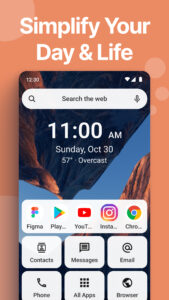
is a launcher that replaces the Android interface and simplifies your phone with easy menus, larger text and buttons, and minimal aesthetic.
Life is complicated enough without a phone that overstimulates. Make your smartphone an oasis of tranquility and elegant design.
Easy to Read
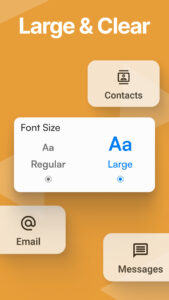
The home screen uses larger fonts and simplified controls. Large text makes it easy to see what you’re looking for, and with large buttons you won’t have to worry about trying to click on tiny icons to get where you need.
Simple Menu
The Easy Homescreen app consists of a simple screen containing the options you choose, including apps, shortcuts, text conversations, contacts and more. It also uses text labels rather than icons, making navigation more simple than ever.
Minimal
Our phones can serve as a huge source of distraction and overwhelm if we let them. Organize your apps simply, and keep your mind clear to focus on things in life that are most important to you.
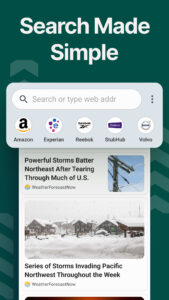
Search
By clicking “install”, I accept and agree to install Easy Homescreen and setting the application’s search functionality to that provided by the service and the Terms of Use and Privacy Policy. The app will update your search settings and will change your Homescreen search experience to use Yahoo.
Beautiful Aesthetic
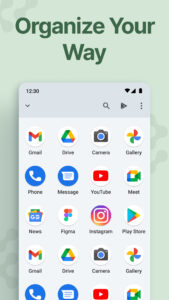
Display all of your apps in an aesthetically pleasing way so your phone can bring you all the vibes. Life is too short to have mismatched icons scattered all over your phone causing chaos and stress.
Utility Features
Includes commonly used features you can access quickly from your homescreen. Maximizes ease of use and productivity.
Easy Keyboard
Includes a custom keyboard with larger keys to allow for more accessibility while typing. This is an optional feature you can use to replace your normal keyboard
Weather
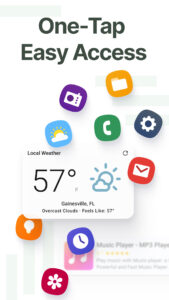
Easily access the current weather and future forecasts. Click on the weather widget at the top of your homescreen to view more detailed weather forecasts.
Do you ever feel overwhelmed with your phone? Or struggle to find apps you need quickly?
Easy Homescreen
is a launcher that replaces the Android interface and simplifies your phone with easy menus, larger text and buttons, and minimal aesthetic.
Life is complicated enough without a phone that overstimulates. Make your smartphone an oasis of tranquility and elegant design.
Easy to Read
The home screen uses larger fonts and simplified controls. Large text makes it easy to see what you’re looking for, and with large buttons you won’t have to worry about trying to click on tiny icons to get where you need.
Simple Menu
The Easy Homescreen app consists of a simple screen containing the options you choose, including apps, shortcuts, text conversations, contacts and more. It also uses text labels rather than icons, making navigation more simple than ever.
Minimal
Our phones can serve as a huge source of distraction and overwhelm if we let them. Organize your apps simply, and keep your mind clear to focus on things in life that are most important to you.
Search
By clicking “install”, I accept and agree to install Easy Homescreen and setting the application’s search functionality to that provided by the service and the Terms of Use and Privacy Policy. The app will update your search settings and will change your Homescreen search experience to use Yahoo.
Beautiful Aesthetic
Display all of your apps in an aesthetically pleasing way so your phone can bring you all the vibes. Life is too short to have mismatched icons scattered all over your phone causing chaos and stress.
Utility Features
Includes commonly used features you can access quickly from your homescreen. Maximizes ease of use and productivity.
Easy Keyboard
Includes a custom keyboard with larger keys to allow for more accessibility while typing. This is an optional feature you can use to replace your normal keyboard
Weather
Easily access the current weather and future forecasts. Click on the weather widget at the top of your homescreen to view more detailed weather forecasts.
Download Easy Homescreen APK
Fast, free and safe download.
APK Permissions 45
- android.permission.ACCESS_ADSERVICES_AD_ID
- android.permission.ACCESS_ADSERVICES_ATTRIBUTION
- android.permission.ACCESS_ADSERVICES_TOPICS
- android.permission.ACCESS_BACKGROUND_LOCATION
- android.permission.ACCESS_COARSE_LOCATION
- android.permission.ACCESS_FINE_LOCATION
- android.permission.ACCESS_NETWORK_STATE
- android.permission.ACCESS_WIFI_STATE
- android.permission.AD_SERVICES_CONFIG
- android.permission.BLUETOOTH
- android.permission.BLUETOOTH_ADMIN
- android.permission.CAMERA
- android.permission.CHANGE_WIFI_STATE
- android.permission.DOWNLOAD_WITHOUT_NOTIFICATION
- android.permission.EXPAND_STATUS_BAR
- android.permission.FOREGROUND_SERVICE
- android.permission.GET_ACCOUNTS
- android.permission.INTERNET
- android.permission.PACKAGE_USAGE_STATS
- android.permission.POST_NOTIFICATIONS
- android.permission.READ_CALENDAR
- android.permission.READ_CONTACTS
- android.permission.READ_EXTERNAL_STORAGE
- android.permission.READ_MEDIA_IMAGES
- android.permission.READ_PHONE_STATE
- android.permission.READ_PROFILE
- android.permission.READ_SYNC_SETTINGS
- android.permission.READ_SYNC_STATS
- android.permission.READ_USER_DICTIONARY
- android.permission.RECEIVE_BOOT_COMPLETED
- android.permission.REQUEST_DELETE_PACKAGES
- android.permission.SET_PREFERRED_APPLICATIONS
- android.permission.SET_WALLPAPER
- android.permission.SET_WALLPAPER_HINTS
- android.permission.USE_CREDENTIALS
- android.permission.VIBRATE
- android.permission.WAKE_LOCK
- android.permission.WRITE_EXTERNAL_STORAGE
- android.permission.WRITE_SYNC_SETTINGS
- android.permission.WRITE_USER_DICTIONARY
- com.android.vending.BILLING
- com.google.android.c2dm.permission.RECEIVE
- com.google.android.finsky.permission.BIND_GET_INSTALL_REFERRER_SERVICE
- com.google.android.gms.permission.AD_ID
- easy.launcher.DYNAMIC_RECEIVER_NOT_EXPORTED_PERMISSION
APK Verified
The cryptographic signature guarantees that the file is safe to install and was not tampered with in any way.
Similar in Personalization


Frequently Asked Questions about Easy Homescreen APK
This is the universal variant — a single APK that contains native libraries for every CPU architecture. It installs on any Android device but is larger than per-architecture variants.
Yes — the APK's signature has been cryptographically verified against the publisher's signing key. The SHA-256 hash is shown in the File Information panel so you can independently confirm the file matches the original release.
Android 26 (API level 34) or newer. Older devices will refuse the install.
Install a free app like 'CPU-Z' or 'Droid Hardware Info' from the Play Store and look at the ABI / Instruction Set row. Most phones made after 2017 are arm64-v8a; if in doubt, download the universal variant.
All variants are functionally identical — same features, same version. They differ only in which CPU architectures the native code is compiled for, and (sometimes) which screen densities the included graphics target. Pick the one that matches your device for the smallest install size, or pick 'Universal' if you're unsure.