
Download Hyundai Digital Key APK 1.0.29.1 arm64-v8a, armeabi-v7a, x86, x86_64 · Android 24+
Download APK
Verified Safe
This is the arm64-v8a, armeabi-v7a, x86, x86_64 build of Hyundai Digital Key 1.0.29.1. Pick this build if your device's primary ABI matches.
File size: 90.5 MB • Min Android: 24 • Target Android: 34 • Version code: 474 • Framework: Native (Java/Kotlin) • Permissions: 25
Screenshots
File Information
| Package Name | com.hyundaiusa.hyundai.digitalcarkey |
|---|---|
| Version Name | 1.0.29.1 |
| Version Code | 474 |
| Architecture | arm64-v8a, armeabi-v7a, x86, x86_64 |
| Min Android Version | Android 24 (API 34) |
| Main Activity | com.hyundaiusa.hyundai.digitalcarkey.ui.activity.IntroActivity |
| Framework | Native (Java/Kotlin) |
| File Size | 90.49 MB |
| Signature (SHA1) | 83F95A1E2DC46B1169C9B7674A6D105829DF1457 |
| File Hash (SHA256) | 28c16b91a105d39f8a1305590c7ce229f760f11e41440c57763b0b4427628c63 |
What's New
• Modify Offline mode logic
• Sync DKC information after offline mode -> online mode
• App permission changes
• Sync DKC information after offline mode -> online mode
• App permission changes
App Description
Introducing Hyundai Digital Key! Using Hyundai Digital Key, you can quickly access and control your Digital Key equipped vehicle using your smartphone. Hyundai Digital Key also allows you to easily create, share and manage digital keys to give friends or family access to your vehicle. With Hyundai Digital Key, you can:
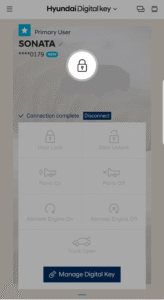
Lock, unlock and start your Hyundai (requires NFC)
Using your smartphone, simply tap your phone on the door handle to lock or unlock your vehicle. When you’re ready to drive, just place your smartphone on the wireless charging pad to start your vehicle.
Remotely control your vehicle using Bluetooth
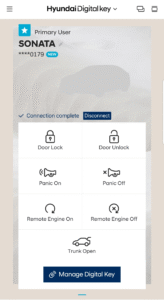
Hyundai Digital Key lets you remotely control your vehicle from a distance using Bluetooth technology. Use the button in the app to remotely start/stop your engine, lock/unlock your doors, turn panic mode on/off or open your trunk.
Share and manage digital keys
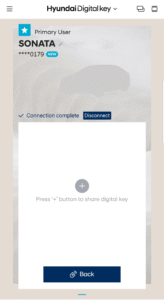
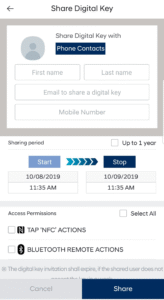
When you want to give someone access to your vehicle, easily create and send them a digital key. Once the invite is accepted, they will be able to use the Hyundai Digital Key app to access or control your vehicle based on the permissions and time period you’ve allowed. Also pause your own digital keys or delete shared keys using the app or on MyHyundai.com.
Lock, unlock and start your Hyundai (requires NFC)
Using your smartphone, simply tap your phone on the door handle to lock or unlock your vehicle. When you’re ready to drive, just place your smartphone on the wireless charging pad to start your vehicle.
Remotely control your vehicle using Bluetooth
Hyundai Digital Key lets you remotely control your vehicle from a distance using Bluetooth technology. Use the button in the app to remotely start/stop your engine, lock/unlock your doors, turn panic mode on/off or open your trunk.
Share and manage digital keys
When you want to give someone access to your vehicle, easily create and send them a digital key. Once the invite is accepted, they will be able to use the Hyundai Digital Key app to access or control your vehicle based on the permissions and time period you’ve allowed. Also pause your own digital keys or delete shared keys using the app or on MyHyundai.com.
Download Hyundai Digital Key APK
Fast, free and safe download.
APK Permissions 25
- android.permission.ACCESS_COARSE_LOCATION
- android.permission.ACCESS_FINE_LOCATION
- android.permission.ACCESS_NETWORK_STATE
- android.permission.BLUETOOTH
- android.permission.BLUETOOTH_ADMIN
- android.permission.BLUETOOTH_ADVERTISE
- android.permission.BLUETOOTH_CONNECT
- android.permission.BLUETOOTH_SCAN
- android.permission.FOREGROUND_SERVICE
- android.permission.FOREGROUND_SERVICE_DATA_SYNC
- android.permission.INTERNET
- android.permission.NFC
- android.permission.POST_NOTIFICATIONS
- android.permission.READ_CONTACTS
- android.permission.READ_EXTERNAL_STORAGE
- android.permission.READ_PHONE_NUMBERS
- android.permission.READ_PHONE_STATE
- android.permission.RECEIVE_BOOT_COMPLETED
- android.permission.VIBRATE
- android.permission.WAKE_LOCK
- android.permission.WRITE_EXTERNAL_STORAGE
- com.google.android.c2dm.permission.RECEIVE
- com.google.android.finsky.permission.BIND_GET_INSTALL_REFERRER_SERVICE
- com.google.android.gms.permission.AD_ID
- com.hyundaiusa.hyundai.digitalcarkey.DYNAMIC_RECEIVER_NOT_EXPORTED_PERMISSION
APK Verified
The cryptographic signature guarantees that the file is safe to install and was not tampered with in any way.
Similar in Auto & Vehicles


Frequently Asked Questions about Hyundai Digital Key APK
This variant is built for devices that report `arm64-v8a, armeabi-v7a, x86, x86_64` as their primary ABI. If your device's CPU matches, this is the smallest, fastest version to install.
Yes — the APK's signature has been cryptographically verified against the publisher's signing key. The SHA-256 hash is shown in the File Information panel so you can independently confirm the file matches the original release.
Android 24 (API level 34) or newer. Older devices will refuse the install.
Install a free app like 'CPU-Z' or 'Droid Hardware Info' from the Play Store and look at the ABI / Instruction Set row. Most phones made after 2017 are arm64-v8a; if in doubt, download the universal variant.
All variants are functionally identical — same features, same version. They differ only in which CPU architectures the native code is compiled for, and (sometimes) which screen densities the included graphics target. Pick the one that matches your device for the smallest install size, or pick 'Universal' if you're unsure.