
Screenshots
File Information
| Package Name | ro.ing.business |
|---|---|
| Version Name | 1.5.59 |
| Version Code | 427 |
| Architecture | arm64-v8a, armeabi-v7a, x86, x86_64 |
| Min Android Version | Android 28 (API 35) |
| Main Activity | com.comarch.new_tech.ui.authentication.AuthenticateActivity |
| Framework | Native (Java/Kotlin) |
| File Size | 39.29 MB |
| Signature (SHA1) | 219931E13580220B5C4B7F32AC14558297E23353 |
| File Hash (SHA256) | 8009e3a83eedc2d40a36bb7a3d1bb60432c9c0bbe6479d275aa9aceeb9025cc0 |
What's New
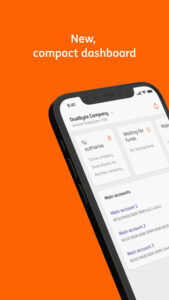
Enjoy simplified access to your account list, account details, and transaction history — just one click away!
You also have access to your credit and deposit account statements in PDF format.
You also have access to your credit and deposit account statements in PDF format.
App Description
We are always here for your business.
The main features of the ING Business app:
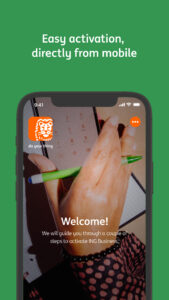
QUICK ACTIVATION:
- Directly from the phone, without using another device (token) or another mobile app;
- A single user code and password to access to all your ING Romania companies;
INCREASED SECURITY AND FLEXIBILITY:
- Versatile login, choose the most suitable option for you: user code and password | 5-digit PIN code | FaceID | Fingerprint;
- Sign payments the way you want: 5-digit PIN code | FaceID | Fingerprint;
DASHBOARD CUSTOMIZATION:
- Hide the accounts you don't want to be displayed;
- Choose the quick buttons you use most frequently;
PUSH NOTIFICATIONS:
- You receive PUSH for transactions from your accounts, if you are a user of a company with only one legal representative;
How do I activate the notifications?
• Update to the latest version of the ING Business application;
• Go to Menu > Settings > General > Notifications (allowed);
• Make sure that you have activated the permission for Notifications from your phone: Settings > Applications > look for the ING Business application in the list of installed applications > Notifications > Allow;
NOTIFICATION MENU (Latest News from ING):
As soon as you log into the application, the page with the latest very important messages will automatically load. The coloured dot placed above the top-right bell indicates if you have unread messages. Also from the bell you can access the Notifications menu, where you can find all the relevant news communicated by ING (read and unread);
KEY FEATURES:
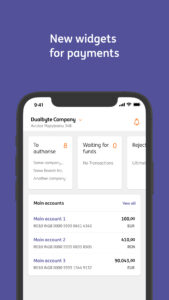
- Access to all accounts of the company/companies;
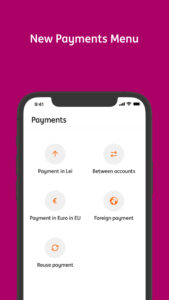
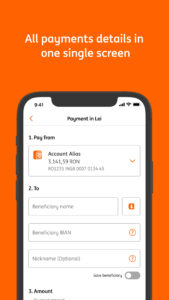
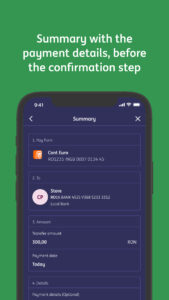
- Payment management:
• sign pending payments made by you or another person;
• view transactions waiting for funds in order to be successfully processed by the bank (without being needed your intervention for processing);
• history/templates to be able to reuse the data of previous payments or previous saved beneficiaries;
• scheduling payments;
- Currency exchange updated in real time;
- Visualization and liquidation of deposits;
- View active loans;
CHOOSE THE PREFFERED LANGUAGE:
Starting with Android 13, you can choose the language of the application, independent of the phone's language (english or romanian):
• add the secondary language from Settings > Language and keyboard;
• Settings > Applications > Language > Choose the desired language;
ADDITIONAL FUNCTIONALITIES:
- Giving a rating - you can tell us directly what you think of ING Business, because we want to know your opinion constantly;
- By default, we show only active deposits, having to go to the settings only if you want to see closed deposits as well;
- Map for ING branches and ATMs;
- Generating for account history in .pdf format for the chosen period;
- The standard exchange rate valid for legal entities.
Keep in mind:
- If you want to see more or need help, we have prepared here (
ing.ro/imm/ING-Business#Tutoriale
) several tutorials videos about the application functionalities.
- Activate the automatic update of the application to ensure you use the latest version and to enjoy all the enhancements (bugfixes or new features).
We strive for a safe experience in ING Business, so we added new cookie modules which help us to identify potential frauds and protect you from malware. You can find details on the ING site in Politica de cookies a ING Business, at the end of the section "Module strict necesare" or in the ING Business App, section “About ING Business mobile app” , option “Read cookie policy”.
The main features of the ING Business app:
QUICK ACTIVATION:
- Directly from the phone, without using another device (token) or another mobile app;
- A single user code and password to access to all your ING Romania companies;
INCREASED SECURITY AND FLEXIBILITY:
- Versatile login, choose the most suitable option for you: user code and password | 5-digit PIN code | FaceID | Fingerprint;
- Sign payments the way you want: 5-digit PIN code | FaceID | Fingerprint;
DASHBOARD CUSTOMIZATION:
- Hide the accounts you don't want to be displayed;
- Choose the quick buttons you use most frequently;
PUSH NOTIFICATIONS:
- You receive PUSH for transactions from your accounts, if you are a user of a company with only one legal representative;
How do I activate the notifications?
• Update to the latest version of the ING Business application;
• Go to Menu > Settings > General > Notifications (allowed);
• Make sure that you have activated the permission for Notifications from your phone: Settings > Applications > look for the ING Business application in the list of installed applications > Notifications > Allow;
NOTIFICATION MENU (Latest News from ING):
As soon as you log into the application, the page with the latest very important messages will automatically load. The coloured dot placed above the top-right bell indicates if you have unread messages. Also from the bell you can access the Notifications menu, where you can find all the relevant news communicated by ING (read and unread);
KEY FEATURES:
- Access to all accounts of the company/companies;
- Payment management:
• sign pending payments made by you or another person;
• view transactions waiting for funds in order to be successfully processed by the bank (without being needed your intervention for processing);
• history/templates to be able to reuse the data of previous payments or previous saved beneficiaries;
• scheduling payments;
- Currency exchange updated in real time;
- Visualization and liquidation of deposits;
- View active loans;
CHOOSE THE PREFFERED LANGUAGE:
Starting with Android 13, you can choose the language of the application, independent of the phone's language (english or romanian):
• add the secondary language from Settings > Language and keyboard;
• Settings > Applications > Language > Choose the desired language;
ADDITIONAL FUNCTIONALITIES:
- Giving a rating - you can tell us directly what you think of ING Business, because we want to know your opinion constantly;
- By default, we show only active deposits, having to go to the settings only if you want to see closed deposits as well;
- Map for ING branches and ATMs;
- Generating for account history in .pdf format for the chosen period;
- The standard exchange rate valid for legal entities.
Keep in mind:
- If you want to see more or need help, we have prepared here (
ing.ro/imm/ING-Business#Tutoriale
) several tutorials videos about the application functionalities.
- Activate the automatic update of the application to ensure you use the latest version and to enjoy all the enhancements (bugfixes or new features).
We strive for a safe experience in ING Business, so we added new cookie modules which help us to identify potential frauds and protect you from malware. You can find details on the ING site in Politica de cookies a ING Business, at the end of the section "Module strict necesare" or in the ING Business App, section “About ING Business mobile app” , option “Read cookie policy”.
Download ING Business Romania APK
Fast, free and safe download.
APK Permissions 20
- android.permission.ACCESS_COARSE_LOCATION
- android.permission.ACCESS_FINE_LOCATION
- android.permission.ACCESS_NETWORK_STATE
- android.permission.ACCESS_WIFI_STATE
- android.permission.BLUETOOTH
- android.permission.BLUETOOTH_CONNECT
- android.permission.INTERNET
- android.permission.POST_NOTIFICATIONS
- android.permission.QUERY_ALL_PACKAGES
- android.permission.READ_PHONE_NUMBERS
- android.permission.READ_PHONE_STATE
- android.permission.READ_PRIVILEGED_PHONE_STATE
- android.permission.USE_BIOMETRIC
- android.permission.USE_FINGERPRINT
- android.permission.WAKE_LOCK
- com.google.android.c2dm.permission.RECEIVE
- com.google.android.finsky.permission.BIND_GET_INSTALL_REFERRER_SERVICE
- ro.ing.business.C2D_MESSAGE
- ro.ing.business.DYNAMIC_RECEIVER_NOT_EXPORTED_PERMISSION
- ro.ing.business.MOBILE_BANKING_PERMISSION
APK Verified
The cryptographic signature guarantees that the file is safe to install and was not tampered with in any way.


