
Download Peachy: Face App & Body Editor APK 1.171.51 Universal · Android 24+
Download APK
Verified Safe
This is the universal build of Peachy: Face App & Body Editor 1.171.51. It contains native libraries for every CPU architecture (arm64-v8a, armeabi-v7a, x86, x86_64), so it installs on any Android device. The trade-off is size — it's larger than per-architecture variants. Pick this one if you're unsure which CPU your phone has, or if you plan to share the APK with multiple devices.
File size: 53.1 MB • Min Android: 24 • Target Android: 35 • Version code: 51 • Framework: Native (Java/Kotlin) • Permissions: 24
Screenshots
File Information
| Package Name | peachy.bodyeditor.faceapp |
|---|---|
| Version Name | 1.171.51 |
| Version Code | 51 |
| Architecture | Universal |
| Min Android Version | Android 24 (API 35) |
| Main Activity | com.faceapp.peachy.ui.activity.SplashActivity |
| Framework | Native (Java/Kotlin) |
| File Size | 53.09 MB |
| Signature (SHA1) | 28AB9173BBAD72DA137EE5DBF04E0C1AF6A059C8 |
| File Hash (SHA256) | e251baece12aae2ac2d0f919403bc3535978ccabf9c07c2cdb2147e288e73b73 |
What's New
🌀 [New - Expand] Smart image expansion now available: AI adds content to enlarge photos.
✨ [New - AI Edits] New page now live with quick access to AI features: Enhance & Expand.
✍️ [Optimization - Crop] Logic enhanced for cropping adjustments.
🌟 Bug fixes and other improvements
📩 Enjoy using Peachy and let us know your thoughts♥️ Our email:
peachy.android@inshot.com.
✨ [New - AI Edits] New page now live with quick access to AI features: Enhance & Expand.
✍️ [Optimization - Crop] Logic enhanced for cropping adjustments.
🌟 Bug fixes and other improvements
📩 Enjoy using Peachy and let us know your thoughts♥️ Our email:
peachy.android@inshot.com.
App Description
Aiming for perfection in every detail,
Peachy
stands out as a powerful and user-friendly professional photo editor, especially for
photo retouch, face tuning and body reshape.
Enhance your Natural Beauty with our amazing face app!
No Watermark and Free.
Everybody is an excellent photographer with this simple photo retouch app, Peachy helps you meet the best version of you, smooth skin, whiten teeth, reshape body, fix blemishes, remove wrinkles, face tuning, get taller and slim, get perfect curves, etc.
Peachy provides lots of portrait and
selfie
photo editing features:
Photo Retouch
- Smooth and retouch your skin
- Remove wrinkles and acne
- Brighten your eyes naturally
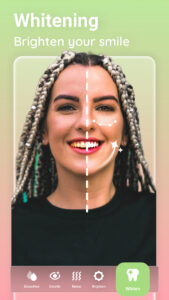
- Perfect your smile with Teeth Whitener
- Add volume and darken your eyebrows
- Get rid of oily skin with the Matte retouch tool
Face Tune & Body Reshape
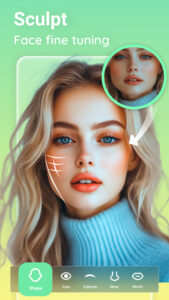
- Fine tune face shape, width, and other facial features
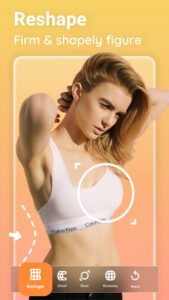
- Reshape your body and facial structure
- Refine a specific area of the selfie, for example, arms or facial features
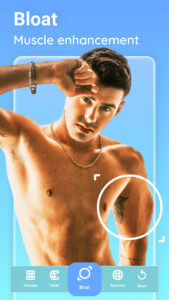
- Bloat your breast to get big boobs, enlarge muscles and get shapely figure
- Creatively use the Reshape tool to enhance and exaggerate features
Face Editor
- Plump your lips in a snap with our face app
- Auto reshape nose, eyes, eyebrows in every details, the best face app with Free features
- Multi-face supported face app: Edit group photos easily with support for
up to 20 faces
- Independently adjust the shape of the left or right side of the face, along with the eyes and eyebrows
Body Editor
- Get small waist and big buttocks easily
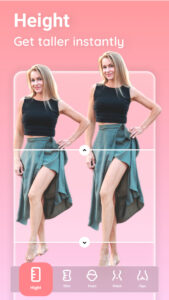
- Slim your legs, or elongate your legs to get taller
- Enhance your body both laterally and longitudinally
- Enhance or slim your arms as you want
AI Touch
-
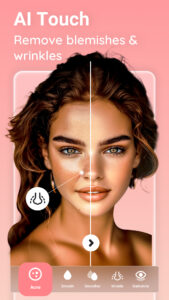
Automatically retouch your face
: remove wrinkles, acne, dark circles, smooth skin, and whiten teeth
- Easily edit group photos with multi-face support: up to 20 faces
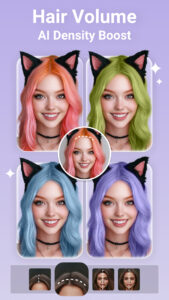
Hair Color Changer
- Dye your hair with hair color changer
- Hair makeover with ombré hair, various color to choose from
Basic Photo Editing Tools
More than just a face editor and body editor, Peachy provides basic photo editor features:
✦
Crop
- Freely rotate and crop your photos to adapt for social media ratios and any other situations.
✦
Adjust
- Easily adjust brightness, contrast, warmth, shadows, sharpness, vignette, etc.
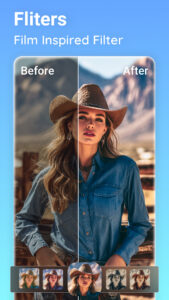
Filters for Selfies
- High-fashion vintage photo filters app
- Perfect filters for selfies
Trendy Effects
- Improve lighting effects of the selfie or portrait
- Explore a variety of trending photo effects located in the sticker menu
With all the powerful and distinctive face and body editor features above, Peachy helps you perfect your selfies or portraits like a pro! Share your artwork to Instagram, Snapchat, WhatsApp, Facebook, etc.
No Watermark.
It can be fun and inspiring!
Any suggestions or feedback for Peachy – AI Face & Body Editor, please email us at
peachy.android@inshot.com
. We will get back to you as soon as possible.
Peachy
stands out as a powerful and user-friendly professional photo editor, especially for
photo retouch, face tuning and body reshape.
Enhance your Natural Beauty with our amazing face app!
No Watermark and Free.
Everybody is an excellent photographer with this simple photo retouch app, Peachy helps you meet the best version of you, smooth skin, whiten teeth, reshape body, fix blemishes, remove wrinkles, face tuning, get taller and slim, get perfect curves, etc.
Peachy provides lots of portrait and
selfie
photo editing features:
Photo Retouch
- Smooth and retouch your skin
- Remove wrinkles and acne
- Brighten your eyes naturally
- Perfect your smile with Teeth Whitener
- Add volume and darken your eyebrows
- Get rid of oily skin with the Matte retouch tool
Face Tune & Body Reshape
- Fine tune face shape, width, and other facial features
- Reshape your body and facial structure
- Refine a specific area of the selfie, for example, arms or facial features
- Bloat your breast to get big boobs, enlarge muscles and get shapely figure
- Creatively use the Reshape tool to enhance and exaggerate features
Face Editor
- Plump your lips in a snap with our face app
- Auto reshape nose, eyes, eyebrows in every details, the best face app with Free features
- Multi-face supported face app: Edit group photos easily with support for
up to 20 faces
- Independently adjust the shape of the left or right side of the face, along with the eyes and eyebrows
Body Editor
- Get small waist and big buttocks easily
- Slim your legs, or elongate your legs to get taller
- Enhance your body both laterally and longitudinally
- Enhance or slim your arms as you want
AI Touch
-
Automatically retouch your face
: remove wrinkles, acne, dark circles, smooth skin, and whiten teeth
- Easily edit group photos with multi-face support: up to 20 faces
Hair Color Changer
- Dye your hair with hair color changer
- Hair makeover with ombré hair, various color to choose from
Basic Photo Editing Tools
More than just a face editor and body editor, Peachy provides basic photo editor features:
✦
Crop
- Freely rotate and crop your photos to adapt for social media ratios and any other situations.
✦
Adjust
- Easily adjust brightness, contrast, warmth, shadows, sharpness, vignette, etc.
Filters for Selfies
- High-fashion vintage photo filters app
- Perfect filters for selfies
Trendy Effects
- Improve lighting effects of the selfie or portrait
- Explore a variety of trending photo effects located in the sticker menu
With all the powerful and distinctive face and body editor features above, Peachy helps you perfect your selfies or portraits like a pro! Share your artwork to Instagram, Snapchat, WhatsApp, Facebook, etc.
No Watermark.
It can be fun and inspiring!
Any suggestions or feedback for Peachy – AI Face & Body Editor, please email us at
peachy.android@inshot.com
. We will get back to you as soon as possible.
Download Peachy: Face App & Body Editor APK
Fast, free and safe download.
APK Permissions 24
- android.permission.ACCESS_ADSERVICES_AD_ID
- android.permission.ACCESS_ADSERVICES_ATTRIBUTION
- android.permission.ACCESS_ADSERVICES_TOPICS
- android.permission.ACCESS_NETWORK_STATE
- android.permission.ACCESS_WIFI_STATE
- android.permission.CAMERA
- android.permission.FOREGROUND_SERVICE
- android.permission.INTERNET
- android.permission.POST_NOTIFICATIONS
- android.permission.READ_EXTERNAL_STORAGE
- android.permission.READ_MEDIA_IMAGES
- android.permission.READ_MEDIA_VISUAL_USER_SELECTED
- android.permission.RECEIVE_BOOT_COMPLETED
- android.permission.SYSTEM_ALERT_WINDOW
- android.permission.VIBRATE
- android.permission.WAKE_LOCK
- android.permission.WRITE_EXTERNAL_STORAGE
- com.android.vending.BILLING
- com.applovin.array.apphub.permission.BIND_APPHUB_SERVICE
- com.google.android.apps.photos.permission.GOOGLE_PHOTOS
- com.google.android.finsky.permission.BIND_GET_INSTALL_REFERRER_SERVICE
- com.google.android.gms.permission.AD_ID
- com.google.android.providers.gsf.permission.READ_GSERVICES
- peachy.bodyeditor.faceapp.DYNAMIC_RECEIVER_NOT_EXPORTED_PERMISSION
APK Verified
The cryptographic signature guarantees that the file is safe to install and was not tampered with in any way.
Similar in Photography


More by InShot Video Editor


Frequently Asked Questions about Peachy: Face App & Body Editor APK
This is the universal variant — a single APK that contains native libraries for every CPU architecture. It installs on any Android device but is larger than per-architecture variants.
Yes — the APK's signature has been cryptographically verified against the publisher's signing key. The SHA-256 hash is shown in the File Information panel so you can independently confirm the file matches the original release.
Android 24 (API level 35) or newer. Older devices will refuse the install.
Install a free app like 'CPU-Z' or 'Droid Hardware Info' from the Play Store and look at the ABI / Instruction Set row. Most phones made after 2017 are arm64-v8a; if in doubt, download the universal variant.
All variants are functionally identical — same features, same version. They differ only in which CPU architectures the native code is compiled for, and (sometimes) which screen densities the included graphics target. Pick the one that matches your device for the smallest install size, or pick 'Universal' if you're unsure.