
This is the universal build of Instapaper 1.2. It contains native libraries for every CPU architecture (arm64-v8a, armeabi-v7a, x86, x86_64), so it installs on any Android device. The trade-off is size — it's larger than per-architecture variants. Pick this one if you're unsure which CPU your phone has, or if you plan to share the APK with multiple devices.
File size: 3.6 MB • Min Android: 10 • Target Android: 17 • Version code: 12 • Framework: Native (Java/Kotlin) • Permissions: 7
Screenshots






File Information
| Package Name | com.instapaper.android |
|---|---|
| Version Name | 1.2 |
| Version Code | 12 |
| Architecture | Universal |
| Min Android Version | Android 10 (API 17) |
| Main Activity | com.instapaper.android.activity.HomeActivity |
| Framework | Native (Java/Kotlin) |
| File Size | 3.59 MB |
| Signature (SHA1) | F98CEEE61233869270ADF08FBA6FF83063D5A925 |
| File Hash (SHA256) | 80986b8fc8aca858aad62a1c4b8b1cc5d2494c79c6812e4936fc411fec19f6bc |
What's New
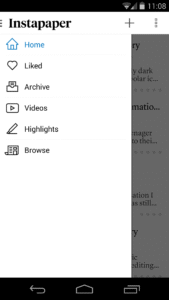
* You can now Add Link directly by opening the side panel and tapping "+".
* Not Tagged filter is now available from article list "..." icon > Filter.
* Read Progress sorting lets you sort articles by those in progress.
* Allow for smaller line heights.
* Crash fixes and other improvements.
* Not Tagged filter is now available from article list "..." icon > Filter.
* Read Progress sorting lets you sort articles by those in progress.
* Allow for smaller line heights.
* Crash fixes and other improvements.
App Description
Instapaper is the simplest way to save and store articles for reading: offline, on-the-go, anytime, anywhere, perfectly formatted.
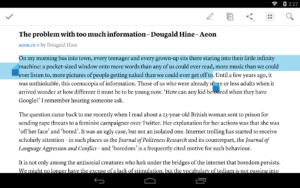
Instapaper for Android provides a mobile and tablet-optimized Text view that makes reading Internet content a clean and uncluttered experience. Read offline, even on airplanes, subways, on elevators, or on Wi-Fi-only devices away from Internet connections.
CORE FEATURES:
- Saves most web pages as text only, stripping away the full-sized layout to optimize for tablet and phone screens
- Distraction-free reading environment gets out of your way so you can focus on the content
- Everything you download is then available **OFFLINE**, so you can read whenever you want, even on airplanes, subways, or Wi-Fi-only devices away from internet connections
PLUS:
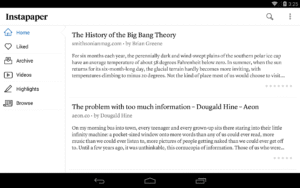
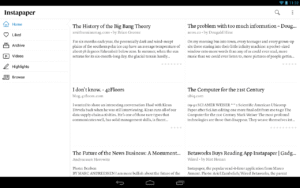
- Optimized tablet interface
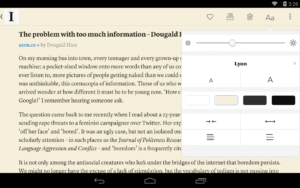
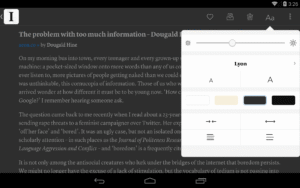
- Adjustable fonts, text sizes, line spacing, and margins
- Dark mode and brightness control for night reading
- Sort your list of unread items by popularity, date, article length, and shuffle
- Folders for organization
- Share via web browser and any app that supports sharing
- Rotation lock
- Download up to 500 articles on your phone or tablet, and store unlimited articles on the Instapaper website
- Folders for organization
- Dictionary and Wikipedia lookups
- Tilt scrolling, page-flipping
- Preview links in the built-in browser without leaving the app
- Search, via in-app purchase
Instapaper for Android provides a mobile and tablet-optimized Text view that makes reading Internet content a clean and uncluttered experience. Read offline, even on airplanes, subways, on elevators, or on Wi-Fi-only devices away from Internet connections.
CORE FEATURES:
- Saves most web pages as text only, stripping away the full-sized layout to optimize for tablet and phone screens
- Distraction-free reading environment gets out of your way so you can focus on the content
- Everything you download is then available **OFFLINE**, so you can read whenever you want, even on airplanes, subways, or Wi-Fi-only devices away from internet connections
PLUS:
- Optimized tablet interface
- Adjustable fonts, text sizes, line spacing, and margins
- Dark mode and brightness control for night reading
- Sort your list of unread items by popularity, date, article length, and shuffle
- Folders for organization
- Share via web browser and any app that supports sharing
- Rotation lock
- Download up to 500 articles on your phone or tablet, and store unlimited articles on the Instapaper website
- Folders for organization
- Dictionary and Wikipedia lookups
- Tilt scrolling, page-flipping
- Preview links in the built-in browser without leaving the app
- Search, via in-app purchase
Download Instapaper APK
Fast, free and safe download.
APK Permissions 7
- android.permission.ACCESS_COARSE_LOCATION
- android.permission.ACCESS_NETWORK_STATE
- android.permission.INTERNET
- android.permission.RECEIVE_BOOT_COMPLETED
- android.permission.WAKE_LOCK
- android.permission.WRITE_EXTERNAL_STORAGE
- android.permission.WRITE_SETTINGS
APK Verified
The cryptographic signature guarantees that the file is safe to install and was not tampered with in any way.
Similar in News & Magazines


Frequently Asked Questions about Instapaper APK
This is the universal variant — a single APK that contains native libraries for every CPU architecture. It installs on any Android device but is larger than per-architecture variants.
Yes — the APK's signature has been cryptographically verified against the publisher's signing key. The SHA-256 hash is shown in the File Information panel so you can independently confirm the file matches the original release.
Android 10 (API level 17) or newer. Older devices will refuse the install.
Install a free app like 'CPU-Z' or 'Droid Hardware Info' from the Play Store and look at the ABI / Instruction Set row. Most phones made after 2017 are arm64-v8a; if in doubt, download the universal variant.
All variants are functionally identical — same features, same version. They differ only in which CPU architectures the native code is compiled for, and (sometimes) which screen densities the included graphics target. Pick the one that matches your device for the smallest install size, or pick 'Universal' if you're unsure.