
Download Iriun 4K Webcam for PC and Mac APK 2.8.12 arm64-v8a, armeabi-v7a, x86_64 · Android 22+
Download APK
Verified Safe
This is the arm64-v8a, armeabi-v7a, x86_64 build of Iriun 4K Webcam for PC and Mac 2.8.12. Pick this build if your device's primary ABI matches.
File size: 6.8 MB • Min Android: 22 • Target Android: 35 • Version code: 188 • Framework: Native (Java/Kotlin) • Permissions: 17
Screenshots
File Information
| Package Name | com.jacksoftw.webcam |
|---|---|
| Version Name | 2.8.12 |
| Version Code | 188 |
| Architecture | arm64-v8a, armeabi-v7a, x86_64 |
| Min Android Version | Android 22 (API 35) |
| Main Activity | com.iriun.webcam.IntroActivity |
| Framework | Native (Java/Kotlin) |
| File Size | 6.80 MB |
| Signature (SHA1) | EF03407CB17E28038AE8CD7F736850A0D05BEFC5 |
| File Hash (SHA256) | f24da8ad49d50f4946c0edce6180e88d2d5d19ffce8be91142c032a1f2136fbc |
What's New
Separate focus control.
App Description
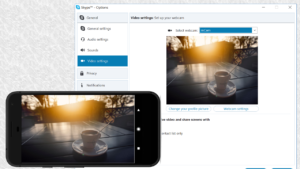
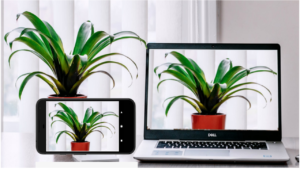
Use your Android phone's camera as a wireless webcam in PC or Mac. Install needed drivers and use your phone with Skype, Zoom etc video applications.
Installing drivers for the computer:
You can download needed webcam drivers for your PC or Mac from
https://iriun.com
Using webcam:
1. Launch Iriun Webcam app on your phone
2. Start Iriun Webcam Server on your PC
3. The phone is connected automatically to your PC using wireless WiFi network and the camera is ready to use.
4. Configure your desktop application to use Iriun Webcam as source for audio and video
Features:
- Works with screen off
- Connects with WiFi or USB.
- Supports resolutions up to 4K. (Max resolution depends on the phone model)
- Pinch zoom
- Mirroring
- No Ads
Pro version features:
- No watermark
- Manually adjust ISO, exposure and white balance
- Remotely control camera from the Desktop too
Installing drivers for the computer:
You can download needed webcam drivers for your PC or Mac from
https://iriun.com
Using webcam:
1. Launch Iriun Webcam app on your phone
2. Start Iriun Webcam Server on your PC
3. The phone is connected automatically to your PC using wireless WiFi network and the camera is ready to use.
4. Configure your desktop application to use Iriun Webcam as source for audio and video
Features:
- Works with screen off
- Connects with WiFi or USB.
- Supports resolutions up to 4K. (Max resolution depends on the phone model)
- Pinch zoom
- Mirroring
- No Ads
Pro version features:
- No watermark
- Manually adjust ISO, exposure and white balance
- Remotely control camera from the Desktop too
Download Iriun 4K Webcam for PC and Mac APK
Fast, free and safe download.
APK Permissions 17
- android.permission.ACCESS_ADSERVICES_AD_ID
- android.permission.ACCESS_ADSERVICES_ATTRIBUTION
- android.permission.ACCESS_ADSERVICES_TOPICS
- android.permission.ACCESS_NETWORK_STATE
- android.permission.CAMERA
- android.permission.FOREGROUND_SERVICE
- android.permission.FOREGROUND_SERVICE_CAMERA
- android.permission.FOREGROUND_SERVICE_MICROPHONE
- android.permission.INTERNET
- android.permission.MODIFY_AUDIO_SETTINGS
- android.permission.POST_NOTIFICATIONS
- android.permission.RECORD_AUDIO
- android.permission.WAKE_LOCK
- com.android.vending.BILLING
- com.google.android.finsky.permission.BIND_GET_INSTALL_REFERRER_SERVICE
- com.google.android.gms.permission.AD_ID
- com.jacksoftw.webcam.DYNAMIC_RECEIVER_NOT_EXPORTED_PERMISSION
APK Verified
The cryptographic signature guarantees that the file is safe to install and was not tampered with in any way.


Frequently Asked Questions about Iriun 4K Webcam for PC and Mac APK
This variant is built for devices that report `arm64-v8a, armeabi-v7a, x86_64` as their primary ABI. If your device's CPU matches, this is the smallest, fastest version to install.
Yes — the APK's signature has been cryptographically verified against the publisher's signing key. The SHA-256 hash is shown in the File Information panel so you can independently confirm the file matches the original release.
Android 22 (API level 35) or newer. Older devices will refuse the install.
Install a free app like 'CPU-Z' or 'Droid Hardware Info' from the Play Store and look at the ABI / Instruction Set row. Most phones made after 2017 are arm64-v8a; if in doubt, download the universal variant.
All variants are functionally identical — same features, same version. They differ only in which CPU architectures the native code is compiled for, and (sometimes) which screen densities the included graphics target. Pick the one that matches your device for the smallest install size, or pick 'Universal' if you're unsure.