
Download Text Expander - Texpand APK 2.5.3 - 47dfe7b Universal · Android 24+
Download APK
Verified Safe
This is the universal build of Text Expander - Texpand 2.5.3 - 47dfe7b. It contains native libraries for every CPU architecture (arm64-v8a, armeabi-v7a, x86, x86_64), so it installs on any Android device. The trade-off is size — it's larger than per-architecture variants. Pick this one if you're unsure which CPU your phone has, or if you plan to share the APK with multiple devices.
File size: 6.2 MB • Min Android: 24 • Target Android: 35 • Version code: 3000055 • Framework: Native (Java/Kotlin) • Permissions: 17
Screenshots


File Information
| Package Name | com.isaiasmatewos.texpand |
|---|---|
| Version Name | 2.5.3 - 47dfe7b |
| Version Code | 3000055 |
| Architecture | Universal |
| Min Android Version | Android 24 (API 35) |
| Main Activity | com.isaiasmatewos.texpand.ui.activities.HomeActivity |
| Framework | Native (Java/Kotlin) |
| File Size | 6.20 MB |
| Signature (SHA1) | 27E57629BA9A3A427673CDC926DB7514320AFA0D |
| File Hash (SHA256) | e69fb012b41ac15155ec7579b7805a7a989267fa56fc6700d8f85cae9352a155 |
What's New
• Fixes issues with Actions
• Fixes an issue where large image containing backups couldn't be imported
• Bug-fixes and minor improvements
• Fixes an issue where large image containing backups couldn't be imported
• Bug-fixes and minor improvements
App Description
Simplify your typing tasks with Texpand, a text-expansion app designed to increase your efficiency.
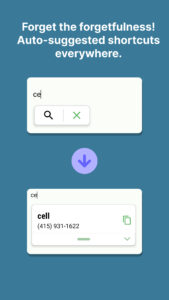
Bysetting up text shortcuts, you can auto-fill frequently used phrases right after typing a shortabbreviation.
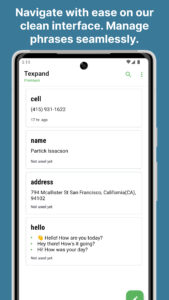
Need options? Our interface offers a dynamic list of phrases coupled with every shortcut.
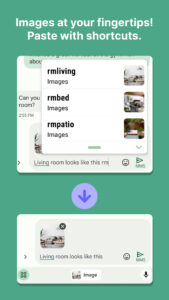
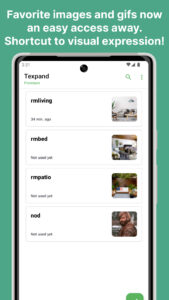
Not just limited to text, you can also attach images or gifs directly to your abbreviations.
Made a mistake? No worries. With a simple tap on backspace, you can undo any text expansions.
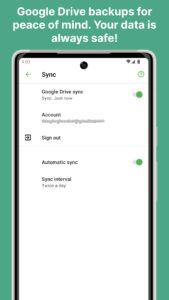
For added peace of mind, your data is safely backed up on Google Drive and easily transferable through CSV file import/export.
Tailor your experience with per-shortcut basis or global text expansion settings - instant expansion, addition of space post-expansion, and more. For a detailed walkthrough, refer to our comprehensive guide.
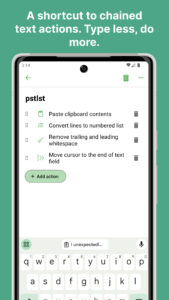
Texpand also offers variable integration - put date/time, cursor positions, or clipboard content right into your phrases. For an even more dynamic output, chain actions together and get multiple tasks done by typing a single shortcut.
Switch to an intelligent writing helper. Experience Texpand
Texpand uses the Accessibility API
Texpand uses Accessibility API to detect whether a saved shortcut is typed and replace it with a corresponding phrase.
Additional Info👇
🚀 Setting up Texpand →
www.texpandapp.com/docs/#/README?id=getting-started-with-texpand
⚙️ Configure Texpand →
www.texpandapp.com/docs/#/text-expansion-configuration?id=configure-text-expansion
🔁 Backup and sync →
www.texpandapp.com/docs/#/backup-and-sync?id=backup-amp-sync
⒳ Texpand Variables →
www.texpandapp.com/docs/#/backup-and-sync?id=backup-amp-sync
🙋 FAQ →
www.texpandapp.com/docs/#/faq
🤝 By downloading and using Texpand you accept it's terms of service:
bit.ly/txpnd-tos
Bysetting up text shortcuts, you can auto-fill frequently used phrases right after typing a shortabbreviation.
Need options? Our interface offers a dynamic list of phrases coupled with every shortcut.
Not just limited to text, you can also attach images or gifs directly to your abbreviations.
Made a mistake? No worries. With a simple tap on backspace, you can undo any text expansions.
For added peace of mind, your data is safely backed up on Google Drive and easily transferable through CSV file import/export.
Tailor your experience with per-shortcut basis or global text expansion settings - instant expansion, addition of space post-expansion, and more. For a detailed walkthrough, refer to our comprehensive guide.
Texpand also offers variable integration - put date/time, cursor positions, or clipboard content right into your phrases. For an even more dynamic output, chain actions together and get multiple tasks done by typing a single shortcut.
Switch to an intelligent writing helper. Experience Texpand
Texpand uses the Accessibility API
Texpand uses Accessibility API to detect whether a saved shortcut is typed and replace it with a corresponding phrase.
Additional Info👇
🚀 Setting up Texpand →
www.texpandapp.com/docs/#/README?id=getting-started-with-texpand
⚙️ Configure Texpand →
www.texpandapp.com/docs/#/text-expansion-configuration?id=configure-text-expansion
🔁 Backup and sync →
www.texpandapp.com/docs/#/backup-and-sync?id=backup-amp-sync
⒳ Texpand Variables →
www.texpandapp.com/docs/#/backup-and-sync?id=backup-amp-sync
🙋 FAQ →
www.texpandapp.com/docs/#/faq
🤝 By downloading and using Texpand you accept it's terms of service:
bit.ly/txpnd-tos
Download Text Expander - Texpand APK
Fast, free and safe download.
APK Permissions 17
- android.permission.ACCESS_NETWORK_STATE
- android.permission.FOREGROUND_SERVICE
- android.permission.FOREGROUND_SERVICE_DATA_SYNC
- android.permission.INTERNET
- android.permission.POST_NOTIFICATIONS
- android.permission.RECEIVE_BOOT_COMPLETED
- android.permission.REQUEST_IGNORE_BATTERY_OPTIMIZATIONS
- android.permission.SYSTEM_ALERT_WINDOW
- android.permission.USE_FINGERPRINT
- android.permission.WAKE_LOCK
- android.permission.WRITE_EXTERNAL_STORAGE
- com.android.vending.BILLING
- com.android.vending.CHECK_LICENSE
- com.google.android.finsky.permission.BIND_GET_INSTALL_REFERRER_SERVICE
- com.google.android.gms.permission.AD_ID
- com.isaiasmatewos.texpand.DYNAMIC_RECEIVER_NOT_EXPORTED_PERMISSION
- com.isaiasmatewos.texpand.permission.ACCESS_DATA
APK Verified
The cryptographic signature guarantees that the file is safe to install and was not tampered with in any way.
Similar in Productivity


Frequently Asked Questions about Text Expander - Texpand APK
This is the universal variant — a single APK that contains native libraries for every CPU architecture. It installs on any Android device but is larger than per-architecture variants.
Yes — the APK's signature has been cryptographically verified against the publisher's signing key. The SHA-256 hash is shown in the File Information panel so you can independently confirm the file matches the original release.
Android 24 (API level 35) or newer. Older devices will refuse the install.
Install a free app like 'CPU-Z' or 'Droid Hardware Info' from the Play Store and look at the ABI / Instruction Set row. Most phones made after 2017 are arm64-v8a; if in doubt, download the universal variant.
All variants are functionally identical — same features, same version. They differ only in which CPU architectures the native code is compiled for, and (sometimes) which screen densities the included graphics target. Pick the one that matches your device for the smallest install size, or pick 'Universal' if you're unsure.