
Download TCG Hub - Pokémon Card Tracker APK 1.8.7 Universal · Android 23+
Download APK
Verified Safe
This is the universal build of TCG Hub - Pokémon Card Tracker 1.8.7. It contains native libraries for every CPU architecture (arm64-v8a, armeabi-v7a, x86, x86_64), so it installs on any Android device. The trade-off is size — it's larger than per-architecture variants. Pick this one if you're unsure which CPU your phone has, or if you plan to share the APK with multiple devices.
File size: 52.8 MB • Min Android: 23 • Target Android: 35 • Version code: 96 • Framework: Native (Java/Kotlin) • Permissions: 12
Screenshots
File Information
| Package Name | com.jacobgreenland.tcghub_pokemon |
|---|---|
| Version Name | 1.8.7 |
| Version Code | 96 |
| Architecture | Universal |
| Min Android Version | Android 23 (API 35) |
| Main Activity | com.jacobgreenland.tcghub_pokemon.views.activities.SplashScreenActivity |
| Framework | Native (Java/Kotlin) |
| File Size | 52.80 MB |
| Signature (SHA1) | 173C8AE0D7C191270E8FBE162773F2978ABFE47B |
| File Hash (SHA256) | 2a75e677b81dba1ad1b2306cce4fefab55039c096c1f0571a35b942d08ab3590 |
What's New
Bug fixes and performance improvements.
App Description
- ALL NEW SETS ADDED BEFORE THEIR OFFICIAL RELEASE! -
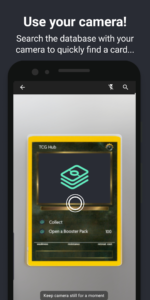
* Now you can scan your cards with your camera to add them to your collection faster than ever! *
TCG Hub - Card Collection Tool is an unofficial app that will become the future for your card collection. Specifically designed to display and record your progress conveniently in one place, the sleek interface allows you to quickly add new cards to your digital collection. Your collection can be synced to the cloud if you wish, by completing a small sign up process you'll be able to take that collection anywhere and always have a backup!
All collection features are available offline, and any future card updates will be supplied to the app automatically without the need for a full app update!
TCG Hub also contains every Secret Rare card for every Set in its database!
With TCG Hub - Card Collection Tool you can:
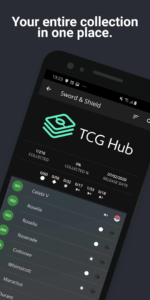
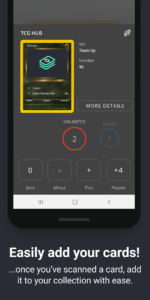
• Record progress made throughout your collecting journey.
• Scan cards with your camera to quickly add them to your collection.
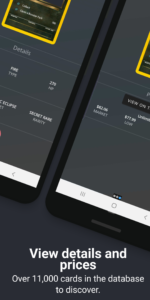
• View prices for each and every card in the database, and view an overall collection value.
• Sync your collection to the cloud to take it with you wherever you go.
• Wishlist cards you want to buy in the future.
• View your entire collection in one place.
• Simulate a trade to see if it's fair for both parties.
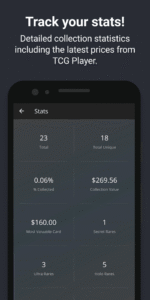
• See detailed statistics of your collection.
TCG Hub is 100% paywall and advertisement free, forever.
* DISCLAIMER *
TCG Hub is an unofficial, free fan made app.
* Now you can scan your cards with your camera to add them to your collection faster than ever! *
TCG Hub - Card Collection Tool is an unofficial app that will become the future for your card collection. Specifically designed to display and record your progress conveniently in one place, the sleek interface allows you to quickly add new cards to your digital collection. Your collection can be synced to the cloud if you wish, by completing a small sign up process you'll be able to take that collection anywhere and always have a backup!
All collection features are available offline, and any future card updates will be supplied to the app automatically without the need for a full app update!
TCG Hub also contains every Secret Rare card for every Set in its database!
With TCG Hub - Card Collection Tool you can:
• Record progress made throughout your collecting journey.
• Scan cards with your camera to quickly add them to your collection.
• View prices for each and every card in the database, and view an overall collection value.
• Sync your collection to the cloud to take it with you wherever you go.
• Wishlist cards you want to buy in the future.
• View your entire collection in one place.
• Simulate a trade to see if it's fair for both parties.
• See detailed statistics of your collection.
TCG Hub is 100% paywall and advertisement free, forever.
* DISCLAIMER *
TCG Hub is an unofficial, free fan made app.
Download TCG Hub - Pokémon Card Tracker APK
Fast, free and safe download.
APK Permissions 12
- android.permission.ACCESS_ADSERVICES_AD_ID
- android.permission.ACCESS_ADSERVICES_ATTRIBUTION
- android.permission.ACCESS_NETWORK_STATE
- android.permission.ACCESS_WIFI_STATE
- android.permission.CAMERA
- android.permission.INTERNET
- android.permission.WAKE_LOCK
- com.google.android.c2dm.permission.RECEIVE
- com.google.android.finsky.permission.BIND_GET_INSTALL_REFERRER_SERVICE
- com.google.android.gms.permission.AD_ID
- com.google.android.providers.gsf.permission.READ_GSERVICES
- com.jacobgreenland.tcghub_pokemon.DYNAMIC_RECEIVER_NOT_EXPORTED_PERMISSION
APK Verified
The cryptographic signature guarantees that the file is safe to install and was not tampered with in any way.
Similar in Tools


Frequently Asked Questions about TCG Hub - Pokémon Card Tracker APK
This is the universal variant — a single APK that contains native libraries for every CPU architecture. It installs on any Android device but is larger than per-architecture variants.
Yes — the APK's signature has been cryptographically verified against the publisher's signing key. The SHA-256 hash is shown in the File Information panel so you can independently confirm the file matches the original release.
Android 23 (API level 35) or newer. Older devices will refuse the install.
Install a free app like 'CPU-Z' or 'Droid Hardware Info' from the Play Store and look at the ABI / Instruction Set row. Most phones made after 2017 are arm64-v8a; if in doubt, download the universal variant.
All variants are functionally identical — same features, same version. They differ only in which CPU architectures the native code is compiled for, and (sometimes) which screen densities the included graphics target. Pick the one that matches your device for the smallest install size, or pick 'Universal' if you're unsure.