
This is the universal build of Developer Assistant 1.2.2. It contains native libraries for every CPU architecture (arm64-v8a, armeabi-v7a, x86, x86_64), so it installs on any Android device. The trade-off is size — it's larger than per-architecture variants. Pick this one if you're unsure which CPU your phone has, or if you plan to share the APK with multiple devices.
File size: 5.1 MB • Min Android: 23 • Target Android: 33 • Version code: 2002001022 • Framework: Native (Java/Kotlin) • Permissions: 12
Screenshots
File Information
| Package Name | com.appsisle.developerassistant |
|---|---|
| Version Name | 1.2.2 |
| Version Code | 2002001022 |
| Architecture | Universal |
| Min Android Version | Android 23 (API 33) |
| Main Activity | com.jw.devassist.ui.screens.main.MainActivity |
| Framework | Native (Java/Kotlin) |
| File Size | 5.14 MB |
| Signature (SHA1) | A3BDA913B15F41465D96C45A855E1A5E809D0647 |
| File Hash (SHA256) | a757e46c729b3c8e3a9dc2613e468241a53df6def717a486913d71162aff6f3a |
What's New
✔ Digital Assistant setup has been refreshed. More clarifications on various methods to summon the assist app.
✔ Added an option to activate a floating button displayed over other apps. We call it the Virtual Button. It helps to summon Developer Assistant if other methods have failed.
✔ Improved stability and compatibility with recent Android OS.
✔ Added an option to activate a floating button displayed over other apps. We call it the Virtual Button. It helps to summon Developer Assistant if other methods have failed.
✔ Improved stability and compatibility with recent Android OS.
App Description
A powerful debugging app for Android. Developer Assistant makes debugging native Android apps as simple as debugging web pages using Chrome’s Developer Tools. It allows you to inspect the View hierarchy, verify Layout, Style, preview Translations and more. Everything can be done directly from the mobile device. Works for most Android apps.
Developer Assistant uses a mixture of official APIs and sophisticated heuristics in order to show at runtime more than possible for other tools. It’s tailored to increase productivity of professionals like Developers, Testers, Designers and Power Users in their day to day geeky tasks.
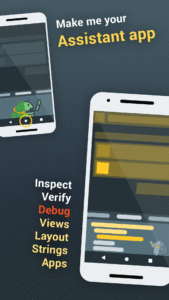
Developer Assistant is… right, the assistant app, you can invoke it at any time by a simple gesture like long pressing the home button.
INSPECT ALMOST ANY ANDROID APP
Developer Assistant can inspect Android applications based on official Android SDK. It supports also web-based apps and websites rendered by Google Chrome web browser. Support for other kinds of apps can be limited.
KEEP CALM & PRIVACY
Developer Assistant doesn’t require root or any specific requirements. It respects system security and user privacy. Any data collected from a screen is processed locally (offline). Apps and views declared as secure are respected, Developer Assistant even can’t access their content. Android assistant apps have access to screen data only after manually invoked by a user.
WHAT YOU GET FOR FREE
A 30day trial of probably the most advanced assistant app dedicated to Android Developers, Testers, Designers and Power Users. After this period, decide: get a professional license or stay with free, a bit limited, however still usable assist app.
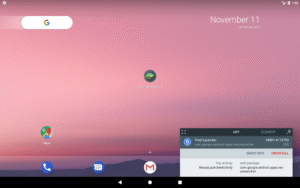
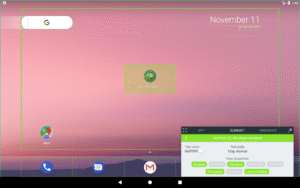
CHECK CURRENT ACTIVITY
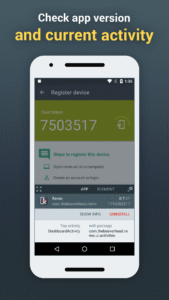
Developers can check class name of a current activity, especially helpful for larger projects. Testers will appreciate a unified solution to access the app version name, version code along with common actions like ‘app info’ or ‘uninstall’.
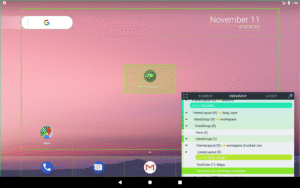
INSPECT VIEW HIERARCHY
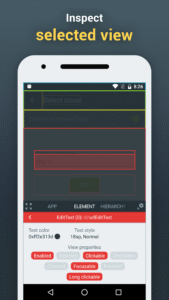
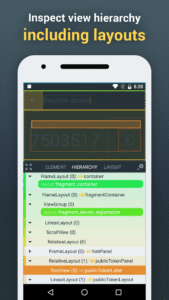
Testers writing automation tests and developers chasing bugs can inspect hierarchy of elements displayed on the screen, directly from the mobile device. The concept is similar to the inspection of web pages with well-known dev tools shipped with the leading web browsers.
✔ Inspect view identifiers, class names, text style or color.
✔ Preview the best matching layout resources displayed next to their root views.
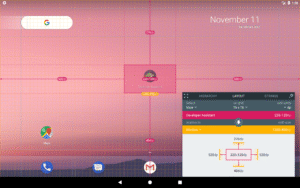
VERIFY LAYOUT
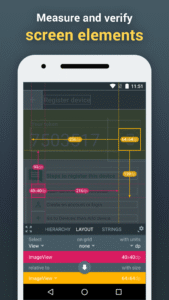
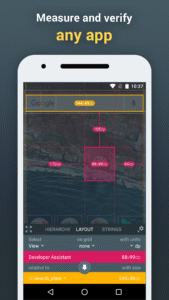
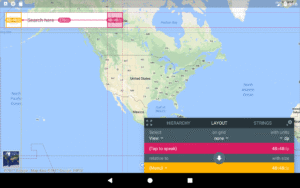
Designers, testers and developers can finally check size and position of various elements presented directly on the mobile device. Did you ever wonder what is the exact distance of a given button to a given text label on a particular device? Or maybe, what is the size of a particular element in density points? Developer Assistant provides a toolkit to help verify and satisfy requirements from designers like the pixel or rather the DP perfect design.
SEE CONTEXT OF TRANSLATIONS
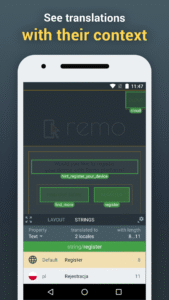
Developer Assistant gives translation offices possibility to display translation keys next to text elements, directly on a mobile device. Translators get what’s the most important in order to provide a quality translation: the context where a given text is used.
✔ Translation keys displayed next to text elements.
✔ Translations for other languages can be previewed (no need to change the language of a mobile device).
✔ Minimum and maximum length among existing translations.
AND MORE...
Developer Assistant is under development, stay tuned for new features to come!
LINKS
✔ The project home page:
appsisle.com/project/developer-assistant/
✔ The wiki addressing common questions:
github.com/jwisniewski/android-developer-assistant/wiki
✔ Example usage on a video tutorial for designers (made by Design Pilot):
youtu.be/SnzXf91b8C4
Developer Assistant uses a mixture of official APIs and sophisticated heuristics in order to show at runtime more than possible for other tools. It’s tailored to increase productivity of professionals like Developers, Testers, Designers and Power Users in their day to day geeky tasks.
Developer Assistant is… right, the assistant app, you can invoke it at any time by a simple gesture like long pressing the home button.
INSPECT ALMOST ANY ANDROID APP
Developer Assistant can inspect Android applications based on official Android SDK. It supports also web-based apps and websites rendered by Google Chrome web browser. Support for other kinds of apps can be limited.
KEEP CALM & PRIVACY
Developer Assistant doesn’t require root or any specific requirements. It respects system security and user privacy. Any data collected from a screen is processed locally (offline). Apps and views declared as secure are respected, Developer Assistant even can’t access their content. Android assistant apps have access to screen data only after manually invoked by a user.
WHAT YOU GET FOR FREE
A 30day trial of probably the most advanced assistant app dedicated to Android Developers, Testers, Designers and Power Users. After this period, decide: get a professional license or stay with free, a bit limited, however still usable assist app.
CHECK CURRENT ACTIVITY
Developers can check class name of a current activity, especially helpful for larger projects. Testers will appreciate a unified solution to access the app version name, version code along with common actions like ‘app info’ or ‘uninstall’.
INSPECT VIEW HIERARCHY
Testers writing automation tests and developers chasing bugs can inspect hierarchy of elements displayed on the screen, directly from the mobile device. The concept is similar to the inspection of web pages with well-known dev tools shipped with the leading web browsers.
✔ Inspect view identifiers, class names, text style or color.
✔ Preview the best matching layout resources displayed next to their root views.
VERIFY LAYOUT
Designers, testers and developers can finally check size and position of various elements presented directly on the mobile device. Did you ever wonder what is the exact distance of a given button to a given text label on a particular device? Or maybe, what is the size of a particular element in density points? Developer Assistant provides a toolkit to help verify and satisfy requirements from designers like the pixel or rather the DP perfect design.
SEE CONTEXT OF TRANSLATIONS
Developer Assistant gives translation offices possibility to display translation keys next to text elements, directly on a mobile device. Translators get what’s the most important in order to provide a quality translation: the context where a given text is used.
✔ Translation keys displayed next to text elements.
✔ Translations for other languages can be previewed (no need to change the language of a mobile device).
✔ Minimum and maximum length among existing translations.
AND MORE...
Developer Assistant is under development, stay tuned for new features to come!
LINKS
✔ The project home page:
appsisle.com/project/developer-assistant/
✔ The wiki addressing common questions:
github.com/jwisniewski/android-developer-assistant/wiki
✔ Example usage on a video tutorial for designers (made by Design Pilot):
youtu.be/SnzXf91b8C4
Download Developer Assistant APK
Fast, free and safe download.
APK Permissions 12
- android.permission.ACCESS_NETWORK_STATE
- android.permission.FOREGROUND_SERVICE
- android.permission.INTERNET
- android.permission.QUERY_ALL_PACKAGES
- android.permission.RECEIVE_BOOT_COMPLETED
- android.permission.REQUEST_DELETE_PACKAGES
- android.permission.SYSTEM_ALERT_WINDOW
- android.permission.VIBRATE
- android.permission.WAKE_LOCK
- com.android.vending.BILLING
- com.google.android.finsky.permission.BIND_GET_INSTALL_REFERRER_SERVICE
- com.google.android.gms.permission.AD_ID
APK Verified
The cryptographic signature guarantees that the file is safe to install and was not tampered with in any way.


Frequently Asked Questions about Developer Assistant APK
This is the universal variant — a single APK that contains native libraries for every CPU architecture. It installs on any Android device but is larger than per-architecture variants.
Yes — the APK's signature has been cryptographically verified against the publisher's signing key. The SHA-256 hash is shown in the File Information panel so you can independently confirm the file matches the original release.
Android 23 (API level 33) or newer. Older devices will refuse the install.
Install a free app like 'CPU-Z' or 'Droid Hardware Info' from the Play Store and look at the ABI / Instruction Set row. Most phones made after 2017 are arm64-v8a; if in doubt, download the universal variant.
All variants are functionally identical — same features, same version. They differ only in which CPU architectures the native code is compiled for, and (sometimes) which screen densities the included graphics target. Pick the one that matches your device for the smallest install size, or pick 'Universal' if you're unsure.