
Download Journi Print - 5min Photo Book APK 7.0.1 Universal · Android 24+
Download APK
Verified Safe
This is the universal build of Journi Print - 5min Photo Book 7.0.1. It contains native libraries for every CPU architecture (arm64-v8a, armeabi-v7a, x86, x86_64), so it installs on any Android device. The trade-off is size — it's larger than per-architecture variants. Pick this one if you're unsure which CPU your phone has, or if you plan to share the APK with multiple devices.
File size: 35.0 MB • Min Android: 24 • Target Android: 35 • Version code: 439 • Framework: Native (Java/Kotlin) • Permissions: 27
Screenshots






File Information
| Package Name | com.journiapp.book |
|---|---|
| Version Name | 7.0.1 |
| Version Code | 439 |
| Architecture | Universal |
| Min Android Version | Android 24 (API 35) |
| Main Activity | com.journiapp.book.ui.main.MainActivity |
| Framework | Native (Java/Kotlin) |
| File Size | 34.97 MB |
| Signature (SHA1) | 7D77E6650F448B863B485521BFB2682BCC813FEE |
| File Hash (SHA256) | 56e6d907e2371d75b9870d3bdd5250e7442aa29215197a27baa49dc9a4f2e5b5 |
What's New
Introducing:
- New map styles for photobooks
- Rearrage your pages in photobook preview
- Fast scroller in photo picker
- Performance Improvements
- Minor issues fixed
Tell us and other users if you like this version by writing a review in the store.
- New map styles for photobooks
- Rearrage your pages in photobook preview
- Fast scroller in photo picker
- Performance Improvements
- Minor issues fixed
Tell us and other users if you like this version by writing a review in the store.
App Description
Photo printing has never been quicker or easier. Designing beautiful photo books or personalized photo calendars is now as easy as taking the photos themselves.
WELCOME DISCOUNT:
Register and automatically get 30% off your first order.
▶︎ HOW CAN I CREATE PHOTO BOOKS IN JUST 5 minutes?
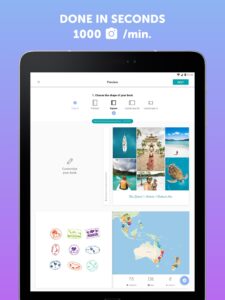
Our crazy-smart algorithm can upload as many as 1,200 photos and design your photo album chronologically with full-page pictures and beautiful collages.
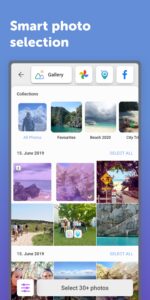
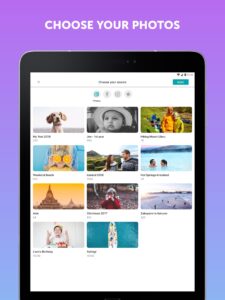
Select the pictures you want to print - add from your device, Google Photos and other social media platforms.
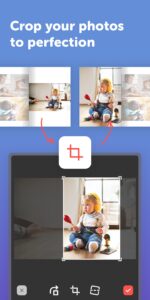
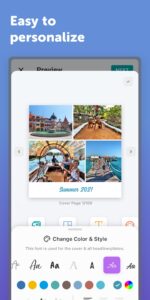
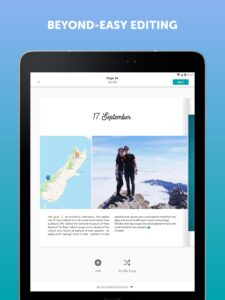
Edit your photo book - add notes, insert automated maps, personalize the design.
Minutes later, you’ve created a unique and personal photo book.
▶︎ OUR USERS ❤️ THESE FEATURES:
Speech-to-text typing for your notes
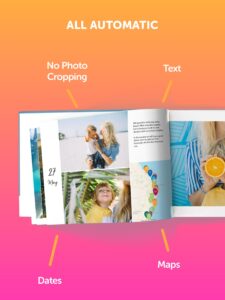
Chronologically orders the photos for you with dates
Generates maps from your photos, so you can trace your adventures
Every photo book is unique and the final price depends on:
the shape and size you choose
the number of pages you need
whether you opt for a soft or a hard cover
The app automatically calculates the price when you create your photo book. (we told you it was smart!) By using the code FIRSTJOURNI you can save some money on your first order.
▶︎▶︎ NOW WHAT ARE YOU WAITING FOR? You could have designed your photo book in the time you read all of this!
✅ DOWNLOAD THE APP FOR FREE and see for yourself how quick and easy it is!
============= DISCOVER OUR FULL PRODUCT RANGE =============
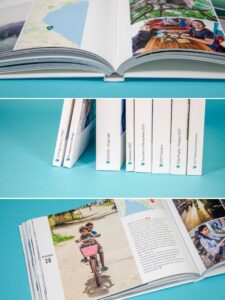
▶︎ PROFESSIONAL-LEVEL PHOTO BOOKS 📚
High-quality, FSC-certified paper 💚
Delivered in sustainable packaging 🌎
A range of shapes and sizes
Choose between soft and hard cover
▶︎ PERSONALIZED PRINTS 🎨
5 sizes and endless design options with borders and colors
Fits in every standard frame
Perfect for greetings cards
Environmentally friendly packaging
350g high quality, FSC certified paper
Matte or glossy finish ✨
▶︎ AUTHENTIC POLAROID PICS 🖼️
Print Polaroid Pics directly from your phone
Complete with the iconic Polaroid frame
A box contains 24 Pics or more
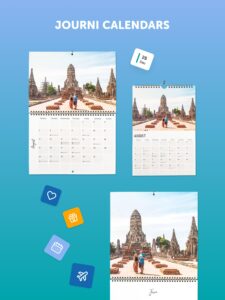
▶︎ QUICK & EASY PHOTO CALENDARS 📅
Start the calendar from any month of the year - great for birthday gifts 😉
Use up to 120 photos, laid out for you seconds later in brilliant collages
Beyond easy editing and personalization
Choose between portrait, landscape and square
For questions & assistance:
support.journiapp.com/
or
support@journiapp.com
WELCOME DISCOUNT:
Register and automatically get 30% off your first order.
▶︎ HOW CAN I CREATE PHOTO BOOKS IN JUST 5 minutes?
Our crazy-smart algorithm can upload as many as 1,200 photos and design your photo album chronologically with full-page pictures and beautiful collages.
Select the pictures you want to print - add from your device, Google Photos and other social media platforms.
Edit your photo book - add notes, insert automated maps, personalize the design.
Minutes later, you’ve created a unique and personal photo book.
▶︎ OUR USERS ❤️ THESE FEATURES:
Speech-to-text typing for your notes
Chronologically orders the photos for you with dates
Generates maps from your photos, so you can trace your adventures
Every photo book is unique and the final price depends on:
the shape and size you choose
the number of pages you need
whether you opt for a soft or a hard cover
The app automatically calculates the price when you create your photo book. (we told you it was smart!) By using the code FIRSTJOURNI you can save some money on your first order.
▶︎▶︎ NOW WHAT ARE YOU WAITING FOR? You could have designed your photo book in the time you read all of this!
✅ DOWNLOAD THE APP FOR FREE and see for yourself how quick and easy it is!
============= DISCOVER OUR FULL PRODUCT RANGE =============
▶︎ PROFESSIONAL-LEVEL PHOTO BOOKS 📚
High-quality, FSC-certified paper 💚
Delivered in sustainable packaging 🌎
A range of shapes and sizes
Choose between soft and hard cover
▶︎ PERSONALIZED PRINTS 🎨
5 sizes and endless design options with borders and colors
Fits in every standard frame
Perfect for greetings cards
Environmentally friendly packaging
350g high quality, FSC certified paper
Matte or glossy finish ✨
▶︎ AUTHENTIC POLAROID PICS 🖼️
Print Polaroid Pics directly from your phone
Complete with the iconic Polaroid frame
A box contains 24 Pics or more
▶︎ QUICK & EASY PHOTO CALENDARS 📅
Start the calendar from any month of the year - great for birthday gifts 😉
Use up to 120 photos, laid out for you seconds later in brilliant collages
Beyond easy editing and personalization
Choose between portrait, landscape and square
For questions & assistance:
support.journiapp.com/
or
support@journiapp.com
Download Journi Print - 5min Photo Book APK
Fast, free and safe download.
APK Permissions 27
- android.permission.ACCESS_ADSERVICES_AD_ID
- android.permission.ACCESS_ADSERVICES_ATTRIBUTION
- android.permission.ACCESS_MEDIA_LOCATION
- android.permission.ACCESS_NETWORK_STATE
- android.permission.ACCESS_WIFI_STATE
- android.permission.BROADCAST_CLOSE_SYSTEM_DIALOGS
- android.permission.FOREGROUND_SERVICE
- android.permission.FOREGROUND_SERVICE_DATA_SYNC
- android.permission.GET_PACKAGE_SIZE
- android.permission.HIDE_OVERLAY_WINDOWS
- android.permission.INTERNET
- android.permission.POST_NOTIFICATIONS
- android.permission.READ_CONTACTS
- android.permission.READ_EXTERNAL_STORAGE
- android.permission.READ_MEDIA_IMAGES
- android.permission.READ_MEDIA_VISUAL_USER_SELECTED
- android.permission.RECEIVE_BOOT_COMPLETED
- android.permission.USE_BIOMETRIC
- android.permission.USE_FINGERPRINT
- android.permission.VIBRATE
- android.permission.WAKE_LOCK
- android.permission.WRITE_EXTERNAL_STORAGE
- com.google.android.c2dm.permission.RECEIVE
- com.google.android.finsky.permission.BIND_GET_INSTALL_REFERRER_SERVICE
- com.google.android.gms.permission.AD_ID
- com.huawei.appmarket.service.commondata.permission.GET_COMMON_DATA
- com.journiapp.book.DYNAMIC_RECEIVER_NOT_EXPORTED_PERMISSION
APK Verified
The cryptographic signature guarantees that the file is safe to install and was not tampered with in any way.
Similar in Photography


Frequently Asked Questions about Journi Print - 5min Photo Book APK
This is the universal variant — a single APK that contains native libraries for every CPU architecture. It installs on any Android device but is larger than per-architecture variants.
Yes — the APK's signature has been cryptographically verified against the publisher's signing key. The SHA-256 hash is shown in the File Information panel so you can independently confirm the file matches the original release.
Android 24 (API level 35) or newer. Older devices will refuse the install.
Install a free app like 'CPU-Z' or 'Droid Hardware Info' from the Play Store and look at the ABI / Instruction Set row. Most phones made after 2017 are arm64-v8a; if in doubt, download the universal variant.
All variants are functionally identical — same features, same version. They differ only in which CPU architectures the native code is compiled for, and (sometimes) which screen densities the included graphics target. Pick the one that matches your device for the smallest install size, or pick 'Universal' if you're unsure.