
This is the universal build of JPay 25.2.0. It contains native libraries for every CPU architecture (arm64-v8a, armeabi-v7a, x86, x86_64), so it installs on any Android device. The trade-off is size — it's larger than per-architecture variants. Pick this one if you're unsure which CPU your phone has, or if you plan to share the APK with multiple devices.
File size: 15.6 MB • Min Android: 30 • Target Android: 35 • Version code: 205 • Framework: Native (Java/Kotlin) • Permissions: 26
Screenshots

File Information
| Package Name | com.brisk.jpay |
|---|---|
| Version Name | 25.2.0 |
| Version Code | 205 |
| Architecture | Universal |
| Min Android Version | Android 30 (API 35) |
| Main Activity | com.jpay.jpaymobileapp.base.JPayMainActivity |
| Framework | Native (Java/Kotlin) |
| File Size | 15.55 MB |
| Signature (SHA1) | 8C81D2BDFC17F76C1F6A497DBF5CEFE2AD8A8100 |
| File Hash (SHA256) | 416bbd5136e0fd6b006bb93aaae55206787e8d0ff115b85750320cde698c37b9 |
What's New
User improvements and minor big fixes.
App Description
The JPay App is the easiest way to stay connected and support your incarcerated individual.
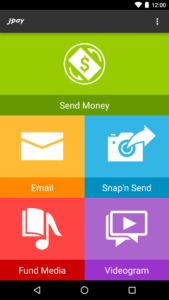
JPay allows you to quickly send money to a trust account, send and receive Emails, photos, eCards and Videograms.
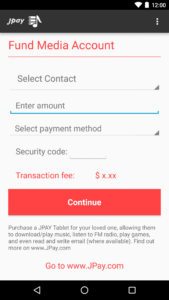
Purchase a tablet for your contact and fund their media account.
Features:
- Create your JPay account
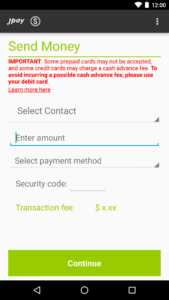
- Send money with your credit/debit card once or schedule recurring transfers
- Purchase stamps for Email, Snap n’ Send® and Videograms
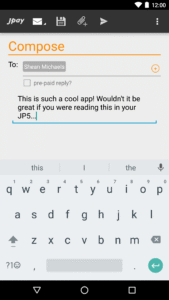
- Send and receive Emails
- Get new Email notifications
- Send emails to multiple recipients
- Prepay for an Email reply or transfer stamps
- Attach and send photos
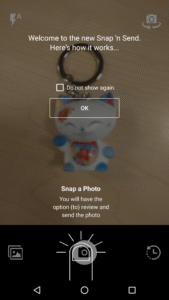
- Send just a photo with Snap n’ Send
- Send a 30 second Videogram
- Setup a low stamp balance reminder
- Purchase tablet fir your contact
- Fund media account for tablet content
- Add/edit payment options and option to save card for future
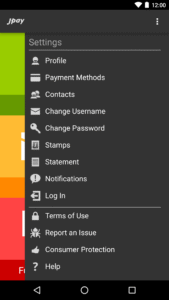
- Manage your profile
Service availability varies, not all services available at all facilities
JPay allows you to quickly send money to a trust account, send and receive Emails, photos, eCards and Videograms.
Purchase a tablet for your contact and fund their media account.
Features:
- Create your JPay account
- Send money with your credit/debit card once or schedule recurring transfers
- Purchase stamps for Email, Snap n’ Send® and Videograms
- Send and receive Emails
- Get new Email notifications
- Send emails to multiple recipients
- Prepay for an Email reply or transfer stamps
- Attach and send photos
- Send just a photo with Snap n’ Send
- Send a 30 second Videogram
- Setup a low stamp balance reminder
- Purchase tablet fir your contact
- Fund media account for tablet content
- Add/edit payment options and option to save card for future
- Manage your profile
Service availability varies, not all services available at all facilities
Download JPay APK
Fast, free and safe download.
APK Permissions 26
- android.permission.ACCESS_ADSERVICES_AD_ID
- android.permission.ACCESS_ADSERVICES_ATTRIBUTION
- android.permission.ACCESS_COARSE_LOCATION
- android.permission.ACCESS_FINE_LOCATION
- android.permission.ACCESS_NETWORK_STATE
- android.permission.CAMERA
- android.permission.GET_TASKS
- android.permission.INTERNET
- android.permission.MANAGE_DOCUMENTS
- android.permission.POST_NOTIFICATIONS
- android.permission.READ_EXTERNAL_STORAGE
- android.permission.READ_PHONE_STATE
- android.permission.RECORD_AUDIO
- android.permission.USE_BIOMETRIC
- android.permission.USE_FINGERPRINT
- android.permission.VIBRATE
- android.permission.WAKE_LOCK
- android.permission.WRITE_INTERNAL_STORAGE
- com.brisk.jpay.DYNAMIC_RECEIVER_NOT_EXPORTED_PERMISSION
- com.google.android.apps.photos.permission.GOOGLE_PHOTOS
- com.google.android.c2dm.permission.RECEIVE
- com.google.android.finsky.permission.BIND_GET_INSTALL_REFERRER_SERVICE
- com.google.android.gms.permission.AD_ID
- com.jpay.jpaymobileapp.videogram.permission
- com.sec.android.provider.badge.permission.READ
- com.sec.android.provider.badge.permission.WRITE
APK Verified
The cryptographic signature guarantees that the file is safe to install and was not tampered with in any way.


Frequently Asked Questions about JPay APK
This is the universal variant — a single APK that contains native libraries for every CPU architecture. It installs on any Android device but is larger than per-architecture variants.
Yes — the APK's signature has been cryptographically verified against the publisher's signing key. The SHA-256 hash is shown in the File Information panel so you can independently confirm the file matches the original release.
Android 30 (API level 35) or newer. Older devices will refuse the install.
Install a free app like 'CPU-Z' or 'Droid Hardware Info' from the Play Store and look at the ABI / Instruction Set row. Most phones made after 2017 are arm64-v8a; if in doubt, download the universal variant.
All variants are functionally identical — same features, same version. They differ only in which CPU architectures the native code is compiled for, and (sometimes) which screen densities the included graphics target. Pick the one that matches your device for the smallest install size, or pick 'Universal' if you're unsure.