
This is the universal build of System app remover 12.2.14038. It contains native libraries for every CPU architecture (arm64-v8a, armeabi-v7a, x86, x86_64), so it installs on any Android device. The trade-off is size — it's larger than per-architecture variants. Pick this one if you're unsure which CPU your phone has, or if you plan to share the APK with multiple devices.
File size: 4.5 MB • Min Android: 21 • Target Android: 34 • Version code: 12001002 • Framework: Native (Java/Kotlin) • Permissions: 13
Screenshots
File Information
| Package Name | com.jumobile.manager.systemapp |
|---|---|
| Version Name | 12.2.14038 |
| Version Code | 12001002 |
| Architecture | Universal |
| Min Android Version | Android 21 (API 34) |
| Main Activity | com.jumobile.manager.systemapp.ui.activity.IndexActivity |
| Framework | Native (Java/Kotlin) |
| File Size | 4.54 MB |
| Signature (SHA1) | 79DB728DE06F9049C5A42C4E42F85E583BA7180C |
| File Hash (SHA256) | e63d2e113337b11b560228229aad47db9b89fe0013173ad2cf269817bc3a68ef |
What's New
Fix bugs;
App Description
We provide not only system app remover, but also user app uninstaller, move app to sdcard, move app to phone, apk on sdcard scan/install/delete.
[System app]
Note: uninstall system app need root permission, and we do not provide root method.
Compare to other similar products, System app remover:
*******************
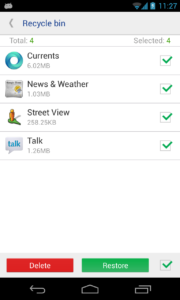
• Safe, we filter out all apps that may cause unstable after uninstalled, and had tested hundreds of devices, so you can use it safely, but we can not make sure 100% safe because of manufacturers may customized too much, also, we backup all app you uninstalled automatic, so you can restore them in Recycle Bin whenever you need;
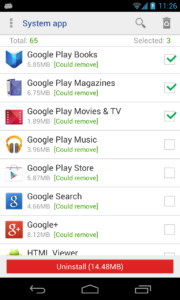
• Clear, we classify all system app as [Could remove], [Should keep], [Key module], so you can choose what app to uninstall clearly;
• Easy, we provide you a way to uninstall multi app in one time, make you easy to go;
• Small, we release all memory allocated while app exit, and may the smallest app;
*******************
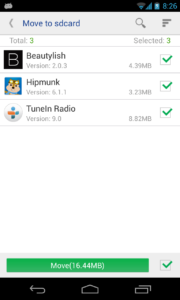
[move to sdcard]
If we granted root permission, we can move multi-app in one click, and can move almost all apps installed.
*******************
• Move apps to SD card
• Move apps to phone internal storage
• Sort app by movable, name, size and time
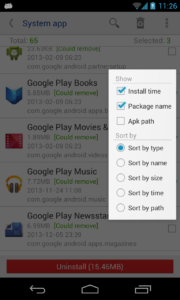
• User can custom [Install time] [Package name] [Apk path] to show in list
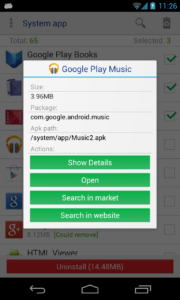
• Show app details: size, install time, package, apk path.
• Open app
• Search in market
• Search in website by apk name, package name, app name
*******************
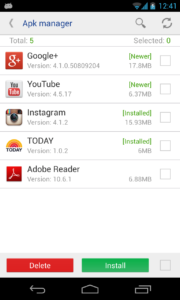
[Apk manager]
*******************
• Scan all APKs in SD card
• Install APK
• Search APK
• Batch rename APK's filename
• Batch Move APKs to directory
• Search and delete all duplicate APKs in one click
• User can custom [time] [Package name] [Apk path] to show in list
• Show apk details: size, package, apk path.
• Search in market
• Search in website by apk name, package name, app name
*******************
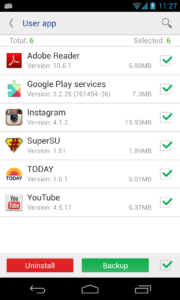
[User app]
*******************
• Uninstall multi-app in one click.
• Backup & restore apps.
• Scan all apks in sdcard.
• Search apps in local, in market and in website.
• User can custom [Install time] [Package name] [Apk path] to show in list;
• User app backup directory can be configured in settings;
• Show app details: size, install time, package, apk path.
• Open app
• Search in market
• Search in website by apk name, package name, app name
*******************
If the Ads annoy you, you can remove it from settings, just one click.
We never say we are the best, but we will try our best to make it better, any comments or suggestions will be nice, please let me know via feedback in our app.
[System app]
Note: uninstall system app need root permission, and we do not provide root method.
Compare to other similar products, System app remover:
*******************
• Safe, we filter out all apps that may cause unstable after uninstalled, and had tested hundreds of devices, so you can use it safely, but we can not make sure 100% safe because of manufacturers may customized too much, also, we backup all app you uninstalled automatic, so you can restore them in Recycle Bin whenever you need;
• Clear, we classify all system app as [Could remove], [Should keep], [Key module], so you can choose what app to uninstall clearly;
• Easy, we provide you a way to uninstall multi app in one time, make you easy to go;
• Small, we release all memory allocated while app exit, and may the smallest app;
*******************
[move to sdcard]
If we granted root permission, we can move multi-app in one click, and can move almost all apps installed.
*******************
• Move apps to SD card
• Move apps to phone internal storage
• Sort app by movable, name, size and time
• User can custom [Install time] [Package name] [Apk path] to show in list
• Show app details: size, install time, package, apk path.
• Open app
• Search in market
• Search in website by apk name, package name, app name
*******************
[Apk manager]
*******************
• Scan all APKs in SD card
• Install APK
• Search APK
• Batch rename APK's filename
• Batch Move APKs to directory
• Search and delete all duplicate APKs in one click
• User can custom [time] [Package name] [Apk path] to show in list
• Show apk details: size, package, apk path.
• Search in market
• Search in website by apk name, package name, app name
*******************
[User app]
*******************
• Uninstall multi-app in one click.
• Backup & restore apps.
• Scan all apks in sdcard.
• Search apps in local, in market and in website.
• User can custom [Install time] [Package name] [Apk path] to show in list;
• User app backup directory can be configured in settings;
• Show app details: size, install time, package, apk path.
• Open app
• Search in market
• Search in website by apk name, package name, app name
*******************
If the Ads annoy you, you can remove it from settings, just one click.
We never say we are the best, but we will try our best to make it better, any comments or suggestions will be nice, please let me know via feedback in our app.
Download System app remover APK
Fast, free and safe download.
APK Permissions 13
- android.permission.ACCESS_NETWORK_STATE
- android.permission.FOREGROUND_SERVICE
- android.permission.INTERNET
- android.permission.MANAGE_EXTERNAL_STORAGE
- android.permission.QUERY_ALL_PACKAGES
- android.permission.READ_EXTERNAL_STORAGE
- android.permission.REQUEST_DELETE_PACKAGES
- android.permission.REQUEST_INSTALL_PACKAGES
- android.permission.WAKE_LOCK
- android.permission.WRITE_EXTERNAL_STORAGE
- com.android.launcher.permission.INSTALL_SHORTCUT
- com.android.vending.BILLING
- com.google.android.gms.permission.AD_ID
APK Verified
The cryptographic signature guarantees that the file is safe to install and was not tampered with in any way.


Frequently Asked Questions about System app remover APK
This is the universal variant — a single APK that contains native libraries for every CPU architecture. It installs on any Android device but is larger than per-architecture variants.
Yes — the APK's signature has been cryptographically verified against the publisher's signing key. The SHA-256 hash is shown in the File Information panel so you can independently confirm the file matches the original release.
Android 21 (API level 34) or newer. Older devices will refuse the install.
Install a free app like 'CPU-Z' or 'Droid Hardware Info' from the Play Store and look at the ABI / Instruction Set row. Most phones made after 2017 are arm64-v8a; if in doubt, download the universal variant.
All variants are functionally identical — same features, same version. They differ only in which CPU architectures the native code is compiled for, and (sometimes) which screen densities the included graphics target. Pick the one that matches your device for the smallest install size, or pick 'Universal' if you're unsure.