
This is the universal build of Serial Bluetooth Terminal 1.50. It contains native libraries for every CPU architecture (arm64-v8a, armeabi-v7a, x86, x86_64), so it installs on any Android device. The trade-off is size — it's larger than per-architecture variants. Pick this one if you're unsure which CPU your phone has, or if you plan to share the APK with multiple devices.
File size: 2.4 MB • Min Android: 21 • Target Android: 36 • Version code: 92 • Framework: Native (Java/Kotlin) • Permissions: 12
Screenshots
File Information
| Package Name | de.kai_morich.serial_bluetooth_terminal |
|---|---|
| Version Name | 1.50 |
| Version Code | 92 |
| Architecture | Universal |
| Min Android Version | Android 21 (API 36) |
| Main Activity | de.kai_morich.serial_bluetooth_terminal.MainActivity |
| Framework | Native (Java/Kotlin) |
| File Size | 2.42 MB |
| Signature (SHA1) | FC7BCC2AE29411A2A9FB086E19E1C1F0DAFFFADB |
| File Hash (SHA256) | 7232779d74374f48830f1127249b39905844cce3090c5622e93ce8527b78e92e |
What's New
1.50 2025-11-06
FIX copy from main text view with unmodified spaces
INFO Android 5.0 as minimum version
1.49 2025-03-17
FIX single CR handling for newline CR+LF setting
1.48 2024-09-29
NEW "Settings > Misc. > Show notification when connected" because not shown in notification bar by default on Android 14
NEW support nRF style BLE devices having PROPERTY_WRITE_NO_RESPONSE, before supported only PROPERTY_WRITE
1.47 2023-11-25
FIX configuration import of custom characteristics
FIX copy from main text view with unmodified spaces
INFO Android 5.0 as minimum version
1.49 2025-03-17
FIX single CR handling for newline CR+LF setting
1.48 2024-09-29
NEW "Settings > Misc. > Show notification when connected" because not shown in notification bar by default on Android 14
NEW support nRF style BLE devices having PROPERTY_WRITE_NO_RESPONSE, before supported only PROPERTY_WRITE
1.47 2023-11-25
FIX configuration import of custom characteristics
App Description
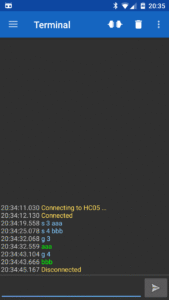
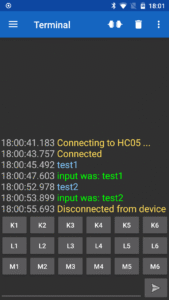
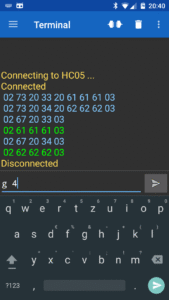
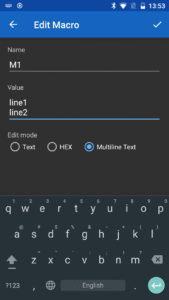
'Serial Bluetooth Terminal' is a line-oriented terminal / console app for microcontrollers, arduinos and other devices with a serial / UART interface connected with a bluetooth to serial converter to your android device.
This app supports different bluetooth versions:
- Bluetooth Classic
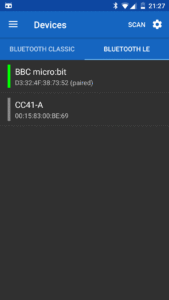
- Bluetooth LE / Bluetooth Low Energy / BLE / Bluetooth Smart
This app supports different bluetooth devices:
Bluetooth Classic (implementing standard Bluetooth SPP profile):
- HC-05, HC-06, ...
- Raspberry Pi 3
- ...
Bluetooth LE (implementing vendor specific Bluetooth GATT services):
- predefined:
* Nordic Semiconductor nRF51822, … (e.g. BBC micro:bit)
* Texas Instruments CC254x (e.g. HM-10, CC41-A, … modules)
* Microchip RN4870/71, BM70/71 'transparent UART service'
* Telit Bluemod
- custom profile:
* Texas Instruments CC2640 serial service, except config characteristics
* Silabls BLE113
* uConnect BLE serial adapter
* ...
All features in this app are free. In-App purchase is only used for the 'Donate' option.
Looking for source code? Here you find simplified variants of this app:
github.com/kai-morich/SimpleBluetoothTerminal
github.com/kai-morich/SimpleBluetoothLeTerminal
This app supports different bluetooth versions:
- Bluetooth Classic
- Bluetooth LE / Bluetooth Low Energy / BLE / Bluetooth Smart
This app supports different bluetooth devices:
Bluetooth Classic (implementing standard Bluetooth SPP profile):
- HC-05, HC-06, ...
- Raspberry Pi 3
- ...
Bluetooth LE (implementing vendor specific Bluetooth GATT services):
- predefined:
* Nordic Semiconductor nRF51822, … (e.g. BBC micro:bit)
* Texas Instruments CC254x (e.g. HM-10, CC41-A, … modules)
* Microchip RN4870/71, BM70/71 'transparent UART service'
* Telit Bluemod
- custom profile:
* Texas Instruments CC2640 serial service, except config characteristics
* Silabls BLE113
* uConnect BLE serial adapter
* ...
All features in this app are free. In-App purchase is only used for the 'Donate' option.
Looking for source code? Here you find simplified variants of this app:
github.com/kai-morich/SimpleBluetoothTerminal
github.com/kai-morich/SimpleBluetoothLeTerminal
Download Serial Bluetooth Terminal APK
Fast, free and safe download.
APK Permissions 12
- android.permission.ACCESS_NETWORK_STATE
- android.permission.BLUETOOTH
- android.permission.BLUETOOTH_ADMIN
- android.permission.BLUETOOTH_CONNECT
- android.permission.BLUETOOTH_SCAN
- android.permission.FOREGROUND_SERVICE
- android.permission.FOREGROUND_SERVICE_CONNECTED_DEVICE
- android.permission.FOREGROUND_SERVICE_REMOTE_MESSAGING
- android.permission.INTERNET
- android.permission.POST_NOTIFICATIONS
- com.android.vending.BILLING
- de.kai_morich.serial_bluetooth_terminal.DYNAMIC_RECEIVER_NOT_EXPORTED_PERMISSION
APK Verified
The cryptographic signature guarantees that the file is safe to install and was not tampered with in any way.
Similar in Tools


More by Kai Morich

Frequently Asked Questions about Serial Bluetooth Terminal APK
This is the universal variant — a single APK that contains native libraries for every CPU architecture. It installs on any Android device but is larger than per-architecture variants.
Yes — the APK's signature has been cryptographically verified against the publisher's signing key. The SHA-256 hash is shown in the File Information panel so you can independently confirm the file matches the original release.
Android 21 (API level 36) or newer. Older devices will refuse the install.
Install a free app like 'CPU-Z' or 'Droid Hardware Info' from the Play Store and look at the ABI / Instruction Set row. Most phones made after 2017 are arm64-v8a; if in doubt, download the universal variant.
All variants are functionally identical — same features, same version. They differ only in which CPU architectures the native code is compiled for, and (sometimes) which screen densities the included graphics target. Pick the one that matches your device for the smallest install size, or pick 'Universal' if you're unsure.