
Download Musicolet Music Player APK 6.12.1 build507 Universal · Android 24+
Download APK
Verified Safe
This is the universal build of Musicolet Music Player 6.12.1 build507. It contains native libraries for every CPU architecture (arm64-v8a, armeabi-v7a, x86, x86_64), so it installs on any Android device. The trade-off is size — it's larger than per-architecture variants. Pick this one if you're unsure which CPU your phone has, or if you plan to share the APK with multiple devices.
File size: 16.6 MB • Min Android: 24 • Target Android: 35 • Version code: 50700 • Framework: Native (Java/Kotlin) • Permissions: 19
Screenshots
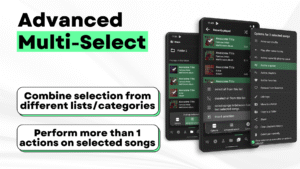
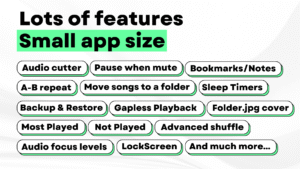
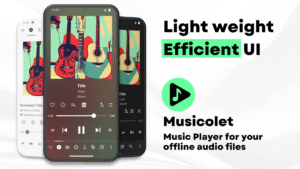
File Information
| Package Name | in.krosbits.musicolet |
|---|---|
| Version Name | 6.12.1 build507 |
| Version Code | 50700 |
| Architecture | Universal |
| Min Android Version | Android 24 (API 35) |
| Main Activity | in.krosbits.musicolet.MusicActivity |
| Framework | Native (Java/Kotlin) |
| File Size | 16.59 MB |
| Signature (SHA1) | 3A1D18902C3CEBEFDA98F2547519B4D84DA3D65C |
| File Hash (SHA256) | f102e8b1d75ec2d7dc1936750596231dc83e564e2decd828ea6f883aaeeaf47b |
What's New
v 6.12:
⭐ Bookmarks/Notes are now saved as separate text files.
⭐ You can now share your "Bookmarks/Notes files" with others.
⭐ These files can be can be opened/edited with other apps too.
⭐ Musicolet can also open/edit such "Bookmarks/Notes files" created by others.
——
v 6.11:
⭐ Customize blur background in 'Now Playing' screen.
⭐ Sleep timer improvements.
🌟 [PRO] Screencast - new option for casting:
——
👉 Read more in the App › Help and info › What's new.
⭐ Bookmarks/Notes are now saved as separate text files.
⭐ You can now share your "Bookmarks/Notes files" with others.
⭐ These files can be can be opened/edited with other apps too.
⭐ Musicolet can also open/edit such "Bookmarks/Notes files" created by others.
——
v 6.11:
⭐ Customize blur background in 'Now Playing' screen.
⭐ Sleep timer improvements.
🌟 [PRO] Screencast - new option for casting:
——
👉 Read more in the App › Help and info › What's new.
App Description
------------------------------------
PLEASE READ THIS BEFORE INSTALLING
1. This app can organise and play only the
local audio files
which are stored on the internal storage or SD card.
2. This app
can not stream/download/search new music online
.
------------------------------------
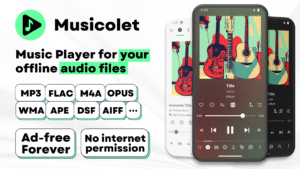
File formats supported:
mp3, m4a, wma, flac, opus, aac, alac, ape, dsf and many more...
Features:
✅
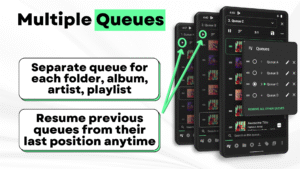
Multiple Queues
Separate queue for each folder, album, artist, playlist. Resume previous queues from their last position anytime.
✅
Efficient UI, Easy navigation
For fast and easy navigation we placed all important components of the app (like Main player, Queues, Folders, Albums, Artists, Playlists) in
just one row
. So you can access them with
just 1-Tap!
✅
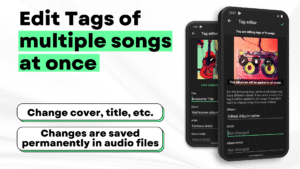
Tag editor+
: Can edit tags and album-arts of
multiple songs at once
.
✅
Move/Copy
songs,
Rename folders
directly in app.
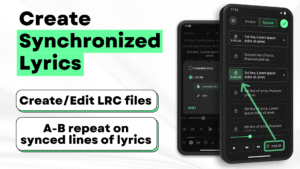
✅ Create
Synchronized Lyrics
.
✅ Save
Bookmarks and Notes
.
✅ Add/remove a song to
>1 playlist
,
from notifications, widgets and even from lockscreen
✅
Folder browsing
📁
2-types of folder structures: 1) Linear (all folders at once) and 2) Hierarchical(folders within folders)
✅
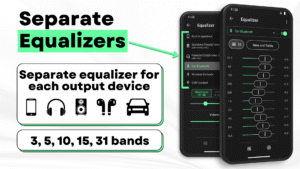
Powerful Equalizer
🎚🎚🎚: Separate presets and settings for Speakers🔊, Headphones🎧, Bluetooth etc.
✅
Gapless playback
✅ 🎧
Earphone controls
🎧
Single click for pause/play. Double click for next and Triple click for previous song.
On each press >=4 you can Fast-Forward the song.
✅
Embedded Lyrics + LRC support
Supports offline lyrics embedded in audio file as ID3 tag. You can edit embedded lyrics from tag editor. Musicolet also support .lrc files for synced lyrics.
(Note: Musicolet doesn't fetch lyrics automatically from internet. You have to manually write or paste lyrics in tag editor, if there is no embedded lyrics. It doesn't fetch lrc file automatically. For lrc files, You have to find lrc file from internet, put it in the same folder and rename to exactly match it with audio file name manually.)
✅
Sleep timers
2 types: 1) close app after
hh:mm time or 2) close app after
N songs
.
✅
Add shortcuts
of any album/artist/folder/playlist to your
HomeScreen (Launcher) app
.
✅
Stunning Widgets
✅
Lock Screen
(with controls, Queue and Lyrics)
✅ 🚘
Android Auto support
🚘
From your 'Android Auto' enabled car, you can control music and access your playlists, queues, folders and whole music library.
✅🎉
Change notifications appearance
🎉
✅ You can also enable
Fast-Forward and rewind buttons in notifications
from settings.
✅
Light and dark themes
✅
Backup and Restore
Automatic and Manual backups. Restore settings, playlists, play-counts from any backup anytime on any device.
And much more...
🚫
No Ads
🚫
Ad-free forever, for all users. 🤩
No internet permission, Completely offline
Musicolet doesn't even use Internet permission (a.k.a. network access permission). (You can check this in
'App permissions'
at the
bottom of this description
in Play Store.)
Dedicated to Music lovers 🎶 all around the world. 🌎
Created with love ❤, lots of code and sleepless nights. Hope you will like our work.
------------------
Our official website:
krosbits.in/musicolet
krosbits.in/musicolet/download
------------------
To send feedback/suggestions, report bugs or for other queries...
Contact us:
musicolet@krosbits.in
PLEASE READ THIS BEFORE INSTALLING
1. This app can organise and play only the
local audio files
which are stored on the internal storage or SD card.
2. This app
can not stream/download/search new music online
.
------------------------------------
File formats supported:
mp3, m4a, wma, flac, opus, aac, alac, ape, dsf and many more...
Features:
✅
Multiple Queues
Separate queue for each folder, album, artist, playlist. Resume previous queues from their last position anytime.
✅
Efficient UI, Easy navigation
For fast and easy navigation we placed all important components of the app (like Main player, Queues, Folders, Albums, Artists, Playlists) in
just one row
. So you can access them with
just 1-Tap!
✅
Tag editor+
: Can edit tags and album-arts of
multiple songs at once
.
✅
Move/Copy
songs,
Rename folders
directly in app.
✅ Create
Synchronized Lyrics
.
✅ Save
Bookmarks and Notes
.
✅ Add/remove a song to
>1 playlist
,
from notifications, widgets and even from lockscreen
✅
Folder browsing
📁
2-types of folder structures: 1) Linear (all folders at once) and 2) Hierarchical(folders within folders)
✅
Powerful Equalizer
🎚🎚🎚: Separate presets and settings for Speakers🔊, Headphones🎧, Bluetooth etc.
✅
Gapless playback
✅ 🎧
Earphone controls
🎧
Single click for pause/play. Double click for next and Triple click for previous song.
On each press >=4 you can Fast-Forward the song.
✅
Embedded Lyrics + LRC support
Supports offline lyrics embedded in audio file as ID3 tag. You can edit embedded lyrics from tag editor. Musicolet also support .lrc files for synced lyrics.
(Note: Musicolet doesn't fetch lyrics automatically from internet. You have to manually write or paste lyrics in tag editor, if there is no embedded lyrics. It doesn't fetch lrc file automatically. For lrc files, You have to find lrc file from internet, put it in the same folder and rename to exactly match it with audio file name manually.)
✅
Sleep timers
2 types: 1) close app after
hh:mm time or 2) close app after
N songs
.
✅
Add shortcuts
of any album/artist/folder/playlist to your
HomeScreen (Launcher) app
.
✅
Stunning Widgets
✅
Lock Screen
(with controls, Queue and Lyrics)
✅ 🚘
Android Auto support
🚘
From your 'Android Auto' enabled car, you can control music and access your playlists, queues, folders and whole music library.
✅🎉
Change notifications appearance
🎉
✅ You can also enable
Fast-Forward and rewind buttons in notifications
from settings.
✅
Light and dark themes
✅
Backup and Restore
Automatic and Manual backups. Restore settings, playlists, play-counts from any backup anytime on any device.
And much more...
🚫
No Ads
🚫
Ad-free forever, for all users. 🤩
No internet permission, Completely offline
Musicolet doesn't even use Internet permission (a.k.a. network access permission). (You can check this in
'App permissions'
at the
bottom of this description
in Play Store.)
Dedicated to Music lovers 🎶 all around the world. 🌎
Created with love ❤, lots of code and sleepless nights. Hope you will like our work.
------------------
Our official website:
krosbits.in/musicolet
krosbits.in/musicolet/download
------------------
To send feedback/suggestions, report bugs or for other queries...
Contact us:
musicolet@krosbits.in
Download Musicolet Music Player APK
Fast, free and safe download.
APK Permissions 19
- android.permission.BLUETOOTH
- android.permission.BLUETOOTH_CONNECT
- android.permission.EXPAND_STATUS_BAR
- android.permission.FOREGROUND_SERVICE
- android.permission.FOREGROUND_SERVICE_MEDIA_PLAYBACK
- android.permission.MODIFY_AUDIO_SETTINGS
- android.permission.POST_NOTIFICATIONS
- android.permission.READ_EXTERNAL_STORAGE
- android.permission.READ_MEDIA_AUDIO
- android.permission.READ_MEDIA_IMAGES
- android.permission.READ_MEDIA_VIDEO
- android.permission.SCHEDULE_EXACT_ALARM
- android.permission.USE_FULL_SCREEN_INTENT
- android.permission.WAKE_LOCK
- android.permission.WRITE_EXTERNAL_STORAGE
- android.permission.WRITE_SETTINGS
- com.android.launcher.permission.INSTALL_SHORTCUT
- com.android.vending.BILLING
- in.krosbits.musicolet.ALLOW_CAST_AUDIO
APK Verified
The cryptographic signature guarantees that the file is safe to install and was not tampered with in any way.
Similar in Music & Audio


More by Krosbits

Frequently Asked Questions about Musicolet Music Player APK
This is the universal variant — a single APK that contains native libraries for every CPU architecture. It installs on any Android device but is larger than per-architecture variants.
Yes — the APK's signature has been cryptographically verified against the publisher's signing key. The SHA-256 hash is shown in the File Information panel so you can independently confirm the file matches the original release.
Android 24 (API level 35) or newer. Older devices will refuse the install.
Install a free app like 'CPU-Z' or 'Droid Hardware Info' from the Play Store and look at the ABI / Instruction Set row. Most phones made after 2017 are arm64-v8a; if in doubt, download the universal variant.
All variants are functionally identical — same features, same version. They differ only in which CPU architectures the native code is compiled for, and (sometimes) which screen densities the included graphics target. Pick the one that matches your device for the smallest install size, or pick 'Universal' if you're unsure.