
This is the universal build of Vikk - AI Lawyer & Legal Help 6.1. It contains native libraries for every CPU architecture (arm64-v8a, armeabi-v7a, x86, x86_64), so it installs on any Android device. The trade-off is size — it's larger than per-architecture variants. Pick this one if you're unsure which CPU your phone has, or if you plan to share the APK with multiple devices.
File size: 60.3 MB • Min Android: 26 • Target Android: 35 • Version code: 73 • Framework: Native (Java/Kotlin) • Permissions: 26
Screenshots




File Information
| Package Name | com.vikktoria |
|---|---|
| Version Name | 6.1 |
| Version Code | 73 |
| Architecture | Universal |
| Min Android Version | Android 26 (API 35) |
| Main Activity | com.vikkproforlawyer.MainActivity |
| Framework | Native (Java/Kotlin) |
| File Size | 60.28 MB |
| Signature (SHA1) | 0DFCCAA4F30EEEE58C7E1F2E5D419140D64796A3 |
| File Hash (SHA256) | c08419794b59fcc3c9db4a31812d6bc6bea694b28d3b7e20a9f7ea2d14887961 |
What's New
This update adds Folders — organize your legal chats and upload files by topic, like wills, contracts, or disputes. Stay organized and keep everything in one place.
App Description
Vikk AI: 24/7 Instant Legal Assistance
New! Audio Features (Talk To Vikk / Dictate / Listen)
New! Connect with Legal PROS (Optional).
Why Choose Vikk AI?
- Instant Legal Assistance
Chat with AI 24/7 on injury, family law, immigration, business law, and more.
- Tailored Guidance
Vikk’s conversational approach adapts to state-specific and federal laws, giving targeted steps for your legal issues.
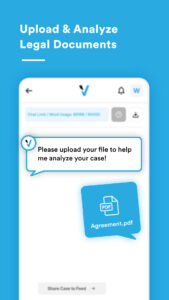
- Document Analysis (PDF Upload)
Easily upload PDF files. Our AI reviews them and offers initial insights (size limit applies).
- Privacy & Security
All conversations and case details remain encrypted, confidential, and protected.
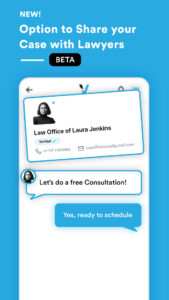
- Connect with Legal PROS (Beta)
Share your case summary in the for outside lawyers to view. If one can help, they’ll contact you—and you decide whether to pursue representation.
- New Audio Features: Use voice dictation, play back answers, or talk live with Vikk for a natural experience.
Key Features
- Interactive legal chat for a wide range of topics
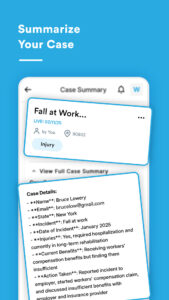
- Automatic case summaries for easy sharing
- PDF upload and instant analysis
- Optional connection with legal professionals
- Audio dictation, playback, and live audio conversation
- Continuous learning for improved accuracy
How It Works:
1. Download & Sign Up: Start chatting with Vikk AI right away—free to use!
2. Get Legal Assistance: 24/7 help on common legal issues.
3. Share Your Case (Optional): Connect with legal pros if you want personalized support.
4. Use Audio Features: Speak or listen to Vikk AI for hands-free help.
5. Upgrade Anytime: If you need more chats, choose a monthly plan that fits your needs.
Frequently Asked Questions
1. What is Vikk AI?
Vikk AI is an AI-powered legal assistant, ready 24/7 to offer insights on a wide range of legal matters.
2. Is Vikk AI a licensed attorney or law firm?
No. Vikk AI provides legal assistance but not official legal advice. We recommend consulting a licensed attorney to finalize any documents or actions.
3. Can Vikk AI prepare legal documents?
Yes—Vikk AI can assist with templates like motions or demand letters, but a licensed lawyer should review them for your specific needs.
Download Vikk AI today and experience expert legal support—anytime, anywhere.
Need Assistance or Have Feedback?
We’re always improving. Contact us at
hello@vikk.ai
.
Thank you for choosing Vikk AI!
New! Audio Features (Talk To Vikk / Dictate / Listen)
New! Connect with Legal PROS (Optional).
Why Choose Vikk AI?
- Instant Legal Assistance
Chat with AI 24/7 on injury, family law, immigration, business law, and more.
- Tailored Guidance
Vikk’s conversational approach adapts to state-specific and federal laws, giving targeted steps for your legal issues.
- Document Analysis (PDF Upload)
Easily upload PDF files. Our AI reviews them and offers initial insights (size limit applies).
- Privacy & Security
All conversations and case details remain encrypted, confidential, and protected.
- Connect with Legal PROS (Beta)
Share your case summary in the for outside lawyers to view. If one can help, they’ll contact you—and you decide whether to pursue representation.
- New Audio Features: Use voice dictation, play back answers, or talk live with Vikk for a natural experience.
Key Features
- Interactive legal chat for a wide range of topics
- Automatic case summaries for easy sharing
- PDF upload and instant analysis
- Optional connection with legal professionals
- Audio dictation, playback, and live audio conversation
- Continuous learning for improved accuracy
How It Works:
1. Download & Sign Up: Start chatting with Vikk AI right away—free to use!
2. Get Legal Assistance: 24/7 help on common legal issues.
3. Share Your Case (Optional): Connect with legal pros if you want personalized support.
4. Use Audio Features: Speak or listen to Vikk AI for hands-free help.
5. Upgrade Anytime: If you need more chats, choose a monthly plan that fits your needs.
Frequently Asked Questions
1. What is Vikk AI?
Vikk AI is an AI-powered legal assistant, ready 24/7 to offer insights on a wide range of legal matters.
2. Is Vikk AI a licensed attorney or law firm?
No. Vikk AI provides legal assistance but not official legal advice. We recommend consulting a licensed attorney to finalize any documents or actions.
3. Can Vikk AI prepare legal documents?
Yes—Vikk AI can assist with templates like motions or demand letters, but a licensed lawyer should review them for your specific needs.
Download Vikk AI today and experience expert legal support—anytime, anywhere.
Need Assistance or Have Feedback?
We’re always improving. Contact us at
hello@vikk.ai
.
Thank you for choosing Vikk AI!
Download Vikk - AI Lawyer & Legal Help APK
Fast, free and safe download.
APK Permissions 26
- android.permission.ACCESS_COARSE_LOCATION
- android.permission.ACCESS_FINE_LOCATION
- android.permission.ACCESS_NETWORK_STATE
- android.permission.ACCESS_WIFI_STATE
- android.permission.BLUETOOTH
- android.permission.BLUETOOTH_CONNECT
- android.permission.CAMERA
- android.permission.FOREGROUND_SERVICE
- android.permission.FOREGROUND_SERVICE_MICROPHONE
- android.permission.INTERNET
- android.permission.MANAGE_OWN_CALLS
- android.permission.MODIFY_AUDIO_SETTINGS
- android.permission.POST_NOTIFICATIONS
- android.permission.READ_EXTERNAL_STORAGE
- android.permission.RECEIVE_BOOT_COMPLETED
- android.permission.RECORD_AUDIO
- android.permission.SCHEDULE_EXACT_ALARM
- android.permission.SYSTEM_ALERT_WINDOW
- android.permission.USE_CREDENTIALS
- android.permission.WAKE_LOCK
- com.android.vending.BILLING
- com.android.vending.CHECK_LICENSE
- com.google.android.c2dm.permission.RECEIVE
- com.google.android.finsky.permission.BIND_GET_INSTALL_REFERRER_SERVICE
- com.google.android.gms.permission.AD_ID
- com.vikktoria.DYNAMIC_RECEIVER_NOT_EXPORTED_PERMISSION
APK Verified
The cryptographic signature guarantees that the file is safe to install and was not tampered with in any way.
Similar in Business


Frequently Asked Questions about Vikk - AI Lawyer & Legal Help APK
This is the universal variant — a single APK that contains native libraries for every CPU architecture. It installs on any Android device but is larger than per-architecture variants.
Yes — the APK's signature has been cryptographically verified against the publisher's signing key. The SHA-256 hash is shown in the File Information panel so you can independently confirm the file matches the original release.
Android 26 (API level 35) or newer. Older devices will refuse the install.
Install a free app like 'CPU-Z' or 'Droid Hardware Info' from the Play Store and look at the ABI / Instruction Set row. Most phones made after 2017 are arm64-v8a; if in doubt, download the universal variant.
All variants are functionally identical — same features, same version. They differ only in which CPU architectures the native code is compiled for, and (sometimes) which screen densities the included graphics target. Pick the one that matches your device for the smallest install size, or pick 'Universal' if you're unsure.