
Download Disable Headphone, HDST Toggle APK 1.3.0 arm64-v8a, armeabi-v7a, x86, x86_64 · Android 23+
Download APK
Verified Safe
This is the arm64-v8a, armeabi-v7a, x86, x86_64 build of Disable Headphone, HDST Toggle 1.3.0. Pick this build if your device's primary ABI matches.
File size: 8.8 MB • Min Android: 23 • Target Android: 35 • Version code: 11 • Framework: Native (Java/Kotlin) • Permissions: 17
Screenshots
File Information
| Package Name | headphonemodeoff.headphonejackfix.disableheadphone.enablespeaker |
|---|---|
| Version Name | 1.3.0 |
| Version Code | 11 |
| Architecture | arm64-v8a, armeabi-v7a, x86, x86_64 |
| Min Android Version | Android 23 (API 35) |
| Main Activity | headphonemodeoff.headphonejackfix.disableheadphone.enablespeaker.MainActivity |
| Framework | Native (Java/Kotlin) |
| File Size | 8.81 MB |
| Signature (SHA1) | 415A6ACA0657AD0CF2FD9663A758BD2A3417A39B |
| File Hash (SHA256) | 4d64560730e697f64096513fa7a2f4eece91a17171135dbed68c55de8c714c29 |
What's New
Phone stuck in headphone mode? Use this app to fix your headphone jack problem in just one click!
Ver 1.3.0
1. Target 35.
Ver 1.3.0
1. Target 35.
App Description
Headphone was not plugged in but headphone icon was showing?
And sound coming from headphone not speaker?
Remove dust on headphone jack doesn’t work?
Disable Headphone(Enable Speaker) - Headset Toggle - Audio Switch can fix those problems for you!
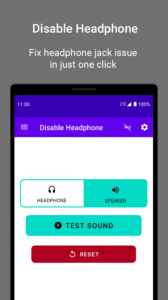
You can enable speaker and disable headphone easily with just one click!
How does Disable Headphone - Headset Toggle - Audio Switch work?
By enabling the speaker as the primary sound output whatever your headphone is connected or not.
Headphone Toggle
Turn on/off your WIRED headset/earphone.
Fully Compatibility
Support all devices
One-Click Switcher
Switch between headphone mode and speaker mode easily
Sound Tester
Test sound routed to speaker or earphone successfully or not
Notification Widget
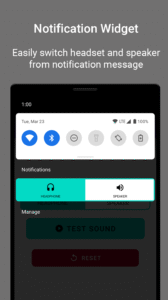
Access headphone and speaker mode switcher from the notification message
Reset Button
Reset switcher to system default in the case of being stuck in one mode forever.
Earphone mode off
Turn your headset mode off easily with only one tap.
If you like Disable Headphone(Enable Speaker) - Headset Toggle - Audio Switch please rate us five stars!
Feedback is always welcomed to send to
gosomatu@gmail.com
Are you ready to use one of the best earphone mode off/on apps?
Install Earphone Mode Off, Disable Headphone, Headset Toggle app on your android device and start fixing your headphone or speaker now!
And sound coming from headphone not speaker?
Remove dust on headphone jack doesn’t work?
Disable Headphone(Enable Speaker) - Headset Toggle - Audio Switch can fix those problems for you!
You can enable speaker and disable headphone easily with just one click!
How does Disable Headphone - Headset Toggle - Audio Switch work?
By enabling the speaker as the primary sound output whatever your headphone is connected or not.
Headphone Toggle
Turn on/off your WIRED headset/earphone.
Fully Compatibility
Support all devices
One-Click Switcher
Switch between headphone mode and speaker mode easily
Sound Tester
Test sound routed to speaker or earphone successfully or not
Notification Widget
Access headphone and speaker mode switcher from the notification message
Reset Button
Reset switcher to system default in the case of being stuck in one mode forever.
Earphone mode off
Turn your headset mode off easily with only one tap.
If you like Disable Headphone(Enable Speaker) - Headset Toggle - Audio Switch please rate us five stars!
Feedback is always welcomed to send to
gosomatu@gmail.com
Are you ready to use one of the best earphone mode off/on apps?
Install Earphone Mode Off, Disable Headphone, Headset Toggle app on your android device and start fixing your headphone or speaker now!
Download Disable Headphone, HDST Toggle APK
Fast, free and safe download.
APK Permissions 17
- android.permission.ACCESS_ADSERVICES_AD_ID
- android.permission.ACCESS_ADSERVICES_ATTRIBUTION
- android.permission.ACCESS_ADSERVICES_TOPICS
- android.permission.ACCESS_NETWORK_STATE
- android.permission.BLUETOOTH
- android.permission.FOREGROUND_SERVICE
- android.permission.FOREGROUND_SERVICE_SPECIAL_USE
- android.permission.INTERNET
- android.permission.MODIFY_AUDIO_SETTINGS
- android.permission.POST_NOTIFICATIONS
- android.permission.RECEIVE_BOOT_COMPLETED
- android.permission.VIBRATE
- android.permission.WAKE_LOCK
- com.android.vending.BILLING
- com.google.android.finsky.permission.BIND_GET_INSTALL_REFERRER_SERVICE
- com.google.android.gms.permission.AD_ID
- headphonemodeoff.headphonejackfix.disableheadphone.enablespeaker.DYNAMIC_RECEIVER_NOT_EXPORTED_PERMISSION
APK Verified
The cryptographic signature guarantees that the file is safe to install and was not tampered with in any way.


Frequently Asked Questions about Disable Headphone, HDST Toggle APK
This variant is built for devices that report `arm64-v8a, armeabi-v7a, x86, x86_64` as their primary ABI. If your device's CPU matches, this is the smallest, fastest version to install.
Yes — the APK's signature has been cryptographically verified against the publisher's signing key. The SHA-256 hash is shown in the File Information panel so you can independently confirm the file matches the original release.
Android 23 (API level 35) or newer. Older devices will refuse the install.
Install a free app like 'CPU-Z' or 'Droid Hardware Info' from the Play Store and look at the ABI / Instruction Set row. Most phones made after 2017 are arm64-v8a; if in doubt, download the universal variant.
All variants are functionally identical — same features, same version. They differ only in which CPU architectures the native code is compiled for, and (sometimes) which screen densities the included graphics target. Pick the one that matches your device for the smallest install size, or pick 'Universal' if you're unsure.