
This is the universal build of 3D Sense Clock & Weather 8.90.0. It contains native libraries for every CPU architecture (arm64-v8a, armeabi-v7a, x86, x86_64), so it installs on any Android device. The trade-off is size — it's larger than per-architecture variants. Pick this one if you're unsure which CPU your phone has, or if you plan to share the APK with multiple devices.
File size: 42.7 MB • Min Android: 23 • Target Android: 36 • Version code: 840 • Framework: Native (Java/Kotlin) • Permissions: 28
Screenshots
File Information
| Package Name | com.droid27.d3senseclockweather |
|---|---|
| Version Name | 8.90.0 |
| Version Code | 840 |
| Architecture | Universal |
| Min Android Version | Android 23 (API 36) |
| Main Activity | com.droid27.weatherinterface.launcher.LauncherActivity |
| Framework | Native (Java/Kotlin) |
| File Size | 42.73 MB |
| Signature (SHA1) | BDB589A28302FBCA84D766BB53FD1CDFE040E081 |
| File Hash (SHA256) | f86bf65ee11d68d82cd59e0664c2c49d65c23647ee5bb7b999452b872f9e5c7b |
What's New
Version 8.50.1
- Updated to the latest Android version
- Fixed problems and improvements in animated backgrounds
- Bug fixes, improvements and optimizations
Version 8.41.2
- Tablet and phone UI improvements
- Improved background location updates
- Many bug fixes and optimizations
- Updated to the latest Android version
- Fixed problems and improvements in animated backgrounds
- Bug fixes, improvements and optimizations
Version 8.41.2
- Tablet and phone UI improvements
- Improved background location updates
- Many bug fixes and optimizations
App Description
3D Sense Clock & weather is a weather app with a variety of useful widgets.
The app includes the following:
- Weather forecast for any location in the world
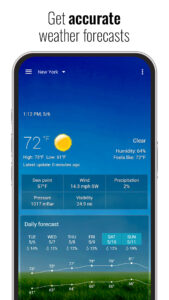
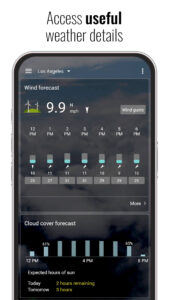
- Weather details (wind speed, UV index, humidity, pressure, rain and snow information, etc)
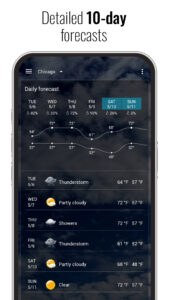
- Current weather conditions, hourly forecast, daily forecast and much more
- Detailed and extended weather forecast (daily and hourly)
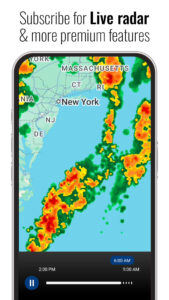
- Weather radar
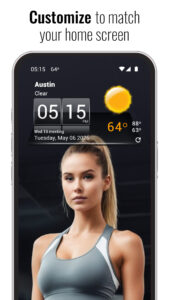
- Many customization options (customize the background, weather icons, weather layout and more)
- Weather graphs (daily and hourly)
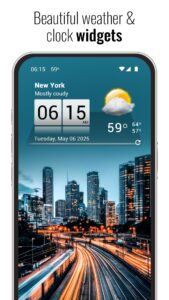
- Widgets (4x1 and 4x2) that support different skins and colors
The widgets include the following:
- Current weather
- Current time and date
- Next alarm
- Next calendar event (if supported by the widget)
- Moon phase
- Hot spots to launch useful apps (some can be customized)
Premium features:
Subscribe to premium to remove ads and unlock all premium features
Website:
www.machapp.net
Email us if you have any problems or suggestions. We are happy to help!
The app includes the following:
- Weather forecast for any location in the world
- Weather details (wind speed, UV index, humidity, pressure, rain and snow information, etc)
- Current weather conditions, hourly forecast, daily forecast and much more
- Detailed and extended weather forecast (daily and hourly)
- Weather radar
- Many customization options (customize the background, weather icons, weather layout and more)
- Weather graphs (daily and hourly)
- Widgets (4x1 and 4x2) that support different skins and colors
The widgets include the following:
- Current weather
- Current time and date
- Next alarm
- Next calendar event (if supported by the widget)
- Moon phase
- Hot spots to launch useful apps (some can be customized)
Premium features:
Subscribe to premium to remove ads and unlock all premium features
Website:
www.machapp.net
Email us if you have any problems or suggestions. We are happy to help!
Download 3D Sense Clock & Weather APK
Fast, free and safe download.
APK Permissions 28
- android.permission.ACCESS_ADSERVICES_AD_ID
- android.permission.ACCESS_ADSERVICES_ATTRIBUTION
- android.permission.ACCESS_ADSERVICES_TOPICS
- android.permission.ACCESS_BACKGROUND_LOCATION
- android.permission.ACCESS_COARSE_LOCATION
- android.permission.ACCESS_FINE_LOCATION
- android.permission.ACCESS_NETWORK_STATE
- android.permission.CAMERA
- android.permission.FOREGROUND_SERVICE
- android.permission.FOREGROUND_SERVICE_DATA_SYNC
- android.permission.INTERNET
- android.permission.POST_NOTIFICATIONS
- android.permission.QUERY_ALL_PACKAGES
- android.permission.READ_CALENDAR
- android.permission.READ_EXTERNAL_STORAGE
- android.permission.RECEIVE_BOOT_COMPLETED
- android.permission.SCHEDULE_EXACT_ALARM
- android.permission.VIBRATE
- android.permission.WAKE_LOCK
- android.permission.WRITE_EXTERNAL_STORAGE
- com.android.vending.BILLING
- com.android.vending.CHECK_LICENSE
- com.applovin.array.apphub.permission.BIND_APPHUB_SERVICE
- com.droid27.d3senseclockweather.DYNAMIC_RECEIVER_NOT_EXPORTED_PERMISSION
- com.google.android.c2dm.permission.RECEIVE
- com.google.android.finsky.permission.BIND_GET_INSTALL_REFERRER_SERVICE
- com.google.android.gms.permission.AD_ID
- com.google.android.permission.PROVIDE_BACKGROUND
APK Verified
The cryptographic signature guarantees that the file is safe to install and was not tampered with in any way.
Similar in Weather


More by MACHAPP Software Ltd


Frequently Asked Questions about 3D Sense Clock & Weather APK
This is the universal variant — a single APK that contains native libraries for every CPU architecture. It installs on any Android device but is larger than per-architecture variants.
Yes — the APK's signature has been cryptographically verified against the publisher's signing key. The SHA-256 hash is shown in the File Information panel so you can independently confirm the file matches the original release.
Android 23 (API level 36) or newer. Older devices will refuse the install.
Install a free app like 'CPU-Z' or 'Droid Hardware Info' from the Play Store and look at the ABI / Instruction Set row. Most phones made after 2017 are arm64-v8a; if in doubt, download the universal variant.
All variants are functionally identical — same features, same version. They differ only in which CPU architectures the native code is compiled for, and (sometimes) which screen densities the included graphics target. Pick the one that matches your device for the smallest install size, or pick 'Universal' if you're unsure.