
Download MailTime: Secure Email Inbox APK 4.1.102.1509-MailTime Universal · Android 24+
Download APK
Verified Safe
This is the universal build of MailTime: Secure Email Inbox 4.1.102.1509-MailTime. It contains native libraries for every CPU architecture (arm64-v8a, armeabi-v7a, x86, x86_64), so it installs on any Android device. The trade-off is size — it's larger than per-architecture variants. Pick this one if you're unsure which CPU your phone has, or if you plan to share the APK with multiple devices.
File size: 71.9 MB • Min Android: 24 • Target Android: 35 • Version code: 502 • Framework: Native (Java/Kotlin) • Permissions: 33
Screenshots


File Information
| Package Name | com.mailtime.android |
|---|---|
| Version Name | 4.1.102.1509-MailTime |
| Version Code | 502 |
| Architecture | Universal |
| Min Android Version | Android 24 (API 35) |
| Main Activity | com.mailtime.android.fullcloud.SplashActivity |
| Framework | Native (Java/Kotlin) |
| File Size | 71.89 MB |
| Signature (SHA1) | 2E2B213F83801A4EA27C7DCF832DD1857333D5E3 |
| File Hash (SHA256) | 12c569bd9dd0e232d0a6a1f1785f7ec0fdf00bbe786a55fa47b8bf83b04860e3 |
What's New
Continuous functionality enhancements.
App Description
MailTime is the easiest email app on your phone.
Send and receive emails just as you would in SMS style without needing all your contacts to download the same app. MailTime simplifies your email inbox and helps declutter your daily life and business.
【MailTime AI: Email Protocol-based AI Assistant】
Experience the disruptive email messaging experience powered by generative AI, brought to you by Measurable Data Token (MDT).
- MailTime AI generates contextual email replies that are tailored to the conversation thread
- Choose from "Positive" or "Negative" tones and select "Long" or "Short" reply length. Click "Generate" to receive personalized, AI-powered email drafts.
- Refine your message with "Proof-read", "Shorten", or "Expand" options, optimizing both AI-generated and your own text.
- Unleash the boundless proficiency, creativity, and flexibility of generative AI. Manage your emails like never before.
- MailTime AI Wallet: Sign up for RewardMe to get daily FREE tokens, or Subscribe to Monthly or Yearly plans to enjoy unlimited use
【MESSENGERS-LIKE EMAIL】
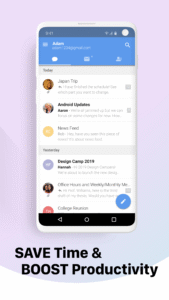
- MailTime reformats your cluttered email threads into clean bubble conversations. Communication should be like a dialogue, not in threads!
- Our smart inbox prioritizes important senders from all your newsletters, marketing emails, and other bot-generated mails in All Mail. Talk to people you care about, not bot!
【EMAIL AS GROUP CHAT】
- Managing your conversations in MailTime just like a group chat. To add, remove, or switch participants to 'cc' or 'bcc', just swipe left and change your participants' status.
- You can have a conversation with people that are not in your contacts. One of the benefits of using email is that you can contact anybody if only you have their email address.
【MULTIPLE EMAIL ACCOUNT SUPPORT】
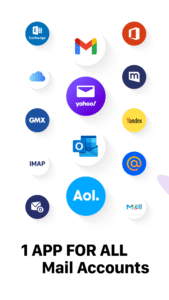
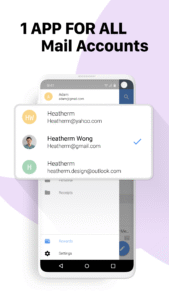
- Do not need to download other email apps. MailTime integrates multiple email platforms and support various email accounts, including Gmail, iCloud, Yahoo, Outlook, AOL, Office 365, Mail.ru, Hotmail, QQ, 163, 126, Tencent Enterprise, Google Apps Mail services.
- You can also attach files from Dropbox, iCloud, Google Drive, Box, and OneDrive with MailTime.
------------
We love emails! Talk to us anytime by clicking the “Write to MailTime Team” button or send an email to
support@mailtime.com
.
Website:
mailtime.com
Twitter:
twitter.com/mailtimeapp
Facebook:
www.facebook.com/mailtimeapp
Instagram:
www.instagram.com/mailtimeapp
Have a Good MailTime!
We care about your privacy. Read more about our privacy policy here:
mailtime.com/en/privacy
Send and receive emails just as you would in SMS style without needing all your contacts to download the same app. MailTime simplifies your email inbox and helps declutter your daily life and business.
【MailTime AI: Email Protocol-based AI Assistant】
Experience the disruptive email messaging experience powered by generative AI, brought to you by Measurable Data Token (MDT).
- MailTime AI generates contextual email replies that are tailored to the conversation thread
- Choose from "Positive" or "Negative" tones and select "Long" or "Short" reply length. Click "Generate" to receive personalized, AI-powered email drafts.
- Refine your message with "Proof-read", "Shorten", or "Expand" options, optimizing both AI-generated and your own text.
- Unleash the boundless proficiency, creativity, and flexibility of generative AI. Manage your emails like never before.
- MailTime AI Wallet: Sign up for RewardMe to get daily FREE tokens, or Subscribe to Monthly or Yearly plans to enjoy unlimited use
【MESSENGERS-LIKE EMAIL】
- MailTime reformats your cluttered email threads into clean bubble conversations. Communication should be like a dialogue, not in threads!
- Our smart inbox prioritizes important senders from all your newsletters, marketing emails, and other bot-generated mails in All Mail. Talk to people you care about, not bot!
【EMAIL AS GROUP CHAT】
- Managing your conversations in MailTime just like a group chat. To add, remove, or switch participants to 'cc' or 'bcc', just swipe left and change your participants' status.
- You can have a conversation with people that are not in your contacts. One of the benefits of using email is that you can contact anybody if only you have their email address.
【MULTIPLE EMAIL ACCOUNT SUPPORT】
- Do not need to download other email apps. MailTime integrates multiple email platforms and support various email accounts, including Gmail, iCloud, Yahoo, Outlook, AOL, Office 365, Mail.ru, Hotmail, QQ, 163, 126, Tencent Enterprise, Google Apps Mail services.
- You can also attach files from Dropbox, iCloud, Google Drive, Box, and OneDrive with MailTime.
------------
We love emails! Talk to us anytime by clicking the “Write to MailTime Team” button or send an email to
support@mailtime.com
.
Website:
mailtime.com
Twitter:
twitter.com/mailtimeapp
Facebook:
www.facebook.com/mailtimeapp
Instagram:
www.instagram.com/mailtimeapp
Have a Good MailTime!
We care about your privacy. Read more about our privacy policy here:
mailtime.com/en/privacy
Download MailTime: Secure Email Inbox APK
Fast, free and safe download.
APK Permissions 33
- android.permission.ACCESS_ADSERVICES_AD_ID
- android.permission.ACCESS_ADSERVICES_ATTRIBUTION
- android.permission.ACCESS_ADSERVICES_CUSTOM_AUDIENCE
- android.permission.ACCESS_ADSERVICES_TOPICS
- android.permission.ACCESS_NETWORK_STATE
- android.permission.ACCESS_WIFI_STATE
- android.permission.CAMERA
- android.permission.DOWNLOAD_WITHOUT_NOTIFICATION
- android.permission.FOREGROUND_SERVICE
- android.permission.GET_ACCOUNTS
- android.permission.GET_TASKS
- android.permission.INTERNET
- android.permission.POST_NOTIFICATIONS
- android.permission.READ_EXTERNAL_STORAGE
- android.permission.READ_PHONE_STATE
- android.permission.RECEIVE_BOOT_COMPLETED
- android.permission.RECORD_AUDIO
- android.permission.USE_CREDENTIALS
- android.permission.WAKE_LOCK
- android.permission.WRITE_EXTERNAL_STORAGE
- com.android.vending.BILLING
- com.asus.msa.SupplementaryDID.ACCESS
- com.google.android.apps.photos.permission.GOOGLE_PHOTOS
- com.google.android.c2dm.permission.RECEIVE
- com.google.android.finsky.permission.BIND_GET_INSTALL_REFERRER_SERVICE
- com.google.android.gms.permission.AD_ID
- com.google.android.providers.gsf.permission.READ_GSERVICES
- com.huawei.appmarket.service.commondata.permission.GET_COMMON_DATA
- com.mailtime.android.DYNAMIC_RECEIVER_NOT_EXPORTED_PERMISSION
- com.mailtime.android.permission.C2D_MESSAGE
- com.mailtime.android.permission.MIPUSH_RECEIVE
- com.mailtime.android.permission.PROCESS_PUSH_MSG
- com.samsung.android.mapsagent.permission.READ_APP_INFO
APK Verified
The cryptographic signature guarantees that the file is safe to install and was not tampered with in any way.


Frequently Asked Questions about MailTime: Secure Email Inbox APK
This is the universal variant — a single APK that contains native libraries for every CPU architecture. It installs on any Android device but is larger than per-architecture variants.
Yes — the APK's signature has been cryptographically verified against the publisher's signing key. The SHA-256 hash is shown in the File Information panel so you can independently confirm the file matches the original release.
Android 24 (API level 35) or newer. Older devices will refuse the install.
Install a free app like 'CPU-Z' or 'Droid Hardware Info' from the Play Store and look at the ABI / Instruction Set row. Most phones made after 2017 are arm64-v8a; if in doubt, download the universal variant.
All variants are functionally identical — same features, same version. They differ only in which CPU architectures the native code is compiled for, and (sometimes) which screen densities the included graphics target. Pick the one that matches your device for the smallest install size, or pick 'Universal' if you're unsure.