
This is the x86_64 build of xOPS CPU Benchmark﹣FLOPS/MIPS 1.1.6. Intel-architecture builds are useful for Android emulators (BlueStacks, NoxPlayer, Android Studio AVD), Chromebooks running ARC, and the small number of Intel-CPU Android phones. Most physical Android phones should download the ARM variant instead.
File size: 11.6 MB • Min Android: 19 • Target Android: 34 • Version code: 16 • Framework: Xamarin • Permissions: 3
Screenshots
File Information
| Package Name | xcom.saplin.xOPS |
|---|---|
| Version Name | 1.1.6 |
| Version Code | 16 |
| Architecture | x86_64 |
| Min Android Version | Android 19 (API 34) |
| Main Activity | crc64b967cc1a76f83cb7.MainActivity |
| Framework | Xamarin |
| File Size | 11.59 MB |
| Signature (SHA1) | 6D5638047B984954738ABEA970A4CF2EE8A1698E |
| File Hash (SHA256) | 93767ea3078f4895e95a7076f188d08758355054d264c9594b7e5247ec4dee6c |
App Description
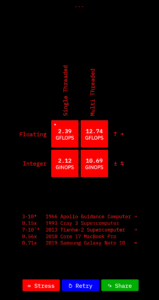
The app calculates how many operations (add, subtract, multiply, divide, etc.) a CPU can perform in a given second with either fractional (floating-point) or integer numbers.
FLOPS - Floating-point Operations Per Second, performance measurement of Floating Point Unit (FPU).
INOPS - Integer Operations Per Second, measurement of Arithmetic Logic Unit (ALU)
E.g. 1 G(iga)FLOPS means that CPU can do 1 billion floating-point operations per second (such as 1.1+2.2=3.3).
General app logic is typically reliant on integer operations, while graphics and games rely on floating-point ones. The faster your CPU can crunch numbers, the faster your apps can run.
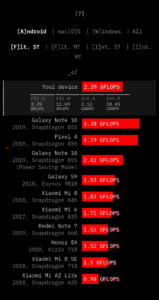
You can compare your device's performance to 1960s Apollo Guidance Computer or 1990s super computer. There's also a results database with comparison figures for more actual devices (smartphones, laptops).
Tests are executed in single and multithreaded modes and reflect multi-core and single-core performance.
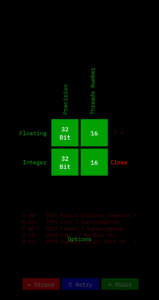
Under Options you can change the number of threads used and choose between 32 and 64 bit precisions.
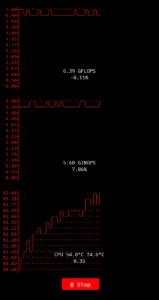
Stress Test is available and allows tracking CPU performance and temperature over time under high load (determining thermal throttling).
More info about how the app works:
maxim-saplin.github.io/xOPS-Web/?about=
Source code:
github.com/maxim-saplin/xOPS-App
FLOPS - Floating-point Operations Per Second, performance measurement of Floating Point Unit (FPU).
INOPS - Integer Operations Per Second, measurement of Arithmetic Logic Unit (ALU)
E.g. 1 G(iga)FLOPS means that CPU can do 1 billion floating-point operations per second (such as 1.1+2.2=3.3).
General app logic is typically reliant on integer operations, while graphics and games rely on floating-point ones. The faster your CPU can crunch numbers, the faster your apps can run.
You can compare your device's performance to 1960s Apollo Guidance Computer or 1990s super computer. There's also a results database with comparison figures for more actual devices (smartphones, laptops).
Tests are executed in single and multithreaded modes and reflect multi-core and single-core performance.
Under Options you can change the number of threads used and choose between 32 and 64 bit precisions.
Stress Test is available and allows tracking CPU performance and temperature over time under high load (determining thermal throttling).
More info about how the app works:
maxim-saplin.github.io/xOPS-Web/?about=
Source code:
github.com/maxim-saplin/xOPS-App
Download xOPS CPU Benchmark﹣FLOPS/MIPS APK
Fast, free and safe download.
APK Permissions 3
- android.permission.INTERNET
- android.permission.WAKE_LOCK
- android.permission.WRITE_EXTERNAL_STORAGE
APK Verified
The cryptographic signature guarantees that the file is safe to install and was not tampered with in any way.
Other Variants
This release has multiple variants (e.g. diff architectures).
arm64-v8a armeabi-v7a x86Similar in Tools


More by Maxim Saplin

Frequently Asked Questions about xOPS CPU Benchmark﹣FLOPS/MIPS APK
This variant is built for 64-bit Intel (Android emulators, Chromebooks). If your device's CPU matches, this is the smallest, fastest version to install.
Yes — the APK's signature has been cryptographically verified against the publisher's signing key. The SHA-256 hash is shown in the File Information panel so you can independently confirm the file matches the original release.
Android 19 (API level 34) or newer. Older devices will refuse the install.
Install a free app like 'CPU-Z' or 'Droid Hardware Info' from the Play Store and look at the ABI / Instruction Set row. Most phones made after 2017 are arm64-v8a; if in doubt, download the universal variant.
All variants are functionally identical — same features, same version. They differ only in which CPU architectures the native code is compiled for, and (sometimes) which screen densities the included graphics target. Pick the one that matches your device for the smallest install size, or pick 'Universal' if you're unsure.