
Download Maxthon browser APK 7.4.6.103 arm64-v8a, armeabi-v7a, x86, x86_64 · Android 24+
Download APK
Verified Safe
This is the arm64-v8a, armeabi-v7a, x86, x86_64 build of Maxthon browser 7.4.6.103. Pick this build if your device's primary ABI matches.
File size: 31.3 MB • Min Android: 24 • Target Android: 35 • Version code: 70406103 • Framework: Native (Java/Kotlin) • Permissions: 104
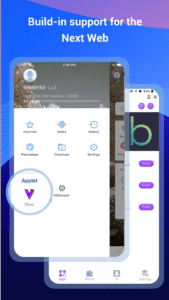
Screenshots
File Information
| Package Name | com.mx.browser |
|---|---|
| Version Name | 7.4.6.103 |
| Version Code | 70406103 |
| Architecture | arm64-v8a, armeabi-v7a, x86, x86_64 |
| Min Android Version | Android 24 (API 35) |
| Main Activity | com.mx.browser.MxSplashActivity |
| Framework | Native (Java/Kotlin) |
| File Size | 31.33 MB |
| Signature (SHA1) | 0F9ED84A5C7051086200C2AE6AA7DA25E12C8C45 |
| File Hash (SHA256) | 536bda757c70c6f3468e73112e9324f884bdd527ccb94e57dac4bd7f2480a4ce |
What's New
1. Fixed an issue where downloads might fail
2. Added download notification prompts
3. Fixed the issue where the bottom notification bar could block content
4. Changed the default download path to the system’s Downloads folder
5. Fixed other potential issues (mainly those reported on Google Play, such as NPE, Service-related problems, etc.)
2. Added download notification prompts
3. Fixed the issue where the bottom notification bar could block content
4. Changed the default download path to the system’s Downloads folder
5. Fixed other potential issues (mainly those reported on Google Play, such as NPE, Service-related problems, etc.)
App Description
Do you want to save mobile data and save money on your monthly bill? Try Maxthon Cloud Browser! You can save all kinds of stuff and read them offline in your browser at any time. Smart image display could also help you control mobile data consumption effectively. This browser is made just for mobile.
As the the 6th generation web browser developed by Maxthon USA Inc., which was once awarded "Best Browser" on About.com For 3 Consecutive Years, Maxthon Cloud Browser is created for those who spend much time on the web every day, especially for iOS users because of its iDevice features like Touch ID, 3D Touch…
It’s time to switch to this faster and lighter browser to improve the efficiency and save data now!
FEATURES:
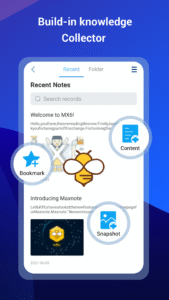
*BUILT-IN NOTE-TAKING TOOL- You can make notes easily while browsing the web. Collect and save any content you see on the web with one tap. Read, edit and organise your collection even offline.
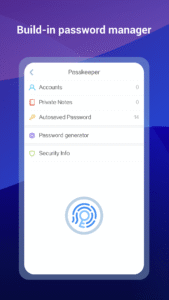
*BUILT-IN PASSWORD MANAGER- It handles passwords for your, securely saves them and automatically fills them in next time you visit the site. Employing multiple encryption technologies, your passwords will never be safer.
*NIGHT MODE- Are you a night owl? It’s time to say time to sore eyes. Read more comfortably in the dark with Maxthon now.
*INCOGNITO MODE- Turn on Incognito mode in Maxthon and browse the mobile web without a trace.
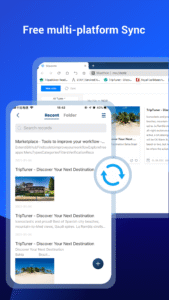
*SYNC ACROSS DEVICES- Access tabs, bookmarks & history from other devices, Pick up where you left off on your other devices and read offline.
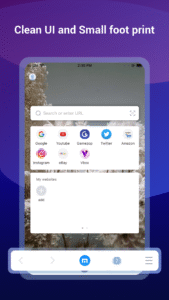
*CUSTOMISABLE SPEED DIAL- Add your favourite websites, apps or even search result to speed dial, to visit them on the go with one touch.
*SMART IMAGE DISPLAY- Help you control your mobile data usage and save money for you.
*EASY MULTI TABS MANAGEMENTS- You can open as many tabs as you like, and switch or close with only one touch.
Millions of people use Maxthon browsers to watch videos, connect with friends, search on the web, and sync data across platforms. We hope Maxthon Cloud Browser could help more and more people enjoy the Internet, while saving more data and money.
Download Maxthon Cloud Browser and save your mobile data from now on!
As the the 6th generation web browser developed by Maxthon USA Inc., which was once awarded "Best Browser" on About.com For 3 Consecutive Years, Maxthon Cloud Browser is created for those who spend much time on the web every day, especially for iOS users because of its iDevice features like Touch ID, 3D Touch…
It’s time to switch to this faster and lighter browser to improve the efficiency and save data now!
FEATURES:
*BUILT-IN NOTE-TAKING TOOL- You can make notes easily while browsing the web. Collect and save any content you see on the web with one tap. Read, edit and organise your collection even offline.
*BUILT-IN PASSWORD MANAGER- It handles passwords for your, securely saves them and automatically fills them in next time you visit the site. Employing multiple encryption technologies, your passwords will never be safer.
*NIGHT MODE- Are you a night owl? It’s time to say time to sore eyes. Read more comfortably in the dark with Maxthon now.
*INCOGNITO MODE- Turn on Incognito mode in Maxthon and browse the mobile web without a trace.
*SYNC ACROSS DEVICES- Access tabs, bookmarks & history from other devices, Pick up where you left off on your other devices and read offline.
*CUSTOMISABLE SPEED DIAL- Add your favourite websites, apps or even search result to speed dial, to visit them on the go with one touch.
*SMART IMAGE DISPLAY- Help you control your mobile data usage and save money for you.
*EASY MULTI TABS MANAGEMENTS- You can open as many tabs as you like, and switch or close with only one touch.
Millions of people use Maxthon browsers to watch videos, connect with friends, search on the web, and sync data across platforms. We hope Maxthon Cloud Browser could help more and more people enjoy the Internet, while saving more data and money.
Download Maxthon Cloud Browser and save your mobile data from now on!
Download Maxthon browser APK
Fast, free and safe download.
APK Permissions 104
- android.permission.ACCESS_COARSE_LOCATION
- android.permission.ACCESS_FINE_LOCATION
- android.permission.ACCESS_NETWORK_STATE
- android.permission.ACCESS_WIFI_STATE
- android.permission.CAMERA
- android.permission.CHANGE_NETWORK_STATE
- android.permission.CHANGE_WIFI_MULTICAST_STATE
- android.permission.CHANGE_WIFI_STATE
- android.permission.FLASHLIGHT
- android.permission.FOREGROUND_SERVICE
- android.permission.FOREGROUND_SERVICE_DATA_SYNC
- android.permission.INTERNET
- android.permission.MOUNT_UNMOUNT_FILESYSTEMS
- android.permission.POST_NOTIFICATIONS
- android.permission.READ_EXTERNAL_STORAGE
- android.permission.READ_MEDIA_IMAGES
- android.permission.READ_MEDIA_STORAGE
- android.permission.READ_PHONE_STATE
- android.permission.READ_PRIVILEGED_PHONE_STATE
- android.permission.RECEIVE_BOOT_COMPLETED
- android.permission.REQUEST_INSTALL_PACKAGES
- android.permission.SYSTEM_ALERT_WINDOW
- android.permission.USE_BIOMETRIC
- android.permission.USE_FINGERPRINT
- android.permission.VIBRATE
- android.permission.WAKE_LOCK
- android.permission.WRITE_EXTERNAL_STORAGE
- android.permission.WRITE_SETTINGS
- cn.nubia.launcher.permission.READ_SETTINGS
- cn.nubia.launcher.permission.WRITE_SETTINGS
- com.aliyun.homeshell.permission.READ_SETTINGS
- com.aliyun.homeshell.permission.WRITE_SETTINGS
- com.anddoes.launcher.permission.READ_SETTINGS
- com.anddoes.launcher.permission.WRITE_SETTINGS
- com.android.browser.permission.READ_HISTORY_BOOKMARKS
- com.android.launcher.permission.INSTALL_SHORTCUT
- com.android.launcher.permission.READ_SETTINGS
- com.android.launcher.permission.UNINSTALL_SHORTCUT
- com.android.launcher.permission.WRITE_SETTINGS
- com.android.launcher2.permission.READ_SETTINGS
- com.android.launcher2.permission.WRITE_SETTINGS
- com.android.launcher3.permission.READ_SETTINGS
- com.android.launcher3.permission.WRITE_SETTINGS
- com.android.mylauncher.permission.READ_SETTINGS
- com.android.mylauncher.permission.WRITE_SETTINGS
- com.ebproductions.android.launcher.permission.READ_SETTINGS
- com.ebproductions.android.launcher.permission.WRITE_SETTINGS
- com.fede.launcher.permission.READ_SETTINGS
- com.fede.launcher.permission.WRITE_SETTINGS
- com.google.android.apps.nexuslauncher.permission.READ_SETTINGS
- com.google.android.apps.nexuslauncher.permission.WRITE_SETTINGS
- com.google.android.c2dm.permission.RECEIVE
- com.google.android.gms.permission.AD_ID
- com.htc.launcher.permission.READ_SETTINGS
- com.htc.launcher.permission.UPDATE_SHORTCUT
- com.htc.launcher.permission.WRITE_SETTINGS
- com.huawei.android.launcher.permission.READ_SETTINGS
- com.huawei.android.launcher.permission.WRITE_SETTINGS
- com.huawei.launcher2.permission.READ_SETTINGS
- com.huawei.launcher2.permission.WRITE_SETTINGS
- com.huawei.launcher3.permission.READ_SETTINGS
- com.huawei.launcher3.permission.WRITE_SETTINGS
- com.iLoong.permission.READ_SETTINGS
- com.iLoong.permission.WRITE_SETTINGS
- com.lenovo.launcher.permission.READ_SETTINGS
- com.lenovo.launcher.permission.WRITE_SETTINGS
- com.lge.launcher.permission.READ_SETTINGS
- com.lge.launcher.permission.WRITE_SETTINGS
- com.majeur.launcher.permission.UPDATE_BADGE
- com.meizu.flyme.launcher.permission.READ_SETTINGS
- com.meizu.flyme.launcher.permission.WRITE_SETTINGS
- com.miui.mihome2.permission.READ_SETTINGS
- com.miui.mihome2.permission.WRITE_SETTINGS
- com.mx.browser.DYNAMIC_RECEIVER_NOT_EXPORTED_PERMISSION
- com.oppo.launcher.permission.READ_SETTINGS
- com.oppo.launcher.permission.WRITE_SETTINGS
- com.qihoo360.launcher.permission.READ_SETTINGS
- com.qihoo360.launcher.permission.WRITE_SETTINGS
- com.sec.android.app.twlauncher.settings.READ_SETTINGS
- com.sec.android.app.twlauncher.settings.WRITE_SETTINGS
- com.smartisanos.launcher.data.ExportDataProvider
- com.smartisanos.launcher.READ_DATABASE
- com.smartisanos.launcher.WRITE_DATABASE
- com.tencent.qqlauncher.permission.READ_SETTINGS
- com.tencent.qqlauncher.permission.WRITE_SETTINGS
- com.teslacoilsw.launcher.permission.READ_SETTINGS
- com.teslacoilsw.launcher.permission.WRITE_SETTINGS
- com.zte.lqsoft.launcher.permission.READ_SETTINGS
- com.zte.lqsoft.launcher.permission.WRITE_SETTINGS
- com.zte.mifavor.launcher.permission.READ_SETTINGS
- com.zte.mifavor.launcher.permission.WRITE_SETTINGS
- com.ztemt.launcher.permission.READ_SETTINGS
- com.ztemt.launcher.permission.WRITE_SETTINGS
- dianxin.permission.ACCESS_LAUNCHER_DATA
- net.qihoo.launcher.permission.READ_SETTINGS
- net.qihoo.launcher.permission.WRITE_SETTINGS
- org.adw.launcher_donut.permission.READ_SETTINGS
- org.adw.launcher_donut.permission.WRITE_SETTINGS
- org.adw.launcher.permission.READ_SETTINGS
- org.adw.launcher.permission.WRITE_SETTINGS
- org.adwfreak.launcher.permission.READ_SETTINGS
- org.adwfreak.launcher.permission.WRITE_SETTINGS
- telecom.mdesk.permission.READ_SETTINGS
- telecom.mdesk.permission.WRITE_SETTINGS
APK Verified
The cryptographic signature guarantees that the file is safe to install and was not tampered with in any way.


Frequently Asked Questions about Maxthon browser APK
This variant is built for devices that report `arm64-v8a, armeabi-v7a, x86, x86_64` as their primary ABI. If your device's CPU matches, this is the smallest, fastest version to install.
Yes — the APK's signature has been cryptographically verified against the publisher's signing key. The SHA-256 hash is shown in the File Information panel so you can independently confirm the file matches the original release.
Android 24 (API level 35) or newer. Older devices will refuse the install.
Install a free app like 'CPU-Z' or 'Droid Hardware Info' from the Play Store and look at the ABI / Instruction Set row. Most phones made after 2017 are arm64-v8a; if in doubt, download the universal variant.
All variants are functionally identical — same features, same version. They differ only in which CPU architectures the native code is compiled for, and (sometimes) which screen densities the included graphics target. Pick the one that matches your device for the smallest install size, or pick 'Universal' if you're unsure.