
Screenshots
File Information
| Package Name | com.mx.browser |
|---|---|
| Version Name | 7.4.7.101 |
| Version Code | 70407101 |
| Architecture | arm64-v8a, armeabi-v7a, x86, x86_64 |
| Min Android Version | Android 24 (API 35) |
| Main Activity | com.mx.browser.MxSplashActivity |
| Framework | Native (Java/Kotlin) |
| File Size | 27.46 MB |
| Signature (SHA1) | 0F9ED84A5C7051086200C2AE6AA7DA25E12C8C45 |
| File Hash (SHA256) | 698a4afaa60222a2d918e6823233c261714187da132a143edf6670e3f7d5cca2 |
What's New
• Improved system sharing to fix missing shared content
• Enhanced webpage stability and reduced unexpected refreshes
• Streamlined shortcut flow for creating new notes
• Fixed issues with download notifications
• Fixed possible loss of note titles
• Fixed saving of empty notes
• Fixed crashes when creating notes via 3D Touch
• Fixed crash when returning after creating a note with 3D Touch
• Fixed image display issues in notes
• Fixed sharing failures on some pages
• Enhanced webpage stability and reduced unexpected refreshes
• Streamlined shortcut flow for creating new notes
• Fixed issues with download notifications
• Fixed possible loss of note titles
• Fixed saving of empty notes
• Fixed crashes when creating notes via 3D Touch
• Fixed crash when returning after creating a note with 3D Touch
• Fixed image display issues in notes
• Fixed sharing failures on some pages
App Description
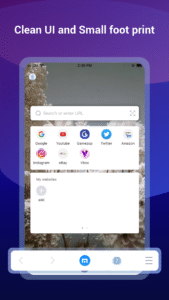
Do you want to save mobile data and save money on your monthly bill? Try Maxthon Cloud Browser! You can save all kinds of stuff and read them offline in your browser at any time. Smart image display could also help you control mobile data consumption effectively. This browser is made just for mobile.
As the the 6th generation web browser developed by Maxthon USA Inc., which was once awarded "Best Browser" on About.com For 3 Consecutive Years, Maxthon Cloud Browser is created for those who spend much time on the web every day, especially for iOS users because of its iDevice features like Touch ID, 3D Touch…
It’s time to switch to this faster and lighter browser to improve the efficiency and save data now!
FEATURES:
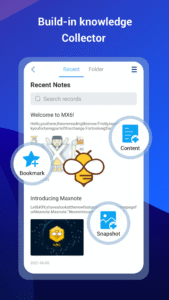
*BUILT-IN NOTE-TAKING TOOL- You can make notes easily while browsing the web. Collect and save any content you see on the web with one tap. Read, edit and organise your collection even offline.
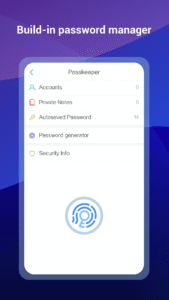
*BUILT-IN PASSWORD MANAGER- It handles passwords for your, securely saves them and automatically fills them in next time you visit the site. Employing multiple encryption technologies, your passwords will never be safer.
*NIGHT MODE- Are you a night owl? It’s time to say time to sore eyes. Read more comfortably in the dark with Maxthon now.
*INCOGNITO MODE- Turn on Incognito mode in Maxthon and browse the mobile web without a trace.
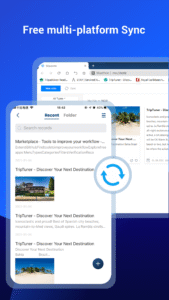
*SYNC ACROSS DEVICES- Access tabs, bookmarks & history from other devices, Pick up where you left off on your other devices and read offline.
*CUSTOMISABLE SPEED DIAL- Add your favourite websites, apps or even search result to speed dial, to visit them on the go with one touch.
*SMART IMAGE DISPLAY- Help you control your mobile data usage and save money for you.
*EASY MULTI TABS MANAGEMENTS- You can open as many tabs as you like, and switch or close with only one touch.
Millions of people use Maxthon browsers to watch videos, connect with friends, search on the web, and sync data across platforms. We hope Maxthon Cloud Browser could help more and more people enjoy the Internet, while saving more data and money.
Download Maxthon Cloud Browser and save your mobile data from now on!
As the the 6th generation web browser developed by Maxthon USA Inc., which was once awarded "Best Browser" on About.com For 3 Consecutive Years, Maxthon Cloud Browser is created for those who spend much time on the web every day, especially for iOS users because of its iDevice features like Touch ID, 3D Touch…
It’s time to switch to this faster and lighter browser to improve the efficiency and save data now!
FEATURES:
*BUILT-IN NOTE-TAKING TOOL- You can make notes easily while browsing the web. Collect and save any content you see on the web with one tap. Read, edit and organise your collection even offline.
*BUILT-IN PASSWORD MANAGER- It handles passwords for your, securely saves them and automatically fills them in next time you visit the site. Employing multiple encryption technologies, your passwords will never be safer.
*NIGHT MODE- Are you a night owl? It’s time to say time to sore eyes. Read more comfortably in the dark with Maxthon now.
*INCOGNITO MODE- Turn on Incognito mode in Maxthon and browse the mobile web without a trace.
*SYNC ACROSS DEVICES- Access tabs, bookmarks & history from other devices, Pick up where you left off on your other devices and read offline.
*CUSTOMISABLE SPEED DIAL- Add your favourite websites, apps or even search result to speed dial, to visit them on the go with one touch.
*SMART IMAGE DISPLAY- Help you control your mobile data usage and save money for you.
*EASY MULTI TABS MANAGEMENTS- You can open as many tabs as you like, and switch or close with only one touch.
Millions of people use Maxthon browsers to watch videos, connect with friends, search on the web, and sync data across platforms. We hope Maxthon Cloud Browser could help more and more people enjoy the Internet, while saving more data and money.
Download Maxthon Cloud Browser and save your mobile data from now on!
Download Maxthon browser APK
Fast, free and safe download.
APK Permissions 104
- android.permission.ACCESS_COARSE_LOCATION
- android.permission.ACCESS_FINE_LOCATION
- android.permission.ACCESS_NETWORK_STATE
- android.permission.ACCESS_WIFI_STATE
- android.permission.CAMERA
- android.permission.CHANGE_NETWORK_STATE
- android.permission.CHANGE_WIFI_MULTICAST_STATE
- android.permission.CHANGE_WIFI_STATE
- android.permission.FLASHLIGHT
- android.permission.FOREGROUND_SERVICE
- android.permission.FOREGROUND_SERVICE_DATA_SYNC
- android.permission.INTERNET
- android.permission.MOUNT_UNMOUNT_FILESYSTEMS
- android.permission.POST_NOTIFICATIONS
- android.permission.READ_EXTERNAL_STORAGE
- android.permission.READ_MEDIA_IMAGES
- android.permission.READ_MEDIA_STORAGE
- android.permission.READ_PHONE_STATE
- android.permission.READ_PRIVILEGED_PHONE_STATE
- android.permission.RECEIVE_BOOT_COMPLETED
- android.permission.REQUEST_INSTALL_PACKAGES
- android.permission.SYSTEM_ALERT_WINDOW
- android.permission.USE_BIOMETRIC
- android.permission.USE_FINGERPRINT
- android.permission.VIBRATE
- android.permission.WAKE_LOCK
- android.permission.WRITE_EXTERNAL_STORAGE
- android.permission.WRITE_SETTINGS
- cn.nubia.launcher.permission.READ_SETTINGS
- cn.nubia.launcher.permission.WRITE_SETTINGS
- com.aliyun.homeshell.permission.READ_SETTINGS
- com.aliyun.homeshell.permission.WRITE_SETTINGS
- com.anddoes.launcher.permission.READ_SETTINGS
- com.anddoes.launcher.permission.WRITE_SETTINGS
- com.android.browser.permission.READ_HISTORY_BOOKMARKS
- com.android.launcher.permission.INSTALL_SHORTCUT
- com.android.launcher.permission.READ_SETTINGS
- com.android.launcher.permission.UNINSTALL_SHORTCUT
- com.android.launcher.permission.WRITE_SETTINGS
- com.android.launcher2.permission.READ_SETTINGS
- com.android.launcher2.permission.WRITE_SETTINGS
- com.android.launcher3.permission.READ_SETTINGS
- com.android.launcher3.permission.WRITE_SETTINGS
- com.android.mylauncher.permission.READ_SETTINGS
- com.android.mylauncher.permission.WRITE_SETTINGS
- com.ebproductions.android.launcher.permission.READ_SETTINGS
- com.ebproductions.android.launcher.permission.WRITE_SETTINGS
- com.fede.launcher.permission.READ_SETTINGS
- com.fede.launcher.permission.WRITE_SETTINGS
- com.google.android.apps.nexuslauncher.permission.READ_SETTINGS
- com.google.android.apps.nexuslauncher.permission.WRITE_SETTINGS
- com.google.android.c2dm.permission.RECEIVE
- com.google.android.gms.permission.AD_ID
- com.htc.launcher.permission.READ_SETTINGS
- com.htc.launcher.permission.UPDATE_SHORTCUT
- com.htc.launcher.permission.WRITE_SETTINGS
- com.huawei.android.launcher.permission.READ_SETTINGS
- com.huawei.android.launcher.permission.WRITE_SETTINGS
- com.huawei.launcher2.permission.READ_SETTINGS
- com.huawei.launcher2.permission.WRITE_SETTINGS
- com.huawei.launcher3.permission.READ_SETTINGS
- com.huawei.launcher3.permission.WRITE_SETTINGS
- com.iLoong.permission.READ_SETTINGS
- com.iLoong.permission.WRITE_SETTINGS
- com.lenovo.launcher.permission.READ_SETTINGS
- com.lenovo.launcher.permission.WRITE_SETTINGS
- com.lge.launcher.permission.READ_SETTINGS
- com.lge.launcher.permission.WRITE_SETTINGS
- com.majeur.launcher.permission.UPDATE_BADGE
- com.meizu.flyme.launcher.permission.READ_SETTINGS
- com.meizu.flyme.launcher.permission.WRITE_SETTINGS
- com.miui.mihome2.permission.READ_SETTINGS
- com.miui.mihome2.permission.WRITE_SETTINGS
- com.mx.browser.DYNAMIC_RECEIVER_NOT_EXPORTED_PERMISSION
- com.oppo.launcher.permission.READ_SETTINGS
- com.oppo.launcher.permission.WRITE_SETTINGS
- com.qihoo360.launcher.permission.READ_SETTINGS
- com.qihoo360.launcher.permission.WRITE_SETTINGS
- com.sec.android.app.twlauncher.settings.READ_SETTINGS
- com.sec.android.app.twlauncher.settings.WRITE_SETTINGS
- com.smartisanos.launcher.data.ExportDataProvider
- com.smartisanos.launcher.READ_DATABASE
- com.smartisanos.launcher.WRITE_DATABASE
- com.tencent.qqlauncher.permission.READ_SETTINGS
- com.tencent.qqlauncher.permission.WRITE_SETTINGS
- com.teslacoilsw.launcher.permission.READ_SETTINGS
- com.teslacoilsw.launcher.permission.WRITE_SETTINGS
- com.zte.lqsoft.launcher.permission.READ_SETTINGS
- com.zte.lqsoft.launcher.permission.WRITE_SETTINGS
- com.zte.mifavor.launcher.permission.READ_SETTINGS
- com.zte.mifavor.launcher.permission.WRITE_SETTINGS
- com.ztemt.launcher.permission.READ_SETTINGS
- com.ztemt.launcher.permission.WRITE_SETTINGS
- dianxin.permission.ACCESS_LAUNCHER_DATA
- net.qihoo.launcher.permission.READ_SETTINGS
- net.qihoo.launcher.permission.WRITE_SETTINGS
- org.adw.launcher_donut.permission.READ_SETTINGS
- org.adw.launcher_donut.permission.WRITE_SETTINGS
- org.adw.launcher.permission.READ_SETTINGS
- org.adw.launcher.permission.WRITE_SETTINGS
- org.adwfreak.launcher.permission.READ_SETTINGS
- org.adwfreak.launcher.permission.WRITE_SETTINGS
- telecom.mdesk.permission.READ_SETTINGS
- telecom.mdesk.permission.WRITE_SETTINGS
APK Verified
The cryptographic signature guarantees that the file is safe to install and was not tampered with in any way.


