
This is the universal build of MediaInfo 25.09. It contains native libraries for every CPU architecture (arm64-v8a, armeabi-v7a, x86, x86_64), so it installs on any Android device. The trade-off is size — it's larger than per-architecture variants. Pick this one if you're unsure which CPU your phone has, or if you plan to share the APK with multiple devices.
File size: 16.0 MB • Min Android: 21 • Target Android: 36 • Version code: 550 • Framework: Native (Java/Kotlin) • Permissions: 6
Screenshots
File Information
| Package Name | net.mediaarea.mediainfo |
|---|---|
| Version Name | 25.09 |
| Version Code | 550 |
| Architecture | Universal |
| Min Android Version | Android 21 (API 36) |
| Main Activity | net.mediaarea.mediainfo.ReportListActivity |
| Framework | Native (Java/Kotlin) |
| File Size | 15.97 MB |
| Signature (SHA1) | F28783E2B97D87761DB7D98E1952185D88E6FBC4 |
| File Hash (SHA256) | 1c3a312dc2f10acb80cc67676483776dfc39fdb5edd5a65b224b173f3665ede1 |
What's New
- Update to MediaInfo library 25.09 with bug fixes, see
mediaarea.net/MediaInfo/ChangeLog
for more details.
- Update graphic interface to Material Design 3.
mediaarea.net/MediaInfo/ChangeLog
for more details.
- Update graphic interface to Material Design 3.
App Description
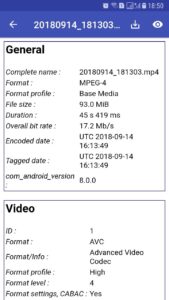
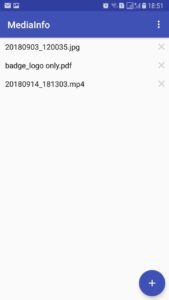
MediaInfo is a convenient unified display of the most relevant technical and tag data for video and audio files.
The MediaInfo data display includes:
- Container: format, profile, commercial name of the format, duration, overall bit rate, writing application and library, title, author, director, album, track number, date...
- Video: format, codec id, aspect, frame rate, bit rate, color space, chroma subsampling, bit depth, scan type, scan order...
- Audio: format, codec id, sample rate, channels, bit depth, bit rate, language...
- Subtitles: format, codec id, language of subtitle...
- Chapters: count of chapters, list of chapters...
The MediaInfo analyticals includes:
- Container: MPEG-4, QuickTime, Matroska, AVI, MPEG-PS (including unprotected DVD), MPEG-TS (including unprotected Blu-ray), MXF, GXF, LXF, WMV, FLV, Real...
- Tags: Id3v1, Id3v2, Vorbis comments, APE tags...
- Video: MPEG-1/2 Video, H.263, MPEG-4 Visual (including DivX, XviD), H.264/AVC, Dirac...
- Audio: MPEG Audio (including MP3), AC3, DTS, AAC, Dolby E, AES3, FLAC, Vorbis, PCM...
- Subtitles: CEA-608, CEA-708, DTVCC, SCTE-20, SCTE-128, ATSC/53, CDP, DVB Subtitle, Teletext, SRT, SSA, ASS, SAMI...
MediaInfo features include:
- Read many video and audio file formats
- View information in different formats (text, tree)
- Export information as text
- Graphical user interface, command line interface, or library (.dylib) versions available (command line interface and library versions are available separately, free of charge, on the editor website)
***
For bug reports and questions, please contact the support instead of using the Play Store comments, it would be more efficient. Support is available by email (email address on the Play Store page) or web ("contact us" menu).
FAQ:
- Why do you show the transfer date instead of the recorded date from a WhatsApp video,?
We show the creation date in the creation date field and we show the recorded date in the recorded date field, when such information is available. We can not extract a non existing metadata, we can show only what exists in the analyzed file.
You should complain to WhatsApp because they re-encode the video without keeping the original creation date
- Why don't you show the time factor in a Samsumg Hyperlapse video?
We can not extract a non existing metadata, we can show only what exists in the analyzed file. We analyzed the file and we can see that there is a Hyperlapse flag, but time factor is not found.
You should complain to Samsung about the lack of such metadata in their files.
- Why don't you show [specific information].
We can not extract a non existing metadata, we can show only what exists in the analyzed file. First please be confident that this information exists in the file. Then maybe we did not face yet this format, please contact us and provide the file, we'll check what we can do for extracting such information from your file.
The MediaInfo data display includes:
- Container: format, profile, commercial name of the format, duration, overall bit rate, writing application and library, title, author, director, album, track number, date...
- Video: format, codec id, aspect, frame rate, bit rate, color space, chroma subsampling, bit depth, scan type, scan order...
- Audio: format, codec id, sample rate, channels, bit depth, bit rate, language...
- Subtitles: format, codec id, language of subtitle...
- Chapters: count of chapters, list of chapters...
The MediaInfo analyticals includes:
- Container: MPEG-4, QuickTime, Matroska, AVI, MPEG-PS (including unprotected DVD), MPEG-TS (including unprotected Blu-ray), MXF, GXF, LXF, WMV, FLV, Real...
- Tags: Id3v1, Id3v2, Vorbis comments, APE tags...
- Video: MPEG-1/2 Video, H.263, MPEG-4 Visual (including DivX, XviD), H.264/AVC, Dirac...
- Audio: MPEG Audio (including MP3), AC3, DTS, AAC, Dolby E, AES3, FLAC, Vorbis, PCM...
- Subtitles: CEA-608, CEA-708, DTVCC, SCTE-20, SCTE-128, ATSC/53, CDP, DVB Subtitle, Teletext, SRT, SSA, ASS, SAMI...
MediaInfo features include:
- Read many video and audio file formats
- View information in different formats (text, tree)
- Export information as text
- Graphical user interface, command line interface, or library (.dylib) versions available (command line interface and library versions are available separately, free of charge, on the editor website)
***
For bug reports and questions, please contact the support instead of using the Play Store comments, it would be more efficient. Support is available by email (email address on the Play Store page) or web ("contact us" menu).
FAQ:
- Why do you show the transfer date instead of the recorded date from a WhatsApp video,?
We show the creation date in the creation date field and we show the recorded date in the recorded date field, when such information is available. We can not extract a non existing metadata, we can show only what exists in the analyzed file.
You should complain to WhatsApp because they re-encode the video without keeping the original creation date
- Why don't you show the time factor in a Samsumg Hyperlapse video?
We can not extract a non existing metadata, we can show only what exists in the analyzed file. We analyzed the file and we can see that there is a Hyperlapse flag, but time factor is not found.
You should complain to Samsung about the lack of such metadata in their files.
- Why don't you show [specific information].
We can not extract a non existing metadata, we can show only what exists in the analyzed file. First please be confident that this information exists in the file. Then maybe we did not face yet this format, please contact us and provide the file, we'll check what we can do for extracting such information from your file.
Download MediaInfo APK
Fast, free and safe download.
APK Permissions 6
- android.permission.ACCESS_NETWORK_STATE
- android.permission.INTERNET
- android.permission.READ_EXTERNAL_STORAGE
- android.permission.WRITE_EXTERNAL_STORAGE
- com.android.vending.BILLING
- net.mediaarea.mediainfo.DYNAMIC_RECEIVER_NOT_EXPORTED_PERMISSION
APK Verified
The cryptographic signature guarantees that the file is safe to install and was not tampered with in any way.


Frequently Asked Questions about MediaInfo APK
This is the universal variant — a single APK that contains native libraries for every CPU architecture. It installs on any Android device but is larger than per-architecture variants.
Yes — the APK's signature has been cryptographically verified against the publisher's signing key. The SHA-256 hash is shown in the File Information panel so you can independently confirm the file matches the original release.
Android 21 (API level 36) or newer. Older devices will refuse the install.
Install a free app like 'CPU-Z' or 'Droid Hardware Info' from the Play Store and look at the ABI / Instruction Set row. Most phones made after 2017 are arm64-v8a; if in doubt, download the universal variant.
All variants are functionally identical — same features, same version. They differ only in which CPU architectures the native code is compiled for, and (sometimes) which screen densities the included graphics target. Pick the one that matches your device for the smallest install size, or pick 'Universal' if you're unsure.