
This is the universal build of Auto Text - Schedule Messages 5.7.2. It contains native libraries for every CPU architecture (arm64-v8a, armeabi-v7a, x86, x86_64), so it installs on any Android device. The trade-off is size — it's larger than per-architecture variants. Pick this one if you're unsure which CPU your phone has, or if you plan to share the APK with multiple devices.
File size: 14.8 MB • Min Android: 24 • Target Android: 34 • Version code: 513 • Framework: Native (Java/Kotlin) • Permissions: 47
Screenshots
File Information
| Package Name | com.hnib.smslater |
|---|---|
| Version Name | 5.7.2 |
| Version Code | 513 |
| Architecture | Universal |
| Min Android Version | Android 24 (API 34) |
| Main Activity | com.hnib.smslater.onboarding.SplashActivity |
| Framework | Native (Java/Kotlin) |
| File Size | 14.80 MB |
| Signature (SHA1) | 94ABB04151BC123C215C14D4DAD9A2099DE688B3 |
| File Hash (SHA256) | b84d3ed8baedce6c068338180ee608822cf7ae189ef40e1e7f6e671e2cdb6a83 |
What's New
- Bug fixes and improvements. Enjoy smoother automatic messaging!
App Description
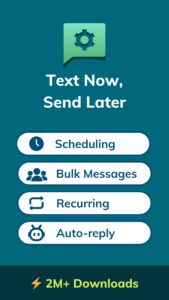
Auto Text is a messaging automation app that lets you auto send SMS later, schedule WhatsApp messages, and enjoy easy auto-reply and text forwarding - all in one app.
Key Features:
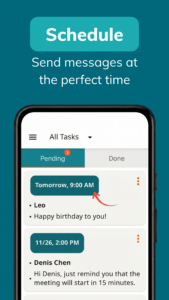
Message Scheduler
: Schedule messages to be sent automatically at a specific time.
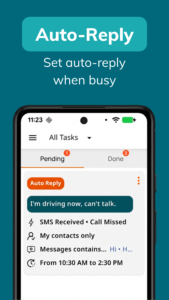
Auto-Reply
: Automatically respond to messages and missed calls when you're busy.
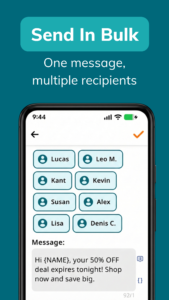
Bulk Messaging
: Send a single message to multiple contacts in one go.
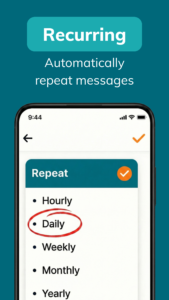
Recurring Messages
: Set up repeating texts on hourly, daily, weekly, or custom schedules.
Text Forwarder
: Instantly forward SMS and call notifications to another phone via SMS or Email.
Volume Scheduler
: Automatically mute or unmute your device at scheduled times.
Read Aloud Reminder
: Stay reminded without even looking at your phone.
💢 Auto Text offers a rich set of tools to manage, customize, and personalize your automated messages:
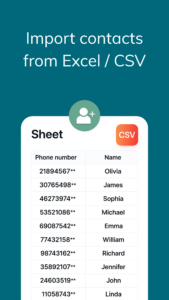
• Import contacts from a file.
• Confirm before sending messages.
• Set delay times for each message.
• Create reusable message templates.
• Organize contacts into separate groups.
💡 What can you use Auto Text for?
Auto Text is flexible and fits into many real-life situations:
• Schedule birthday wishes ahead of time so you never miss a special day
• Small business owners can automate marketing messages and save hours
• Drivers can safely reply to calls and texts while on the road.
• Busy people can schedule reminders or auto-messages to stay organized.
• Online sellers can send weekly or monthly follow-ups to returning customers.
• Professionals with dual phones can forward work SMS to their personal device.
• Anyone can stay responsive — even when offline, sleeping, or in a meeting.
📌 Note
• This app requires SMS permission to read, receive, and send messages.
• This app requires Call Log permission to access incoming and missed call details.
• Accessibility API: Auto Text uses Android Accessibility Services to automate sending scheduled messages on your behalf. This permission is used only for this purpose. No user data is collected or shared.
• This app is NOT affiliated with WhatsApp, Messenger, or Telegram. WhatsApp and Messenger are registered trademarks of Meta Platforms, Inc. Telegram is a registered trademark of Telegram FZ-LLC.
Need help?
Contact us anytime:
kant@doitlater.co
Key Features:
Message Scheduler
: Schedule messages to be sent automatically at a specific time.
Auto-Reply
: Automatically respond to messages and missed calls when you're busy.
Bulk Messaging
: Send a single message to multiple contacts in one go.
Recurring Messages
: Set up repeating texts on hourly, daily, weekly, or custom schedules.
Text Forwarder
: Instantly forward SMS and call notifications to another phone via SMS or Email.
Volume Scheduler
: Automatically mute or unmute your device at scheduled times.
Read Aloud Reminder
: Stay reminded without even looking at your phone.
💢 Auto Text offers a rich set of tools to manage, customize, and personalize your automated messages:
• Import contacts from a file.
• Confirm before sending messages.
• Set delay times for each message.
• Create reusable message templates.
• Organize contacts into separate groups.
💡 What can you use Auto Text for?
Auto Text is flexible and fits into many real-life situations:
• Schedule birthday wishes ahead of time so you never miss a special day
• Small business owners can automate marketing messages and save hours
• Drivers can safely reply to calls and texts while on the road.
• Busy people can schedule reminders or auto-messages to stay organized.
• Online sellers can send weekly or monthly follow-ups to returning customers.
• Professionals with dual phones can forward work SMS to their personal device.
• Anyone can stay responsive — even when offline, sleeping, or in a meeting.
📌 Note
• This app requires SMS permission to read, receive, and send messages.
• This app requires Call Log permission to access incoming and missed call details.
• Accessibility API: Auto Text uses Android Accessibility Services to automate sending scheduled messages on your behalf. This permission is used only for this purpose. No user data is collected or shared.
• This app is NOT affiliated with WhatsApp, Messenger, or Telegram. WhatsApp and Messenger are registered trademarks of Meta Platforms, Inc. Telegram is a registered trademark of Telegram FZ-LLC.
Need help?
Contact us anytime:
kant@doitlater.co
Download Auto Text - Schedule Messages APK
Fast, free and safe download.
APK Permissions 47
- android.permission.ACCESS_ADSERVICES_AD_ID
- android.permission.ACCESS_ADSERVICES_ATTRIBUTION
- android.permission.ACCESS_ADSERVICES_TOPICS
- android.permission.ACCESS_BACKGROUND_LOCATION
- android.permission.ACCESS_COARSE_LOCATION
- android.permission.ACCESS_FINE_LOCATION
- android.permission.ACCESS_NETWORK_STATE
- android.permission.ACCESS_NOTIFICATION_POLICY
- android.permission.ACCESS_WIFI_STATE
- android.permission.AUTHENTICATE_ACCOUNTS
- android.permission.BLUETOOTH
- android.permission.BLUETOOTH_CONNECT
- android.permission.CALL_PHONE
- android.permission.DISABLE_KEYGUARD
- android.permission.FOREGROUND_SERVICE
- android.permission.FOREGROUND_SERVICE_SPECIAL_USE
- android.permission.GET_ACCOUNTS
- android.permission.INTERNET
- android.permission.MANAGE_SUBSCRIPTION_USER_ASSOCIATION
- android.permission.MODIFY_AUDIO_SETTINGS
- android.permission.POST_NOTIFICATIONS
- android.permission.READ_CALL_LOG
- android.permission.READ_CONTACTS
- android.permission.READ_EXTERNAL_STORAGE
- android.permission.READ_MEDIA_AUDIO
- android.permission.READ_MEDIA_IMAGES
- android.permission.READ_MEDIA_VIDEO
- android.permission.READ_PHONE_STATE
- android.permission.READ_SMS
- android.permission.RECEIVE_BOOT_COMPLETED
- android.permission.RECEIVE_SMS
- android.permission.REQUEST_IGNORE_BATTERY_OPTIMIZATIONS
- android.permission.SCHEDULE_EXACT_ALARM
- android.permission.SEND_SMS
- android.permission.SYSTEM_ALERT_WINDOW
- android.permission.USE_CREDENTIALS
- android.permission.USE_FULL_SCREEN_INTENT
- android.permission.VIBRATE
- android.permission.WAKE_LOCK
- android.permission.WRITE_EXTERNAL_STORAGE
- com.android.vending.BILLING
- com.google.android.c2dm.permission.RECEIVE
- com.google.android.finsky.permission.BIND_GET_INSTALL_REFERRER_SERVICE
- com.google.android.gms.permission.AD_ID
- com.hnib.smslater.DYNAMIC_RECEIVER_NOT_EXPORTED_PERMISSION
- com.huawei.permission.external_app_settings.USE_COMPONENT
- oppo.permission.OPPO_COMPONENT_SAFE
APK Verified
The cryptographic signature guarantees that the file is safe to install and was not tampered with in any way.


Frequently Asked Questions about Auto Text - Schedule Messages APK
This is the universal variant — a single APK that contains native libraries for every CPU architecture. It installs on any Android device but is larger than per-architecture variants.
Yes — the APK's signature has been cryptographically verified against the publisher's signing key. The SHA-256 hash is shown in the File Information panel so you can independently confirm the file matches the original release.
Android 24 (API level 34) or newer. Older devices will refuse the install.
Install a free app like 'CPU-Z' or 'Droid Hardware Info' from the Play Store and look at the ABI / Instruction Set row. Most phones made after 2017 are arm64-v8a; if in doubt, download the universal variant.
All variants are functionally identical — same features, same version. They differ only in which CPU architectures the native code is compiled for, and (sometimes) which screen densities the included graphics target. Pick the one that matches your device for the smallest install size, or pick 'Universal' if you're unsure.