
This is the universal build of Auto Text - Schedule Messages 5.7.6. It contains native libraries for every CPU architecture (arm64-v8a, armeabi-v7a, x86, x86_64), so it installs on any Android device. The trade-off is size — it's larger than per-architecture variants. Pick this one if you're unsure which CPU your phone has, or if you plan to share the APK with multiple devices.
File size: 16.8 MB • Min Android: 24 • Target Android: 34 • Version code: 521 • Framework: Native (Java/Kotlin) • Permissions: 45
Screenshots
File Information
| Package Name | com.hnib.smslater |
|---|---|
| Version Name | 5.7.6 |
| Version Code | 521 |
| Architecture | Universal |
| Min Android Version | Android 24 (API 34) |
| Main Activity | com.hnib.smslater.onboarding.SplashActivity |
| Framework | Native (Java/Kotlin) |
| File Size | 16.78 MB |
| Signature (SHA1) | 94ABB04151BC123C215C14D4DAD9A2099DE688B3 |
| File Hash (SHA256) | 66596815ac5b5797ee472ffdc14dafd972c0356b34e997bd6e8842fcb5ff5493 |
What's New
- The new version makes your automated message sending more stable.
App Description
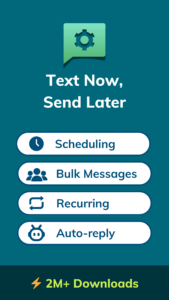
Auto Text: The fastest way to schedule and send automated SMS, WhatsApp and social chat messages.
Automate your messaging tasks with Auto Text: message scheduling, auto-replies, text forwarding, and more. Never miss or repeat a message again.
# This app was formerly known as Do It Later.
How this Auto Message Sender can help you:
- Schedule SMS to be sent later at a specific time.
- Send automated responses to SMS and Calls.
- Send automated WhatsApp messages with WhatsApp Timer and Auto-responder.
- Automatically forward texts and call notifications via SMS or Email.
Write Now, Send Later Automatically
Key Features:
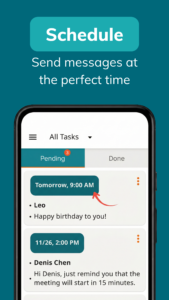
Message Scheduler
: Schedule messages to be sent later at any date and time you choose.
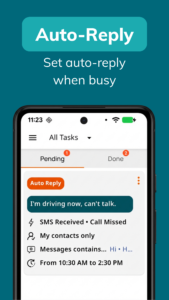
Auto-Reply Message – Text While Driving
: Instantly auto-reply to SMS or Calls when you're busy, driving, or unavailable.
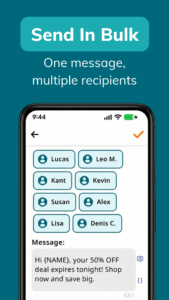
Bulk Messaging - Text Blast App
: Send a single message to multiple contacts in one go.
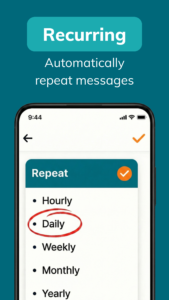
Recurring Messages
: Set up repeating texts on hourly, daily, weekly, or custom schedules.
Auto SMS Forwarder
: Instantly forward SMS and call notifications to another phone via SMS or Email.
Volume Scheduler
: Automatically mute or unmute your device at scheduled times.
Read Aloud Reminder
: Stay reminded without even looking at your phone.
Powerful Tools for Your Automated Messages.
💢 Auto Text offers a rich set of tools to manage, customize, and personalize your automated messages:
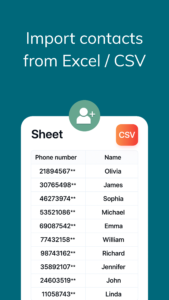
• Import contacts from a file.
• Confirm before sending messages.
• Set delay times for each message.
• Create reusable message templates.
• Organize contacts into separate groups.
💡 What can you use Auto Text for?
Auto Text is flexible and fits into many real-life situations:
• Schedule birthday wishes ahead of time so you never miss a special day
• Small business owners can automate marketing messages and save hours
• Drivers can safely reply to calls and texts while on the road.
• Busy people can schedule reminders or auto-messages to stay organized.
• Online sellers can send weekly or monthly follow-ups to returning customers.
• Professionals with dual phones can forward work SMS to their personal device.
• Anyone can stay responsive — even when offline, sleeping, or in a meeting.
📌 Note
• This app requires SMS permission to read, receive, and send messages.
• This app requires Call Log permission to access incoming and missed call details.
• Accessibility API: Auto Text uses Android Accessibility Services to automate sending scheduled messages on your behalf. This permission is used only for this purpose. No user data is collected or shared.
• This app is NOT affiliated with WhatsApp, Messenger, or Telegram. WhatsApp and Messenger are registered trademarks of Meta Platforms, Inc. Telegram is a registered trademark of Telegram FZ-LLC.
Need help?
Contact us anytime:
kant@doitlater.co
Automate your messaging tasks with Auto Text: message scheduling, auto-replies, text forwarding, and more. Never miss or repeat a message again.
# This app was formerly known as Do It Later.
How this Auto Message Sender can help you:
- Schedule SMS to be sent later at a specific time.
- Send automated responses to SMS and Calls.
- Send automated WhatsApp messages with WhatsApp Timer and Auto-responder.
- Automatically forward texts and call notifications via SMS or Email.
Write Now, Send Later Automatically
Key Features:
Message Scheduler
: Schedule messages to be sent later at any date and time you choose.
Auto-Reply Message – Text While Driving
: Instantly auto-reply to SMS or Calls when you're busy, driving, or unavailable.
Bulk Messaging - Text Blast App
: Send a single message to multiple contacts in one go.
Recurring Messages
: Set up repeating texts on hourly, daily, weekly, or custom schedules.
Auto SMS Forwarder
: Instantly forward SMS and call notifications to another phone via SMS or Email.
Volume Scheduler
: Automatically mute or unmute your device at scheduled times.
Read Aloud Reminder
: Stay reminded without even looking at your phone.
Powerful Tools for Your Automated Messages.
💢 Auto Text offers a rich set of tools to manage, customize, and personalize your automated messages:
• Import contacts from a file.
• Confirm before sending messages.
• Set delay times for each message.
• Create reusable message templates.
• Organize contacts into separate groups.
💡 What can you use Auto Text for?
Auto Text is flexible and fits into many real-life situations:
• Schedule birthday wishes ahead of time so you never miss a special day
• Small business owners can automate marketing messages and save hours
• Drivers can safely reply to calls and texts while on the road.
• Busy people can schedule reminders or auto-messages to stay organized.
• Online sellers can send weekly or monthly follow-ups to returning customers.
• Professionals with dual phones can forward work SMS to their personal device.
• Anyone can stay responsive — even when offline, sleeping, or in a meeting.
📌 Note
• This app requires SMS permission to read, receive, and send messages.
• This app requires Call Log permission to access incoming and missed call details.
• Accessibility API: Auto Text uses Android Accessibility Services to automate sending scheduled messages on your behalf. This permission is used only for this purpose. No user data is collected or shared.
• This app is NOT affiliated with WhatsApp, Messenger, or Telegram. WhatsApp and Messenger are registered trademarks of Meta Platforms, Inc. Telegram is a registered trademark of Telegram FZ-LLC.
Need help?
Contact us anytime:
kant@doitlater.co
Download Auto Text - Schedule Messages APK
Fast, free and safe download.
APK Permissions 45
- android.permission.ACCESS_ADSERVICES_AD_ID
- android.permission.ACCESS_ADSERVICES_ATTRIBUTION
- android.permission.ACCESS_ADSERVICES_TOPICS
- android.permission.ACCESS_BACKGROUND_LOCATION
- android.permission.ACCESS_COARSE_LOCATION
- android.permission.ACCESS_FINE_LOCATION
- android.permission.ACCESS_NETWORK_STATE
- android.permission.ACCESS_NOTIFICATION_POLICY
- android.permission.ACCESS_WIFI_STATE
- android.permission.AUTHENTICATE_ACCOUNTS
- android.permission.BLUETOOTH
- android.permission.BLUETOOTH_CONNECT
- android.permission.CALL_PHONE
- android.permission.DISABLE_KEYGUARD
- android.permission.FOREGROUND_SERVICE
- android.permission.FOREGROUND_SERVICE_SPECIAL_USE
- android.permission.GET_ACCOUNTS
- android.permission.INTERNET
- android.permission.MANAGE_SUBSCRIPTION_USER_ASSOCIATION
- android.permission.MODIFY_AUDIO_SETTINGS
- android.permission.POST_NOTIFICATIONS
- android.permission.READ_CALL_LOG
- android.permission.READ_CONTACTS
- android.permission.READ_EXTERNAL_STORAGE
- android.permission.READ_MEDIA_AUDIO
- android.permission.READ_PHONE_STATE
- android.permission.READ_SMS
- android.permission.RECEIVE_BOOT_COMPLETED
- android.permission.RECEIVE_SMS
- android.permission.REQUEST_IGNORE_BATTERY_OPTIMIZATIONS
- android.permission.SCHEDULE_EXACT_ALARM
- android.permission.SEND_SMS
- android.permission.SYSTEM_ALERT_WINDOW
- android.permission.USE_CREDENTIALS
- android.permission.USE_FULL_SCREEN_INTENT
- android.permission.VIBRATE
- android.permission.WAKE_LOCK
- android.permission.WRITE_EXTERNAL_STORAGE
- com.android.vending.BILLING
- com.google.android.c2dm.permission.RECEIVE
- com.google.android.finsky.permission.BIND_GET_INSTALL_REFERRER_SERVICE
- com.google.android.gms.permission.AD_ID
- com.hnib.smslater.DYNAMIC_RECEIVER_NOT_EXPORTED_PERMISSION
- com.huawei.permission.external_app_settings.USE_COMPONENT
- oppo.permission.OPPO_COMPONENT_SAFE
APK Verified
The cryptographic signature guarantees that the file is safe to install and was not tampered with in any way.
Similar in Communication


Frequently Asked Questions about Auto Text - Schedule Messages APK
This is the universal variant — a single APK that contains native libraries for every CPU architecture. It installs on any Android device but is larger than per-architecture variants.
Yes — the APK's signature has been cryptographically verified against the publisher's signing key. The SHA-256 hash is shown in the File Information panel so you can independently confirm the file matches the original release.
Android 24 (API level 34) or newer. Older devices will refuse the install.
Install a free app like 'CPU-Z' or 'Droid Hardware Info' from the Play Store and look at the ABI / Instruction Set row. Most phones made after 2017 are arm64-v8a; if in doubt, download the universal variant.
All variants are functionally identical — same features, same version. They differ only in which CPU architectures the native code is compiled for, and (sometimes) which screen densities the included graphics target. Pick the one that matches your device for the smallest install size, or pick 'Universal' if you're unsure.