
This is the universal build of Visual Voicemail 11.5.0.684478. It contains native libraries for every CPU architecture (arm64-v8a, armeabi-v7a, x86, x86_64), so it installs on any Android device. The trade-off is size — it's larger than per-architecture variants. Pick this one if you're unsure which CPU your phone has, or if you plan to share the APK with multiple devices.
File size: 8.5 MB • Min Android: 26 • Target Android: 35 • Version code: 684478 • Framework: Native (Java/Kotlin) • Permissions: 43
Screenshots

File Information
| Package Name | com.metropcs.service.vvm |
|---|---|
| Version Name | 11.5.0.684478 |
| Version Code | 684478 |
| Architecture | Universal |
| Min Android Version | Android 26 (API 35) |
| Main Activity | com.metropcs.service.vvm.activity.setup.WelcomeActivity |
| Framework | Native (Java/Kotlin) |
| File Size | 8.52 MB |
| Signature (SHA1) | 4065DA7693F1808BE835825237C0B9A387FAAD2E |
| File Hash (SHA256) | e37d9a4ffb210059f850f50a014d9d4810ab6a4b3db9ff8d8440d9609f0f92c0 |
What's New
Improvement and bug fixes
App Description
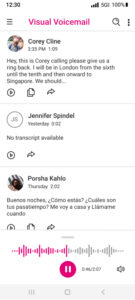
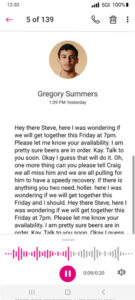
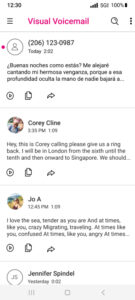
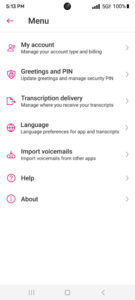
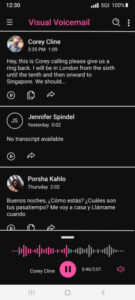
MetroPCS Voicemail keeps getting better and better! With Visual Voicemail you can listen to messages in any order, respond in one click, update your contacts, and easily manage your inbox without ever dialing into your voicemail.
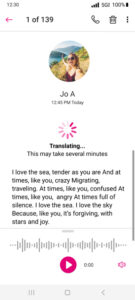
No need to change your MetroPCS voicemail number or to reconfigure your voicemail forwarding - Visual Voicemail activates for free at first launch. You can also upgrade to Voicemail to Text for a small monthly fee and receive all your voicemails transcribed into text directly in the application inbox or via SMS message.
MetroPCS Visual Voicemail may use infrequent, free SMS messages to communicate with the Voicemail server.
An Unread Messages widget is now included with MetroPCS Visual Voicemail. On most Android devices you can add the Visual Voicemail widget by long pressing on any free space on your home screen, selecting 'Add Widgets', and choosing the Visual Voicemail widget from the alphabetical list.
No need to change your MetroPCS voicemail number or to reconfigure your voicemail forwarding - Visual Voicemail activates for free at first launch. You can also upgrade to Voicemail to Text for a small monthly fee and receive all your voicemails transcribed into text directly in the application inbox or via SMS message.
MetroPCS Visual Voicemail may use infrequent, free SMS messages to communicate with the Voicemail server.
An Unread Messages widget is now included with MetroPCS Visual Voicemail. On most Android devices you can add the Visual Voicemail widget by long pressing on any free space on your home screen, selecting 'Add Widgets', and choosing the Visual Voicemail widget from the alphabetical list.
Download Visual Voicemail APK
Fast, free and safe download.
APK Permissions 43
- android.permission.ACCESS_ADSERVICES_AD_ID
- android.permission.ACCESS_ADSERVICES_ATTRIBUTION
- android.permission.ACCESS_COARSE_LOCATION
- android.permission.ACCESS_NETWORK_STATE
- android.permission.ACCESS_WIFI_STATE
- android.permission.BLUETOOTH
- android.permission.CHANGE_NETWORK_STATE
- android.permission.FOREGROUND_SERVICE
- android.permission.FOREGROUND_SERVICE_DATA_SYNC
- android.permission.INTERNET
- android.permission.MODIFY_AUDIO_SETTINGS
- android.permission.POST_NOTIFICATIONS
- android.permission.READ_APP_BADGE
- android.permission.READ_CONTACTS
- android.permission.READ_PHONE_STATE
- android.permission.READ_PRIVILEGED_PHONE_STATE
- android.permission.RECEIVE_BOOT_COMPLETED
- android.permission.RECORD_AUDIO
- android.permission.USE_BIOMETRIC
- android.permission.USE_FINGERPRINT
- android.permission.WAKE_LOCK
- android.permission.WRITE_EXTERNAL_STORAGE
- com.anddoes.launcher.permission.UPDATE_COUNT
- com.google.android.c2dm.permission.RECEIVE
- com.google.android.finsky.permission.BIND_GET_INSTALL_REFERRER_SERVICE
- com.google.android.gms.permission.AD_ID
- com.htc.launcher.permission.READ_SETTINGS
- com.htc.launcher.permission.UPDATE_SHORTCUT
- com.huawei.android.launcher.permission.CHANGE_BADGE
- com.huawei.android.launcher.permission.READ_SETTINGS
- com.huawei.android.launcher.permission.WRITE_SETTINGS
- com.majeur.launcher.permission.UPDATE_BADGE
- com.metropcs.service.vvm.DYNAMIC_RECEIVER_NOT_EXPORTED_PERMISSION
- com.metropcs.service.vvm.permission.ERROR_RECEIVER
- com.metropcs.service.vvm.permission.NOTIFICATION_ACTION
- com.oppo.launcher.permission.READ_SETTINGS
- com.oppo.launcher.permission.WRITE_SETTINGS
- com.sec.android.provider.badge.permission.READ
- com.sec.android.provider.badge.permission.WRITE
- com.sonyericsson.home.permission.BROADCAST_BADGE
- com.sonymobile.home.permission.PROVIDER_INSERT_BADGE
- me.everything.badger.permission.BADGE_COUNT_READ
- me.everything.badger.permission.BADGE_COUNT_WRITE
APK Verified
The cryptographic signature guarantees that the file is safe to install and was not tampered with in any way.
Similar in Business


Frequently Asked Questions about Visual Voicemail APK
This is the universal variant — a single APK that contains native libraries for every CPU architecture. It installs on any Android device but is larger than per-architecture variants.
Yes — the APK's signature has been cryptographically verified against the publisher's signing key. The SHA-256 hash is shown in the File Information panel so you can independently confirm the file matches the original release.
Android 26 (API level 35) or newer. Older devices will refuse the install.
Install a free app like 'CPU-Z' or 'Droid Hardware Info' from the Play Store and look at the ABI / Instruction Set row. Most phones made after 2017 are arm64-v8a; if in doubt, download the universal variant.
All variants are functionally identical — same features, same version. They differ only in which CPU architectures the native code is compiled for, and (sometimes) which screen densities the included graphics target. Pick the one that matches your device for the smallest install size, or pick 'Universal' if you're unsure.