
Download Mi Video-Short Video Download 2025052904(MiVideo-GP) (arm-v7a) (Android APK 2025101000(MiVideo-GP) arm64-v8a · Android 24+
Download APK
Verified Safe
This is the arm64-v8a build of Mi Video-Short Video Download 2025052904(MiVideo-GP) (arm-v7a) (Android 2025101000(MiVideo-GP) — the modern 64-bit ARM build that runs on virtually every Android phone released since 2017. It's smaller and faster than the universal variant because Android only loads the native code your CPU actually needs. If your phone is from the last 8 years, this is the right pick.
File size: 91.5 MB • Min Android: 24 • Target Android: 35 • Version code: 2025101060 • Framework: Native (Java/Kotlin) • Permissions: 58
Screenshots
File Information
| Package Name | com.miui.videoplayer |
|---|---|
| Version Name | 2025101000(MiVideo-GP) |
| Version Code | 2025101060 |
| Architecture | arm64-v8a |
| Min Android Version | Android 24 (API 35) |
| Main Activity | com.miui.video.global.app.LauncherAlias |
| Framework | Native (Java/Kotlin) |
| File Size | 91.46 MB |
| Signature (SHA1) | 7B6DC7079C34739CE81159719FB5EB61D2A03225 |
| File Hash (SHA256) | 0896f3cfcb7f5b7420b3cec6c6682de1ffdc11bdc27da411bed72cdc804374e2 |
What's New
- Optimized search features.
- Optimized subtitle feature for local videos.
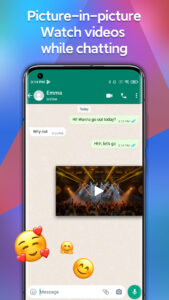
- Subtitles and picture-in-picture features for TV and movies.
- Fixed some bugs.
- Optimized subtitle feature for local videos.
- Subtitles and picture-in-picture features for TV and movies.
- Fixed some bugs.
App Description
We've added some new features to make your viewing experience even better:
Powerful zoom is right at your fingertips. Mi Video supports 25%-500% zoom.
Search online for subtitles, even for local videos. Select the language you need, hassle-free.
Choose between 16:9 or 4:3 aspect ratios.
Mi Video is a powerful local video player and downloader preferred by millions of users. With Mi Video, you can play, download, stream, and manage your videos all in one place.
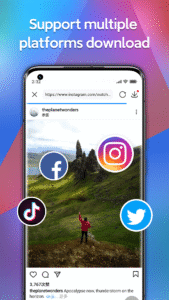
High requirements for the video player? Don't worry, we're exactly the video player you need, amazing video player for your phone and pad with attractive user Interface and powerful play functions such as background play function, pop-up play function. High requirements for the video downloader? Endless of trending videos from Instagram, Likee, facebook, Trumblr, Snapchat, Tiktok, you can download videos of all these media, enjoy fun content any time and any where, and share them to Whatsapp.
Looking for a perfect video player? Mi Video is committed to creating an excellent video player and providing high-quality playback experience for users of all mobile phone brands such as Samsung, Motorola, Huawei, OPPO, VIVO and so on!
Video player
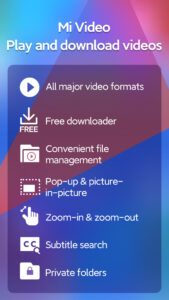
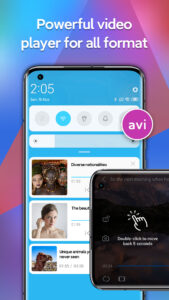
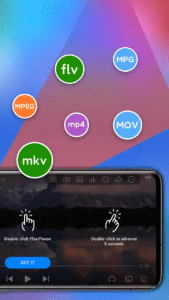
- Mi Video supports all major video file formats, including MKV, MP4, M4V, MOV, AVI, and more.
- Background playback is convenient and full-featured:
You can double tap the screen to pause or resume playback.
Smart gesture controls allow you to adjust volume, brightness, or playback progress in a simple and intuitive way.
You can easily zoom in and out on the played videos.
- Subtitles are available in multiple languages.
Free video downloader
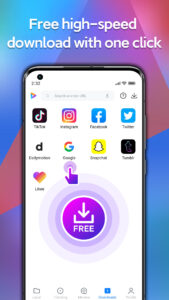
- Want to save online videos on your device and watch them later? Mi Video can download videos from all major social media platforms.
- Downloading videos seems too complicated? Our new interface makes video downloads simple and trouble-free.
- Use the "Help" section of our app to learn how you can download videos.
- Mi Video supports downloading multiple videos at the same time. You can also select your preferred resolution!
Online streaming
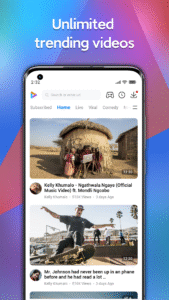
- Mi Video offers a huge online streaming library: pranks, games, sports, news - you'll always find something to your taste.
- When you don't know what to watch next, you can always check out our selection of the videos trending around the world or dive into built-in Facebook Watch feed.
File manager
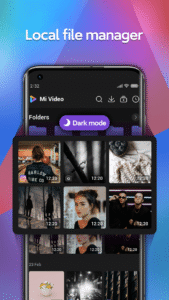
- All-new design allows you to find the videos you need in no time.
- Create password-protected folders to store videos intended for your eyes only.
We keep updating Mi Video to make video playback, downloading, and file management even more convenient.
Mi Video is a perfect way to enjoy your videos. If you like Mi Video, give us some stars! ⭐⭐⭐⭐⭐
If you have any questions, feel free to drop us a line at
mivideo-feedback@xiaomi.com
or use the in-app feedback channel. Your feedback helps us make Mi Video better!
Powerful zoom is right at your fingertips. Mi Video supports 25%-500% zoom.
Search online for subtitles, even for local videos. Select the language you need, hassle-free.
Choose between 16:9 or 4:3 aspect ratios.
Mi Video is a powerful local video player and downloader preferred by millions of users. With Mi Video, you can play, download, stream, and manage your videos all in one place.
High requirements for the video player? Don't worry, we're exactly the video player you need, amazing video player for your phone and pad with attractive user Interface and powerful play functions such as background play function, pop-up play function. High requirements for the video downloader? Endless of trending videos from Instagram, Likee, facebook, Trumblr, Snapchat, Tiktok, you can download videos of all these media, enjoy fun content any time and any where, and share them to Whatsapp.
Looking for a perfect video player? Mi Video is committed to creating an excellent video player and providing high-quality playback experience for users of all mobile phone brands such as Samsung, Motorola, Huawei, OPPO, VIVO and so on!
Video player
- Mi Video supports all major video file formats, including MKV, MP4, M4V, MOV, AVI, and more.
- Background playback is convenient and full-featured:
You can double tap the screen to pause or resume playback.
Smart gesture controls allow you to adjust volume, brightness, or playback progress in a simple and intuitive way.
You can easily zoom in and out on the played videos.
- Subtitles are available in multiple languages.
Free video downloader
- Want to save online videos on your device and watch them later? Mi Video can download videos from all major social media platforms.
- Downloading videos seems too complicated? Our new interface makes video downloads simple and trouble-free.
- Use the "Help" section of our app to learn how you can download videos.
- Mi Video supports downloading multiple videos at the same time. You can also select your preferred resolution!
Online streaming
- Mi Video offers a huge online streaming library: pranks, games, sports, news - you'll always find something to your taste.
- When you don't know what to watch next, you can always check out our selection of the videos trending around the world or dive into built-in Facebook Watch feed.
File manager
- All-new design allows you to find the videos you need in no time.
- Create password-protected folders to store videos intended for your eyes only.
We keep updating Mi Video to make video playback, downloading, and file management even more convenient.
Mi Video is a perfect way to enjoy your videos. If you like Mi Video, give us some stars! ⭐⭐⭐⭐⭐
If you have any questions, feel free to drop us a line at
mivideo-feedback@xiaomi.com
or use the in-app feedback channel. Your feedback helps us make Mi Video better!
Download Mi Video-Short Video Download 2025052904(MiVideo-GP) (arm-v7a) (Android APK
Fast, free and safe download.
APK Permissions 58
- android.permission.ACCESS_ADSERVICES_AD_ID
- android.permission.ACCESS_ADSERVICES_ATTRIBUTION
- android.permission.ACCESS_ADSERVICES_TOPICS
- android.permission.ACCESS_NETWORK_STATE
- android.permission.ACCESS_WIFI_STATE
- android.permission.AUTHENTICATE_ACCOUNTS
- android.permission.BLUETOOTH
- android.permission.BLUETOOTH_ADMIN
- android.permission.BLUETOOTH_ADVERTISE
- android.permission.BLUETOOTH_CONNECT
- android.permission.BLUETOOTH_SCAN
- android.permission.CHANGE_WIFI_MULTICAST_STATE
- android.permission.CHANGE_WIFI_STATE
- android.permission.FOREGROUND_SERVICE
- android.permission.FOREGROUND_SERVICE_MEDIA_PLAYBACK
- android.permission.INJECT_EVENTS
- android.permission.INTERNET
- android.permission.MANAGE_ACCOUNTS
- android.permission.MANAGE_ACTIVITY_STACKS
- android.permission.MODIFY_AUDIO_SETTINGS
- android.permission.MOUNT_UNMOUNT_FILESYSTEMS
- android.permission.POST_NOTIFICATIONS
- android.permission.READ_EXTERNAL_STORAGE
- android.permission.READ_MEDIA_AUDIO
- android.permission.READ_MEDIA_VIDEO
- android.permission.READ_MEDIA_VISUAL_USER_SELECTED
- android.permission.REAL_GET_TASKS
- android.permission.RECEIVE_USER_PRESENT
- android.permission.REORDER_TASKS
- android.permission.REQUEST_DELETE_PACKAGES
- android.permission.SCHEDULE_EXACT_ALARM
- android.permission.SET_PREFERRED_APPLICATIONS
- android.permission.SYSTEM_ALERT_WINDOW
- android.permission.USE_CREDENTIALS
- android.permission.VIBRATE
- android.permission.WAKE_LOCK
- android.permission.WRITE_EXTERNAL_STORAGE
- android.permission.WRITE_SETTINGS
- com.android.launcher.permission.INSTALL_SHORTCUT
- com.android.launcher.permission.READ_SETTINGS
- com.android.settings.permission.CLOUD_SETTINGS_PROVIDER
- com.android.vending.BILLING
- com.anroid.settings.permission.PRIVACY_AUTHORIZATION_DIALOG
- com.applovin.array.apphub.permission.BIND_APPHUB_SERVICE
- com.farsitel.bazaar.permission.PAY_THROUGH_BAZAAR
- com.google.android.c2dm.permission.RECEIVE
- com.google.android.finsky.permission.BIND_GET_INSTALL_REFERRER_SERVICE
- com.google.android.gms.permission.AD_ID
- com.miui.gallery.permission.MEDIA_SCANNER
- com.miui.securitycenter.permission.PERM_USE_INFO
- com.miui.systemAdSolution.adSwitch.PROVIDER
- com.miui.systemAdSolution.LOCAL_AD_PROVIDER
- com.miui.videoplayer.DYNAMIC_RECEIVER_NOT_EXPORTED_PERMISSION
- com.msa.permission.RETRY_BUFFER
- com.xiaomi.market.sdk.UPDATE
- com.zeus.gmc.sdk.mobileads.msa.odi.permission.ONDEVICE_INTELLIGENCE_PROVIDER
- miui.permission.ACCESS_MILINK_CAST
- miui.permission.USE_INTERNAL_GENERAL_API
APK Verified
The cryptographic signature guarantees that the file is safe to install and was not tampered with in any way.


Frequently Asked Questions about Mi Video-Short Video Download 2025052904(MiVideo-GP) (arm-v7a) (Android APK
This variant is built for 64-bit ARM (most Android phones made since 2017). If your device's CPU matches, this is the smallest, fastest version to install.
Yes — the APK's signature has been cryptographically verified against the publisher's signing key. The SHA-256 hash is shown in the File Information panel so you can independently confirm the file matches the original release.
Android 24 (API level 35) or newer. Older devices will refuse the install.
Install a free app like 'CPU-Z' or 'Droid Hardware Info' from the Play Store and look at the ABI / Instruction Set row. Most phones made after 2017 are arm64-v8a; if in doubt, download the universal variant.
All variants are functionally identical — same features, same version. They differ only in which CPU architectures the native code is compiled for, and (sometimes) which screen densities the included graphics target. Pick the one that matches your device for the smallest install size, or pick 'Universal' if you're unsure.