
Download Microsoft Bing Search APK 32.4.430908006 Universal · Android 30+
Download APK
Verified Safe
This is the universal build of Microsoft Bing Search 32.4.430908006. It contains native libraries for every CPU architecture (arm64-v8a, armeabi-v7a, x86, x86_64), so it installs on any Android device. The trade-off is size — it's larger than per-architecture variants. Pick this one if you're unsure which CPU your phone has, or if you plan to share the APK with multiple devices.
File size: 135.3 MB • Min Android: 30 • Target Android: 35 • Version code: 430908006 • Framework: Native (Java/Kotlin) • Permissions: 48
Screenshots
File Information
| Package Name | com.microsoft.bing |
|---|---|
| Version Name | 32.4.430908006 |
| Version Code | 430908006 |
| Architecture | Universal |
| Min Android Version | Android 30 (API 35) |
| Main Activity | com.microsoft.sapphire.app.main.SapphireMainActivity |
| Framework | Native (Java/Kotlin) |
| File Size | 135.28 MB |
| Signature (SHA1) | 29E2DA0D1A38C352E64738AE88E97B0A8DBD215B |
| File Hash (SHA256) | 96b3bcceff376a437ba0afebee13d615f73cea43efa5fd8b8ad90f416f00eaac |
What's New
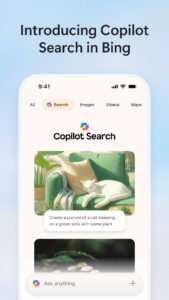
Introducing Copilot Search in Bing. A new way to search that delivers fast, intelligently curated answers and makes it easier than ever to discover more.
App Description
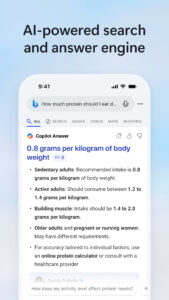
Microsoft Bing delivers fast, intelligently curated answers and makes it easier than ever to discover more.
Introducing Copilot Search in Bing
Copilot Search in Bing brings AI to search where clear answers and key information are quickly curated at the top of your search results. Kickstart your next discovery with a new search to unlock the possibilities of where your curiosity can take you.
Unlock answers faster
Copilot Search in Bing brings intelligence to search so you can spend less time searching and more time discovering. Depending on your query, you’ll get an easy-to-scan layout of information, a summary of the most critical points, or a clear answer. No more hunting across the web.
Explore deeper
Need to dive deeper? The next answer or new angle is waiting for you with helpful web links and clickable follow-up topics. It brings the best of traditional and generative search together to help you find what you need – and discover more.
Discover confidently
Perfect for when you want to go heads-down to write a paper, learn something new, explore a passion project, or simply let your curiosity wonder. Choose from a variety of suggested queries to start your journey or simply start a new search to harness the power of AI to get curated results.
Try Copilot Search in Bing today!
All the highlights
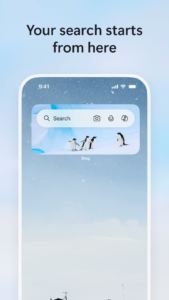
New homepage: Stay updated on topics you're following, and get quick access to Microsoft features
Copilot Search in Bing: Seamlessly find a topic to explore within your everyday search flow
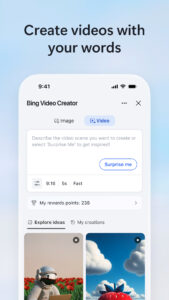
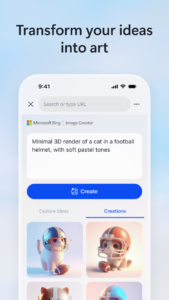
Image Creator: Create images from words with AI
Visual search: Search right from your camera or by uploading a picture
Voice search: Tap the mic icon and use your voice to search
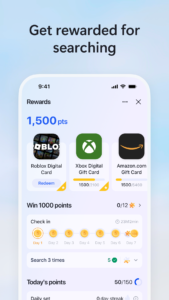
Microsoft Rewards: Earn more rewards is easy, simple, and fun. Just search with the Microsoft Bing app and you’ll earn faster than ever
Weather: See the forecast for today and the week ahead
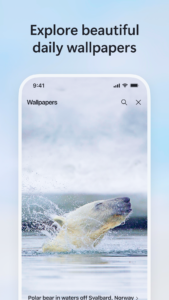
Wallpaper: Pick from a collection of beautiful images featured on the Bing homepage
Functions mentioned above not available in all markets, actual features and display contents may vary.
Introducing Copilot Search in Bing
Copilot Search in Bing brings AI to search where clear answers and key information are quickly curated at the top of your search results. Kickstart your next discovery with a new search to unlock the possibilities of where your curiosity can take you.
Unlock answers faster
Copilot Search in Bing brings intelligence to search so you can spend less time searching and more time discovering. Depending on your query, you’ll get an easy-to-scan layout of information, a summary of the most critical points, or a clear answer. No more hunting across the web.
Explore deeper
Need to dive deeper? The next answer or new angle is waiting for you with helpful web links and clickable follow-up topics. It brings the best of traditional and generative search together to help you find what you need – and discover more.
Discover confidently
Perfect for when you want to go heads-down to write a paper, learn something new, explore a passion project, or simply let your curiosity wonder. Choose from a variety of suggested queries to start your journey or simply start a new search to harness the power of AI to get curated results.
Try Copilot Search in Bing today!
All the highlights
New homepage: Stay updated on topics you're following, and get quick access to Microsoft features
Copilot Search in Bing: Seamlessly find a topic to explore within your everyday search flow
Image Creator: Create images from words with AI
Visual search: Search right from your camera or by uploading a picture
Voice search: Tap the mic icon and use your voice to search
Microsoft Rewards: Earn more rewards is easy, simple, and fun. Just search with the Microsoft Bing app and you’ll earn faster than ever
Weather: See the forecast for today and the week ahead
Wallpaper: Pick from a collection of beautiful images featured on the Bing homepage
Functions mentioned above not available in all markets, actual features and display contents may vary.
Download Microsoft Bing Search APK
Fast, free and safe download.
APK Permissions 48
- android.permission.ACCESS_COARSE_LOCATION
- android.permission.ACCESS_FINE_LOCATION
- android.permission.ACCESS_NETWORK_STATE
- android.permission.ACCESS_WIFI_STATE
- android.permission.BLUETOOTH
- android.permission.BLUETOOTH_CONNECT
- android.permission.CALL_PHONE
- android.permission.CAMERA
- android.permission.DETECT_SCREEN_CAPTURE
- android.permission.DOWNLOAD_WITHOUT_NOTIFICATION
- android.permission.FOREGROUND_SERVICE
- android.permission.FOREGROUND_SERVICE_MEDIA_PLAYBACK
- android.permission.FOREGROUND_SERVICE_MICROPHONE
- android.permission.HIGH_SAMPLING_RATE_SENSORS
- android.permission.INSTALL_SHORTCUT
- android.permission.INTERNET
- android.permission.MODIFY_AUDIO_SETTINGS
- android.permission.NFC
- android.permission.POST_NOTIFICATIONS
- android.permission.READ_CALENDAR
- android.permission.READ_CONTACTS
- android.permission.READ_EXTERNAL_STORAGE
- android.permission.READ_PHONE_STATE
- android.permission.RECEIVE_BOOT_COMPLETED
- android.permission.RECORD_AUDIO
- android.permission.REORDER_TASKS
- android.permission.SEND_SMS
- android.permission.SET_WALLPAPER
- android.permission.SYSTEM_ALERT_WINDOW
- android.permission.USE_BIOMETRIC
- android.permission.USE_FINGERPRINT
- android.permission.VIBRATE
- android.permission.WAKE_LOCK
- android.permission.WRITE_CALENDAR
- android.permission.WRITE_EXTERNAL_STORAGE
- com.android.alarm.permission.SET_ALARM
- com.android.providers.tv.permission.READ_EPG_DATA
- com.android.providers.tv.permission.WRITE_EPG_DATA
- com.android.vending.BILLING
- com.google.android.c2dm.permission.RECEIVE
- com.google.android.finsky.permission.BIND_GET_INSTALL_REFERRER_SERVICE
- com.google.android.gms.permission.AD_ID
- com.google.android.providers.gsf.permission.READ_GSERVICES
- com.huawei.android.launcher.permission.CHANGE_BADGE
- com.microsoft.bing.DYNAMIC_RECEIVER_NOT_EXPORTED_PERMISSION
- com.microsoft.bing.manual.dump
- com.microsoft.bing.matrix.permission.PROCESS_SUPERVISOR
- com.orange.update.permission.READ_ATTRIBUTION
APK Verified
The cryptographic signature guarantees that the file is safe to install and was not tampered with in any way.
Similar in Tools


Frequently Asked Questions about Microsoft Bing Search APK
This is the universal variant — a single APK that contains native libraries for every CPU architecture. It installs on any Android device but is larger than per-architecture variants.
Yes — the APK's signature has been cryptographically verified against the publisher's signing key. The SHA-256 hash is shown in the File Information panel so you can independently confirm the file matches the original release.
Android 30 (API level 35) or newer. Older devices will refuse the install.
Install a free app like 'CPU-Z' or 'Droid Hardware Info' from the Play Store and look at the ABI / Instruction Set row. Most phones made after 2017 are arm64-v8a; if in doubt, download the universal variant.
All variants are functionally identical — same features, same version. They differ only in which CPU architectures the native code is compiled for, and (sometimes) which screen densities the included graphics target. Pick the one that matches your device for the smallest install size, or pick 'Universal' if you're unsure.