
Download Managed Home Screen APK 2.2.0.106169 arm64-v8a, armeabi-v7a, x86, x86_64 · Android 26+
Download APK
Verified Safe
This is the arm64-v8a, armeabi-v7a, x86, x86_64 build of Managed Home Screen 2.2.0.106169. Pick this build if your device's primary ABI matches.
File size: 22.2 MB • Min Android: 26 • Target Android: 36 • Version code: 106169 • Framework: Native (Java/Kotlin) • Permissions: 68
Screenshots
File Information
| Package Name | com.microsoft.launcher.enterprise |
|---|---|
| Version Name | 2.2.0.106169 |
| Version Code | 106169 |
| Architecture | arm64-v8a, armeabi-v7a, x86, x86_64 |
| Min Android Version | Android 26 (API 36) |
| Main Activity | com.microsoft.launcher.homescreen.EntryActivity |
| Framework | Native (Java/Kotlin) |
| File Size | 22.22 MB |
| Signature (SHA1) | AFB5C4F74C1D2E6778B61E36CB63A6E8059D281D |
| File Hash (SHA256) | 44f40447ad55e5ef9738b7a815774132f9e951c37041ea3b7b4720cc0037c3ef |
What's New
From version
2.2.0.91169
:
Thanks for using Managed Home Screen! In this update we addressed some stability bugs.
2.2.0.91169
:
Thanks for using Managed Home Screen! In this update we addressed some stability bugs.
App Description
The Managed Home Screen app, for corporate-owned devices in organizations subscribed to Microsoft Intune, enables the Multi App Kiosk mode for specific, locked down use. This app should only be deployed by your organization. It helps your organization remotely configure and customize the home screen on the device(s) to deliver a highly productive single use experience. This app replaces the default home screen or launcher to restrict device activities and access based on remotely configurable settings.
Features:
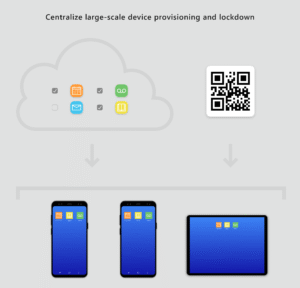
• Centralized large-scale device deployment and lockdown
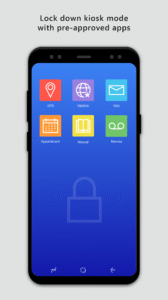
• Locked down kiosk mode with pre-approved apps
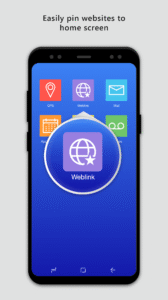
• Easily pin websites to home screen
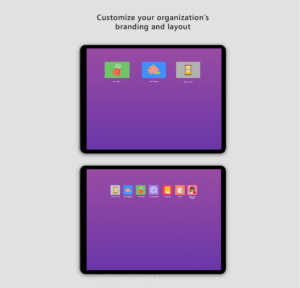
• Customize home screen experience and layout
Important: This app is for organizational use only and works only with devices managed by organizations subscribed to Microsoft Intune. Individuals downloading this will not be able to manage, configure or use this app. If you work for an organization and are a user of this app and are facing issues or have questions about its use (including your company’s privacy policy), contact your IT administrator. Do not contact your network operator, the device manufacturer, or Microsoft for support.
Microsoft Application License Terms
Third Party Notices
To subscribe for Intune management services visit -
https://www.microsoft.com/en-us/cloud-platform/microsoft-intune
Features:
• Centralized large-scale device deployment and lockdown
• Locked down kiosk mode with pre-approved apps
• Easily pin websites to home screen
• Customize home screen experience and layout
Important: This app is for organizational use only and works only with devices managed by organizations subscribed to Microsoft Intune. Individuals downloading this will not be able to manage, configure or use this app. If you work for an organization and are a user of this app and are facing issues or have questions about its use (including your company’s privacy policy), contact your IT administrator. Do not contact your network operator, the device manufacturer, or Microsoft for support.
Microsoft Application License Terms
Third Party Notices
To subscribe for Intune management services visit -
https://www.microsoft.com/en-us/cloud-platform/microsoft-intune
Download Managed Home Screen APK
Fast, free and safe download.
APK Permissions 68
- android.permission.ACCESS_COARSE_LOCATION
- android.permission.ACCESS_FINE_LOCATION
- android.permission.ACCESS_NETWORK_STATE
- android.permission.ACCESS_NOTIFICATION_POLICY
- android.permission.ACCESS_WEATHERCLOCK_PROVIDER
- android.permission.ACCESS_WIFI_STATE
- android.permission.BIND_APPWIDGET
- android.permission.BLUETOOTH
- android.permission.BLUETOOTH_ADMIN
- android.permission.BLUETOOTH_CONNECT
- android.permission.BLUETOOTH_SCAN
- android.permission.CALL_PHONE
- android.permission.CAMERA
- android.permission.CHANGE_NETWORK_STATE
- android.permission.CHANGE_WIFI_STATE
- android.permission.DOWNLOAD_WITHOUT_NOTIFICATION
- android.permission.EXPAND_STATUS_BAR
- android.permission.FLASHLIGHT
- android.permission.FOREGROUND_SERVICE
- android.permission.GET_ACCOUNTS
- android.permission.GET_TASKS
- android.permission.INTERNET
- android.permission.KILL_BACKGROUND_PROCESSES
- android.permission.MANAGE_ACCOUNTS
- android.permission.NFC
- android.permission.PACKAGE_USAGE_STATS
- android.permission.POST_NOTIFICATIONS
- android.permission.QUERY_ALL_PACKAGES
- android.permission.READ_CONTACTS
- android.permission.READ_EXTERNAL_STORAGE
- android.permission.READ_PHONE_STATE
- android.permission.READ_PROFILE
- android.permission.RECEIVE_BOOT_COMPLETED
- android.permission.REORDER_TASKS
- android.permission.SCHEDULE_EXACT_ALARM
- android.permission.SET_WALLPAPER
- android.permission.SET_WALLPAPER_HINTS
- android.permission.STATUS_BAR
- android.permission.SYSTEM_ALERT_WINDOW
- android.permission.USE_CREDENTIALS
- android.permission.VIBRATE
- android.permission.WAKE_LOCK
- android.permission.WRITE_CONTACTS
- android.permission.WRITE_EXTERNAL_STORAGE
- android.permission.WRITE_SECURE_SETTINGS
- android.permission.WRITE_SETTINGS
- com.actionlauncher.playstore.permission.READ_SETTINGS
- com.anddoes.launcher.permission.READ_SETTINGS
- com.android.alarm.permission.SET_ALARM
- com.android.launcher.permission.READ_SETTINGS
- com.android.launcher2.permission.READ_SETTINGS
- com.android.launcher3.permission.READ_SETTINGS
- com.cyanogenmod.trebuchet.permission.READ_SETTINGS
- com.google.android.apps.nexuslauncher.permission.READ_SETTINGS
- com.google.android.c2dm.permission.RECEIVE
- com.google.android.launcher.permission.READ_SETTINGS
- com.htc.launcher.permission.READ_SETTINGS
- com.htc.permission.APP_PLATFORM
- com.huawei.android.totemweather.permission.ACCESS_WEATHERCLOCK_PROVIDER
- com.lge.launcher3.permission.READ_SETTINGS
- com.microsoft.launcher.enterprise.DYNAMIC_RECEIVER_NOT_EXPORTED_PERMISSION
- com.microsoft.launcher.enterprise.permission.C2D_MESSAGE
- com.samsung.android.launcher.permission.READ_SETTINGS
- com.sec.android.provider.badge.permission.READ
- com.sec.android.provider.badge.permission.WRITE
- com.teslacoilsw.launcher.permission.READ_SETTINGS
- com.yandex.launcher.permission.READ_SETTINGS
- huawei.android.permission.HW_SIGNATURE_OR_SYSTEM
APK Verified
The cryptographic signature guarantees that the file is safe to install and was not tampered with in any way.
Similar in Business


Frequently Asked Questions about Managed Home Screen APK
This variant is built for devices that report `arm64-v8a, armeabi-v7a, x86, x86_64` as their primary ABI. If your device's CPU matches, this is the smallest, fastest version to install.
Yes — the APK's signature has been cryptographically verified against the publisher's signing key. The SHA-256 hash is shown in the File Information panel so you can independently confirm the file matches the original release.
Android 26 (API level 36) or newer. Older devices will refuse the install.
Install a free app like 'CPU-Z' or 'Droid Hardware Info' from the Play Store and look at the ABI / Instruction Set row. Most phones made after 2017 are arm64-v8a; if in doubt, download the universal variant.
All variants are functionally identical — same features, same version. They differ only in which CPU architectures the native code is compiled for, and (sometimes) which screen densities the included graphics target. Pick the one that matches your device for the smallest install size, or pick 'Universal' if you're unsure.