
Download Microsoft Defender: Antivirus APK 1.0.8102.0102 arm64-v8a · Android 29+
Download APK
Verified Safe
This is the arm64-v8a build of Microsoft Defender: Antivirus 1.0.8102.0102 — the modern 64-bit ARM build that runs on virtually every Android phone released since 2017. It's smaller and faster than the universal variant because Android only loads the native code your CPU actually needs. If your phone is from the last 8 years, this is the right pick.
File size: 78.3 MB • Min Android: 29 • Target Android: 35 • Version code: 810200122 • Framework: Native (Java/Kotlin) • Permissions: 30
Screenshots
File Information
| Package Name | com.microsoft.scmx |
|---|---|
| Version Name | 1.0.8102.0102 |
| Version Code | 810200122 |
| Architecture | arm64-v8a |
| Min Android Version | Android 29 (API 35) |
| Main Activity | com.microsoft.defender.ux.activity.MDMainActivity |
| Framework | Native (Java/Kotlin) |
| File Size | 78.32 MB |
| Signature (SHA1) | 7DC83CD2ABE833560C2896626E307041C0DF3A7A |
| File Hash (SHA256) | 26664909471903a540cc6f72f3fc586f6f115ed01fe5ecb76a1dd87291559040 |
App Description
Microsoft Defender is an online security app for your digital life
1
and work
2
.
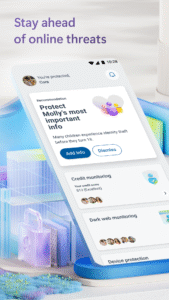
Stay safer online with Microsoft Defender for individuals
1
. Defender is an easy-to-use app that helps keep you and your family one step ahead of threats. Microsoft Defender for individuals is available with a Microsoft 365 Personal or Family subscription.
All-in-one security app
Protect your personal identity, privacy, and devices against malicious threats with antivirus scanning
3
, threat monitoring
4
, multidevice alerts, and expert guidance.
Manage your security in one place
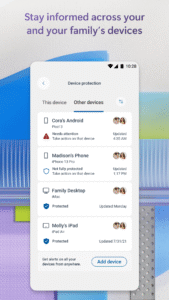
• Check the security status of your family’s devices and identity
5
.
• Get timely threat alerts and recommended actions across your devices.
Safeguard your family’s personal information
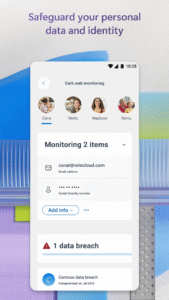
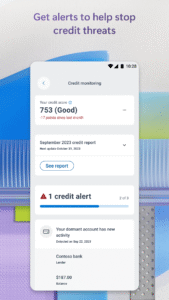
• Get continuous monitoring of your and your family's personal identity
4
and credit
6
.
• Call an identity theft restoration expert for help, anytime day or night.
• Get identity insurance coverage, up to USD1 million, to help cover restoration fees. Insurance coverage includes up to USD100,000 to recover lost funds
7
.
Trusted device protection
• Protect your devices against new and existing threats3.
• Get alerted if malicious apps are found and take steps to remove the threat.
• Continuously scans for harmful links before you click on them to help protect you from malicious threats.
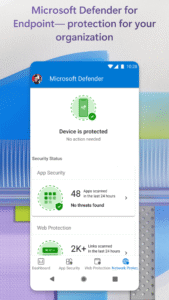
Microsoft Defender for Endpoint
Microsoft Defender for Endpoint is an industry-leading, cloud-powered endpoint security solution that helps to secure against ransomware, file-less malware, and other sophisticated attacks across platforms.
Microsoft Defender uses accessibility services to automatically block malicious web pages that may be accessed via links from SMS, messaging apps, browsers, and email.
App and feature availability may vary by device, language, and region.
1. Microsoft 365 Family or Personal subscription required. Sign in with your Microsoft account. App is currently not available in certain Microsoft 365 Personal or Family regions.
2. If you are a member of a business or organization, login with your work or school email. Your school or business is required to have a valid license or subscription.
3. Does not replace existing malware protection on iOS and Windows devices.
4. Feature is available in the United States and US territories.
5. A one-time parent or legal guardian verification is required to receive dark web threat alert details for children. If the organizer’s family member is under 13, consent is not required to create and/or monitor a child’s identity. Consent is required to create and/or monitor identity of family members over 13 years of age.
6. Feature available in the United States and US territories. Credit score is a single bureau VantageScore 3.0 provided by Experian®. The monthly credit report is provided by Experian® using single bureau data. For users under the age of 18 or those without a credit history, credit score not included. Family organizers will not have the ability to onboard, view, and receive alerts related to family member credit monitoring. Your device's primary display language must be set to English.
7. The identity theft insurance is underwritten and administered by American Bankers Insurance Company of Florida, an Assurant company. Please refer to the actual policies for terms, conditions, and exclusions of coverage. Coverage may not be available in all jurisdictions. Review the Summary of Benefits:
learn.microsoft.com/en-us/legal/microsoft-365/summary-of-benefits-for-itm
.
1
and work
2
.
Stay safer online with Microsoft Defender for individuals
1
. Defender is an easy-to-use app that helps keep you and your family one step ahead of threats. Microsoft Defender for individuals is available with a Microsoft 365 Personal or Family subscription.
All-in-one security app
Protect your personal identity, privacy, and devices against malicious threats with antivirus scanning
3
, threat monitoring
4
, multidevice alerts, and expert guidance.
Manage your security in one place
• Check the security status of your family’s devices and identity
5
.
• Get timely threat alerts and recommended actions across your devices.
Safeguard your family’s personal information
• Get continuous monitoring of your and your family's personal identity
4
and credit
6
.
• Call an identity theft restoration expert for help, anytime day or night.
• Get identity insurance coverage, up to USD1 million, to help cover restoration fees. Insurance coverage includes up to USD100,000 to recover lost funds
7
.
Trusted device protection
• Protect your devices against new and existing threats3.
• Get alerted if malicious apps are found and take steps to remove the threat.
• Continuously scans for harmful links before you click on them to help protect you from malicious threats.
Microsoft Defender for Endpoint
Microsoft Defender for Endpoint is an industry-leading, cloud-powered endpoint security solution that helps to secure against ransomware, file-less malware, and other sophisticated attacks across platforms.
Microsoft Defender uses accessibility services to automatically block malicious web pages that may be accessed via links from SMS, messaging apps, browsers, and email.
App and feature availability may vary by device, language, and region.
1. Microsoft 365 Family or Personal subscription required. Sign in with your Microsoft account. App is currently not available in certain Microsoft 365 Personal or Family regions.
2. If you are a member of a business or organization, login with your work or school email. Your school or business is required to have a valid license or subscription.
3. Does not replace existing malware protection on iOS and Windows devices.
4. Feature is available in the United States and US territories.
5. A one-time parent or legal guardian verification is required to receive dark web threat alert details for children. If the organizer’s family member is under 13, consent is not required to create and/or monitor a child’s identity. Consent is required to create and/or monitor identity of family members over 13 years of age.
6. Feature available in the United States and US territories. Credit score is a single bureau VantageScore 3.0 provided by Experian®. The monthly credit report is provided by Experian® using single bureau data. For users under the age of 18 or those without a credit history, credit score not included. Family organizers will not have the ability to onboard, view, and receive alerts related to family member credit monitoring. Your device's primary display language must be set to English.
7. The identity theft insurance is underwritten and administered by American Bankers Insurance Company of Florida, an Assurant company. Please refer to the actual policies for terms, conditions, and exclusions of coverage. Coverage may not be available in all jurisdictions. Review the Summary of Benefits:
learn.microsoft.com/en-us/legal/microsoft-365/summary-of-benefits-for-itm
.
Download Microsoft Defender: Antivirus APK
Fast, free and safe download.
APK Permissions 30
- android.permission.ACCESS_BACKGROUND_LOCATION
- android.permission.ACCESS_COARSE_LOCATION
- android.permission.ACCESS_FINE_LOCATION
- android.permission.ACCESS_NETWORK_STATE
- android.permission.ACCESS_WIFI_STATE
- android.permission.CHANGE_WIFI_STATE
- android.permission.FOREGROUND_SERVICE
- android.permission.FOREGROUND_SERVICE_SPECIAL_USE
- android.permission.INTERNET
- android.permission.MANAGE_EXTERNAL_STORAGE
- android.permission.NFC
- android.permission.POST_NOTIFICATIONS
- android.permission.QUERY_ALL_PACKAGES
- android.permission.READ_EXTERNAL_STORAGE
- android.permission.RECEIVE_BOOT_COMPLETED
- android.permission.REORDER_TASKS
- android.permission.REQUEST_DELETE_PACKAGES
- android.permission.REQUEST_IGNORE_BATTERY_OPTIMIZATIONS
- android.permission.SYSTEM_ALERT_WINDOW
- android.permission.WAKE_LOCK
- android.permission.WRITE_EXTERNAL_STORAGE
- com.android.vending.BILLING
- com.android.vending.CHECK_LICENSE
- com.google.android.c2dm.permission.RECEIVE
- com.google.android.finsky.permission.BIND_GET_INSTALL_REFERRER_SERVICE
- com.google.android.gms.permission.AD_ID
- com.microsoft.intune.omadm.DEFENDER_ATP
- com.microsoft.scmx.BIND_GET_INSTALL_REFERRER_SERVICE
- com.microsoft.scmx.DYNAMIC_RECEIVER_NOT_EXPORTED_PERMISSION
- com.microsoft.scmx.libraries.uxcommon.activity.permission.CROSS_PROFILE_INTENT_SHARING
APK Verified
The cryptographic signature guarantees that the file is safe to install and was not tampered with in any way.
Similar in Tools


Frequently Asked Questions about Microsoft Defender: Antivirus APK
This variant is built for 64-bit ARM (most Android phones made since 2017). If your device's CPU matches, this is the smallest, fastest version to install.
Yes — the APK's signature has been cryptographically verified against the publisher's signing key. The SHA-256 hash is shown in the File Information panel so you can independently confirm the file matches the original release.
Android 29 (API level 35) or newer. Older devices will refuse the install.
Install a free app like 'CPU-Z' or 'Droid Hardware Info' from the Play Store and look at the ABI / Instruction Set row. Most phones made after 2017 are arm64-v8a; if in doubt, download the universal variant.
All variants are functionally identical — same features, same version. They differ only in which CPU architectures the native code is compiled for, and (sometimes) which screen densities the included graphics target. Pick the one that matches your device for the smallest install size, or pick 'Universal' if you're unsure.